



Total 3027 characters, estimated reading time: 8 minutes.
In the tossing soft routing this road, you never know where the next step will lead to no end, life is tossing. As long as the home bandwidth is large enough, NAS, routers, virtual machines, bypass routing ...... can finally become a “whole-house digital laboratory”. Many friends may also be like me: obviously the performance of the main router is very strong, but once encountered Wi-Fi coverage, began to “soft legs”, why do we need to use AC + AP, one is to facilitate the management, and the second is that we set a good threshold we can achieve low-latency non-dropout whole-house roaming, non-sensitization of the use.
To be honest, the wireless capability of the soft router is really not very good and the current housing structure, including 5G-wifi6 penetration is not 2.4G and run not enough bandwidth at home, which also leads to a large number of players will be the wireless part of the hand over to the professional AC + AP processing, at present this is the optimal state of affairs, of course, wiring is not in place, we can also use the MESH group network, wireless MESH.
Hub AC + AP unified management and seamless roaming test detailsMany people don't realize: in addition to the free Collector AP system, Collector actually offers a Standalone x86 AC controller system --Faster and more complete roaming in multi-AP scenarios. It so happens that Unraid is inherently suitable for virtualization deployment of course, including our previously shared Flying Cow ah pve ah ah all kinds of nas virtualization we install VM virtual machine can be achieved, “virtual a set of collector AC manager” has become the most secure, the lowest cost option. Currently my LAN also has a Lenovo mini brush AC manager, but the number of X86 settings will be more.
To view, please open this page in an internet environment with access to YouTube.
A full graphic description is provided below and can be read on.
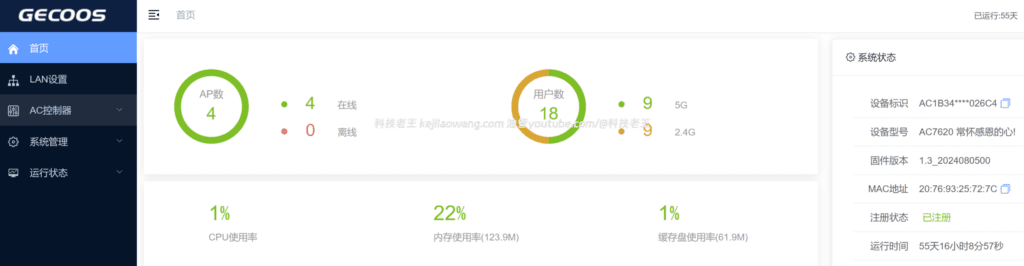
So the tutorials will be based on the latest experience, hand in hand with you in the Installing the Collector AC Gateway in Unraid (x86 Edition), and comes with full details on image creation, boot order fixes, NIC compatibility, and more to avoid stepping in the pits.
I. Preparation: Getting the boot image
The official package provided by Tibco is a USB flash drive installation package, which needs to be written to the boot sector before it can boot properly. If you use a physical USB stick directly and then passthrough to Unraid, it often will:
- Failure to lead
- USB recognition exception
- Installation disk type detection error
This tutorial therefore recommends using the IMG boot imageThe
You can make your own, or you can quickly use an already-organized lazy bag.
Available resources:
✔ Lazy boot image (recommended, can skip making steps)
Download address (20251130 Lazy Pack):
Google cloud drive
Download and jump directly to Chapter 2: Unraid Installing the Collector AC GatewayThe
If you need to create your own mirror (optional)
The official resource of the Collector:
- Tibco X86 Firmware-AC Installer:
http://file.cnrouter.com/index.php/Index/index.html?model_id=48&device_type_id=2 - Tiburon X86-AC upgrade package:
http://file.cnrouter.com/index.php/Index/download/id/115.html
The production method can be used:
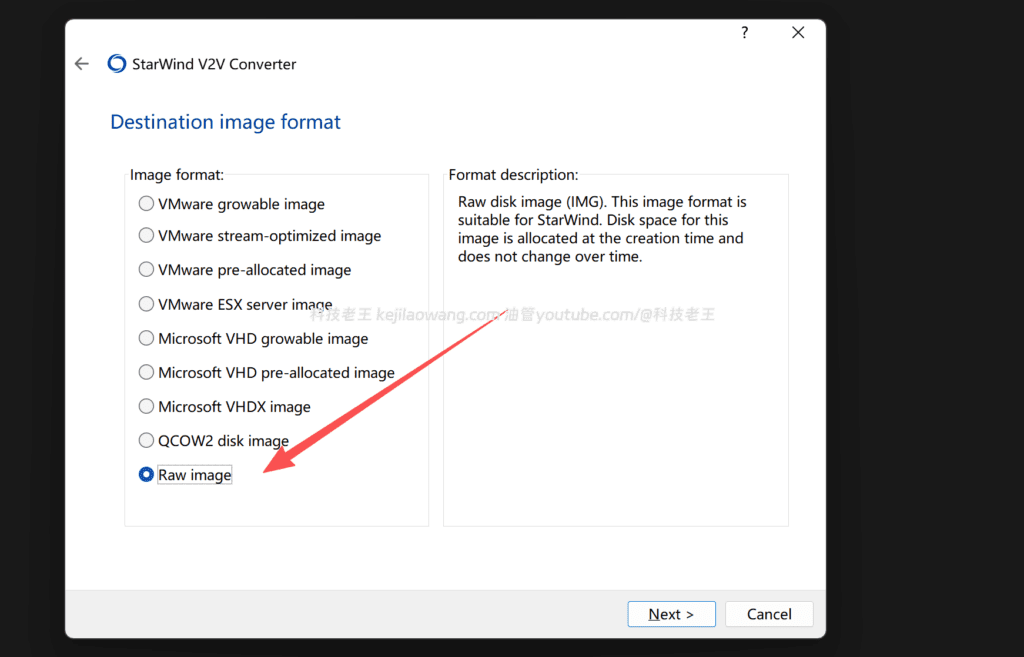
- Load as removable disk
- Select “Physical Disk Emulation” for the emulation mode.”
Once this is done, you will have a bootable IMG image.
II. Installing the Collector AC Gateway in Unraid (core steps)
1. New virtual machine
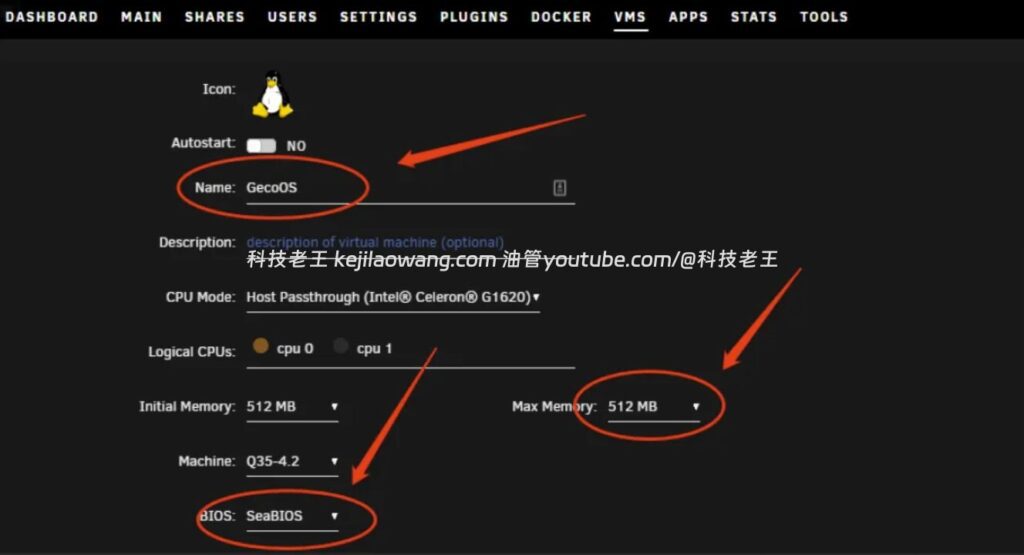
In Unraid → VMs → Add VM → LinuxSuggested Parameters:
| parameters | recommended value |
|---|---|
| Name | GECOOS / JIKE-AC |
| CPU | 1 core |
| Memory | 512MB is enough. |
| bios (software) | SeaBIOS (required) |
| Primary vDisk | 8GB+, SATA mode |
| Second hard disk | Manually select your IMG boot image (USB mode) |
⚠ BIOS must select SeaBIOS or it will report unbootable.
2. Creation of a dual disk structure
The disk layout must be met:
- The first disk (system disk) is SATA
- The second disk (boot disk) is USB
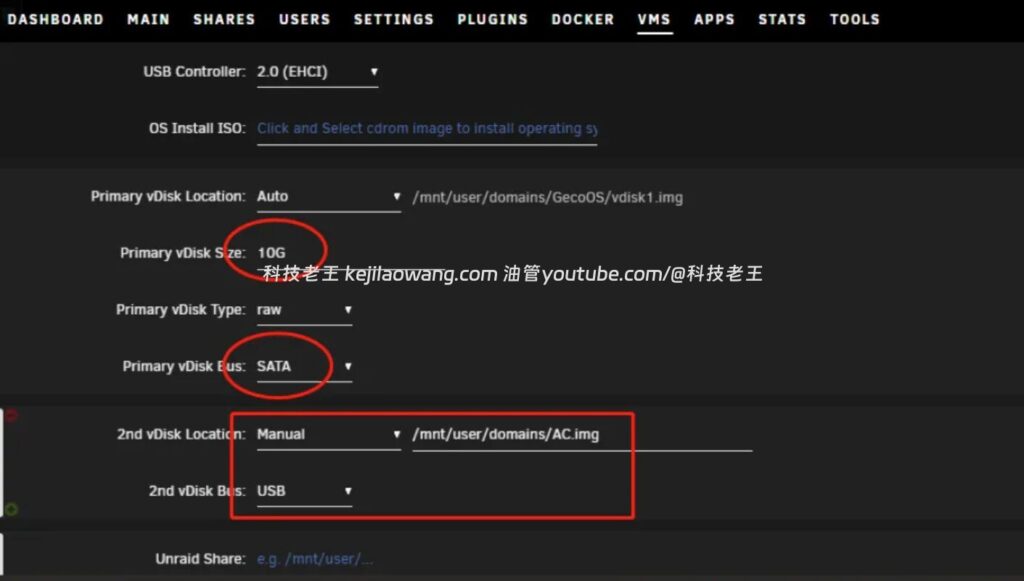
Otherwise it will appear:
- “No bootable device”
- The installer does not recognize the installation package
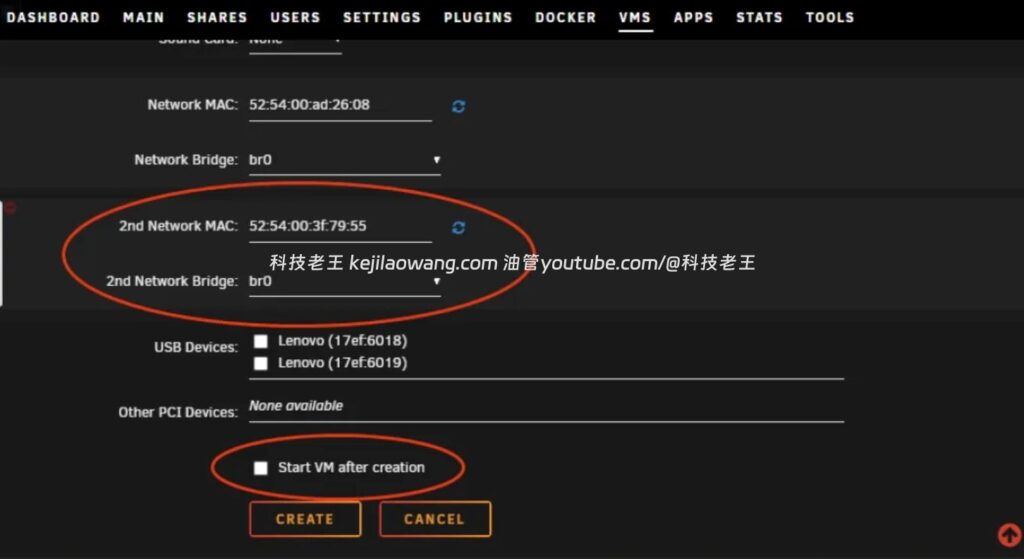
3. Adding a second NIC
Add an additional NIC to Network Interfaces and click the Refresh icon on the right to generate a random MAC for it.
Upon completion.Do not check the box“Start the virtual machine immediately after creation”.
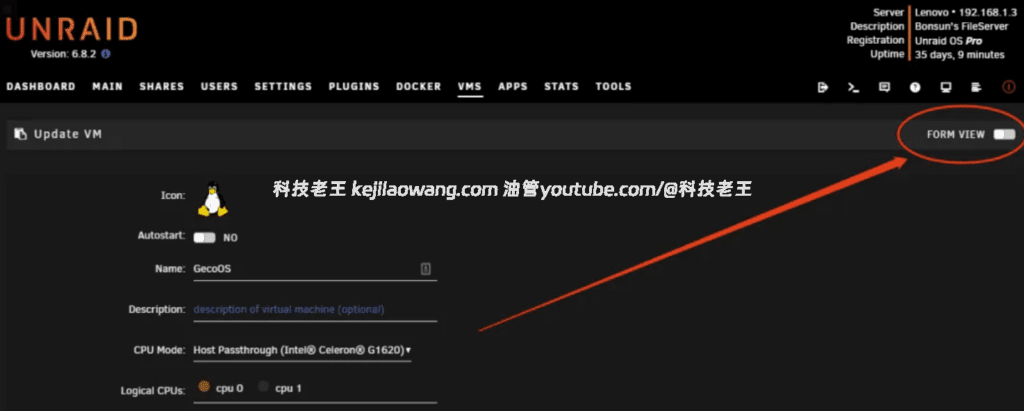
4. Editing the VM XML: setting the boot sequence
Go to the virtual machine → Edit → Switch to FORM VIEW → XML VIEW
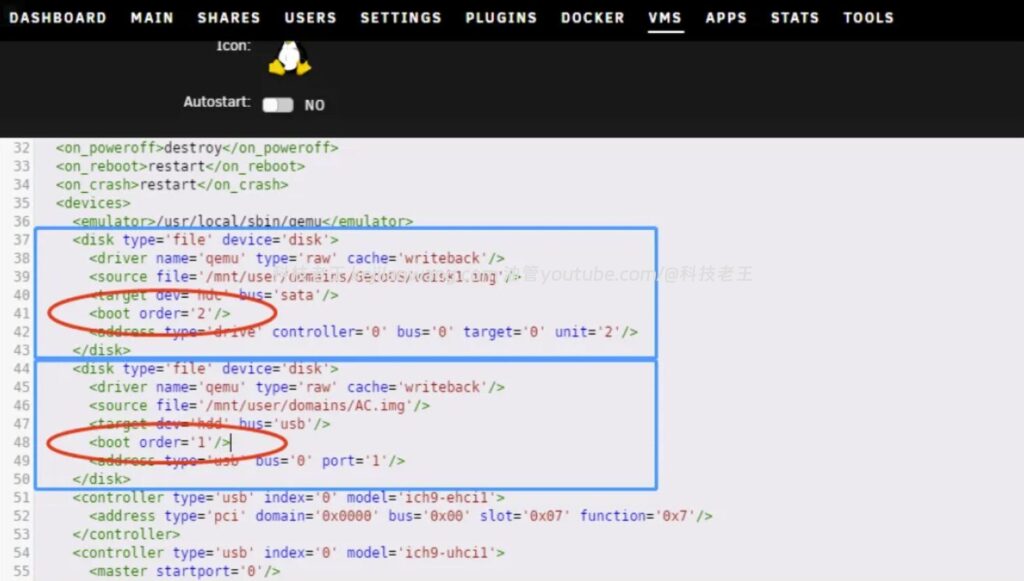
Find the code segment for both disks:
- Main Disk (System Disk)
- IMG image (USB boot disk)
The adjustments are as follows:
The main disk is modified:
<boot order='2'/>Bootstrap mirror additions:
<boot order='1'/>Purpose: To give the virtual machine priority to boot from the USB installation disk, otherwise it will not be able to enter the installation program
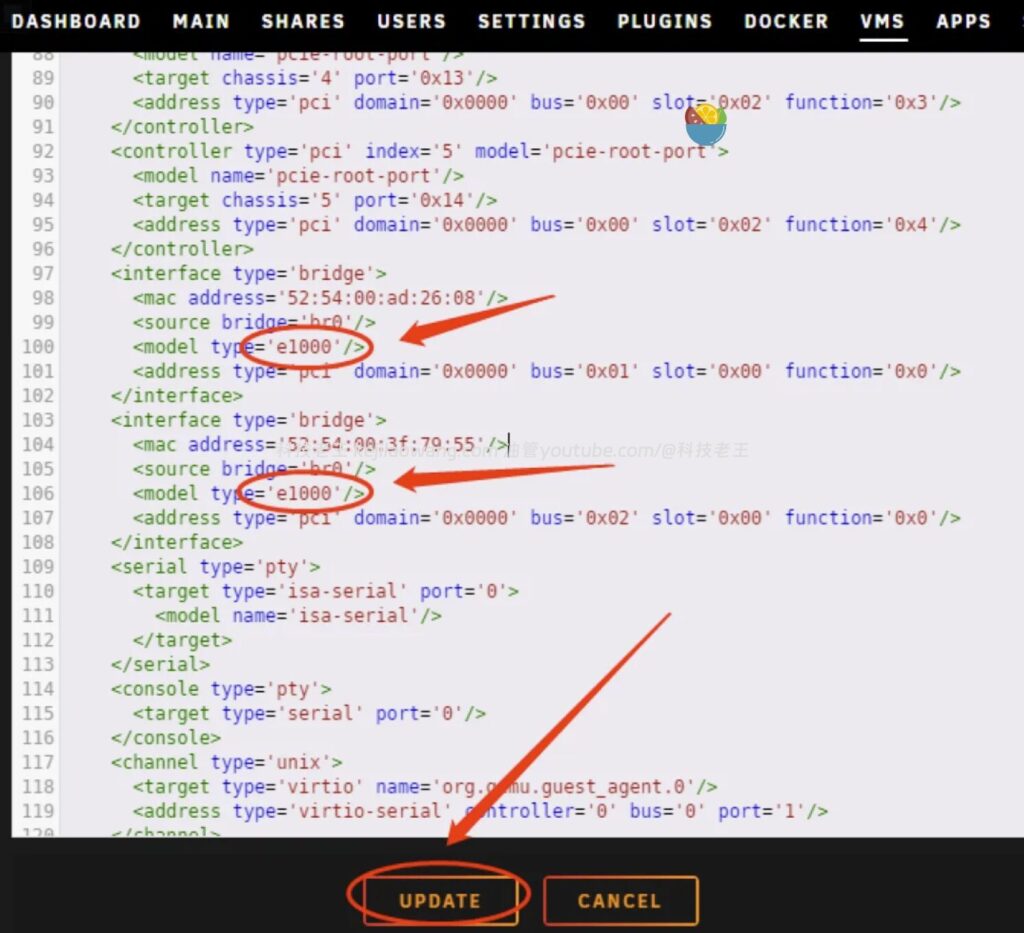
5. Modify the NIC model to e1000.
Find the XML location of the two NICs that will:
<model type='virtio'/>Replace with:
<model type='e1000'/>Reason: Tibco installation program Not recognized virtioThe e1000 must be used. just save and exit.
Start installing the Collector AC Gateway
6. Starting the virtual machine
About 30 seconds after startup, you will enter the installation screen and select:
3 Installing the AC Controller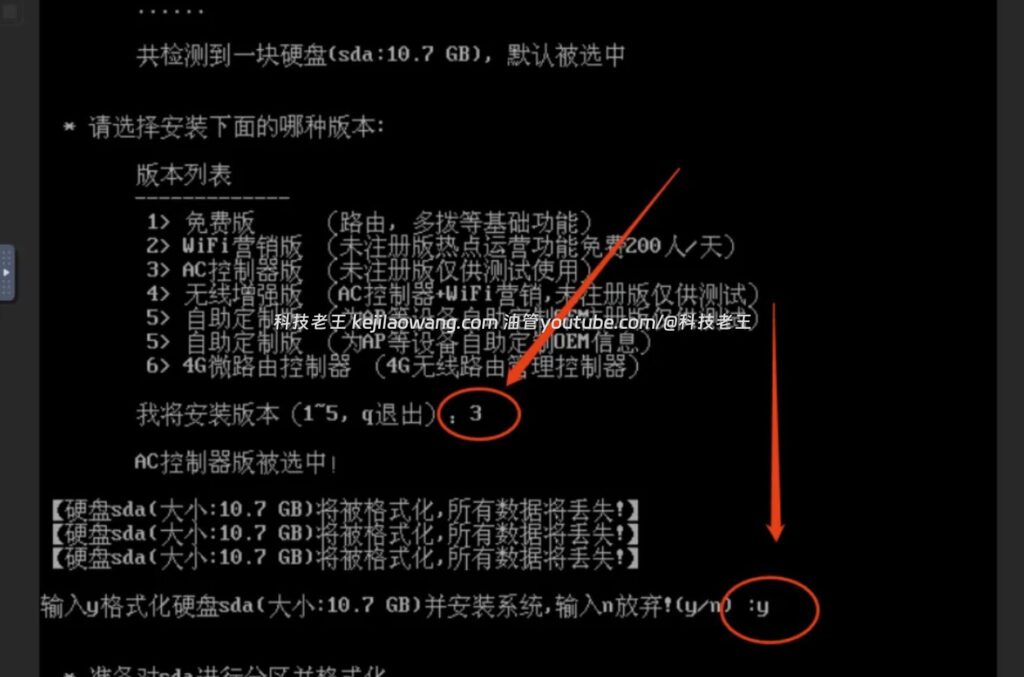
Enter afterward:
yConfirm writing to the system.
7. When the installation is complete, prompt to pull out the USB flash drive.
Since we don't have a physical USB, we naturally can't follow the instructions, so we need to proceed to the next step.
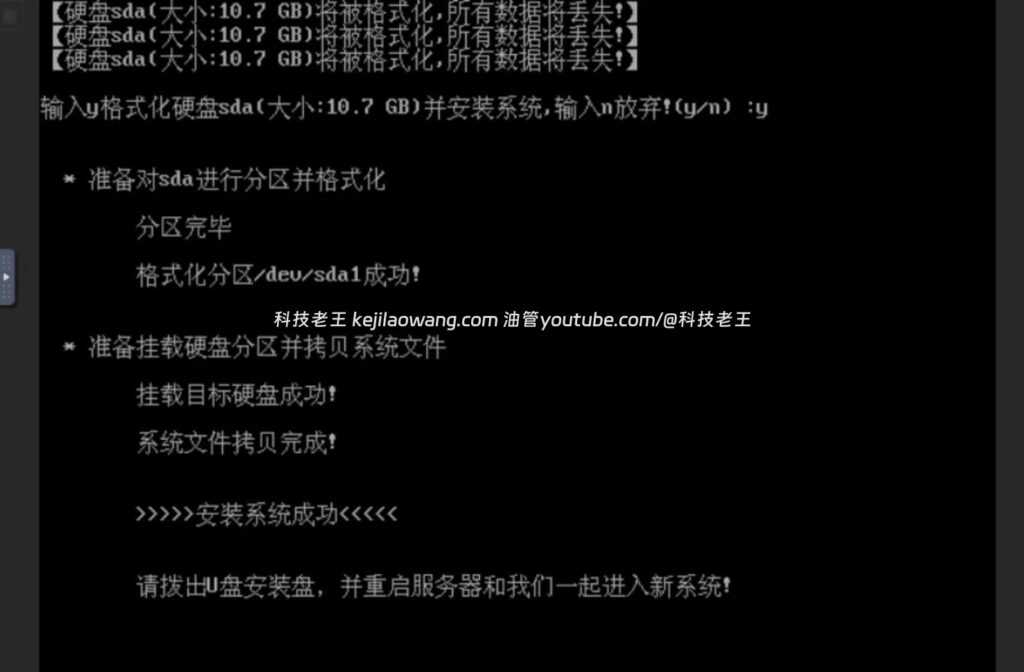
Remove the installation disk and enter the system
8. Force shutdown of virtual machines
In the list of Unraid virtual machines, click Force Stop.
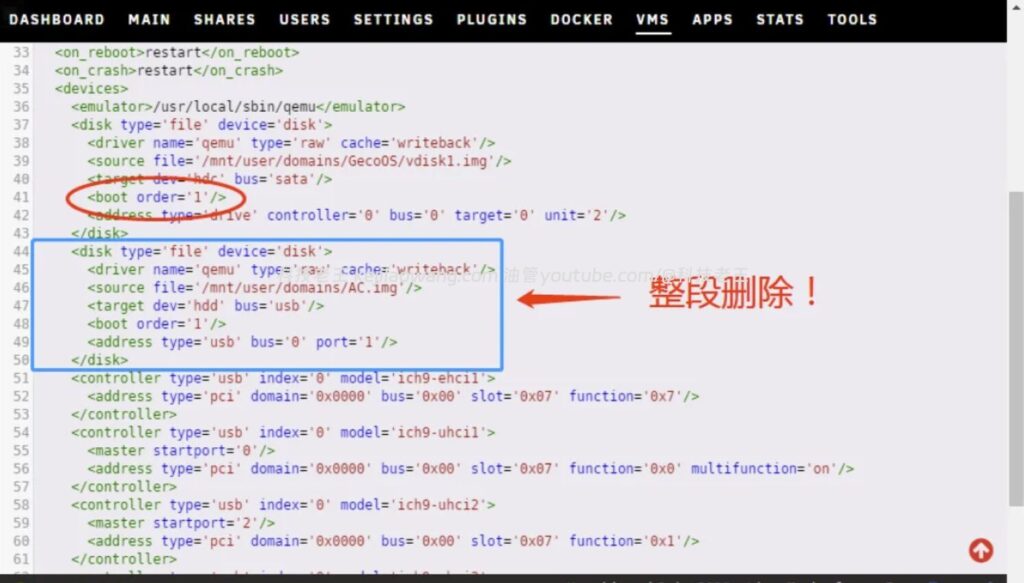
9. Modify startup sequence and remove IMG
Edit the virtual machine again:
- Change the primary disk boot order to:
<boot order='1'/>Delete the entire block of code for the USB image (i.e., the second disk)
Save and exit
10. Activate the collector AC controller
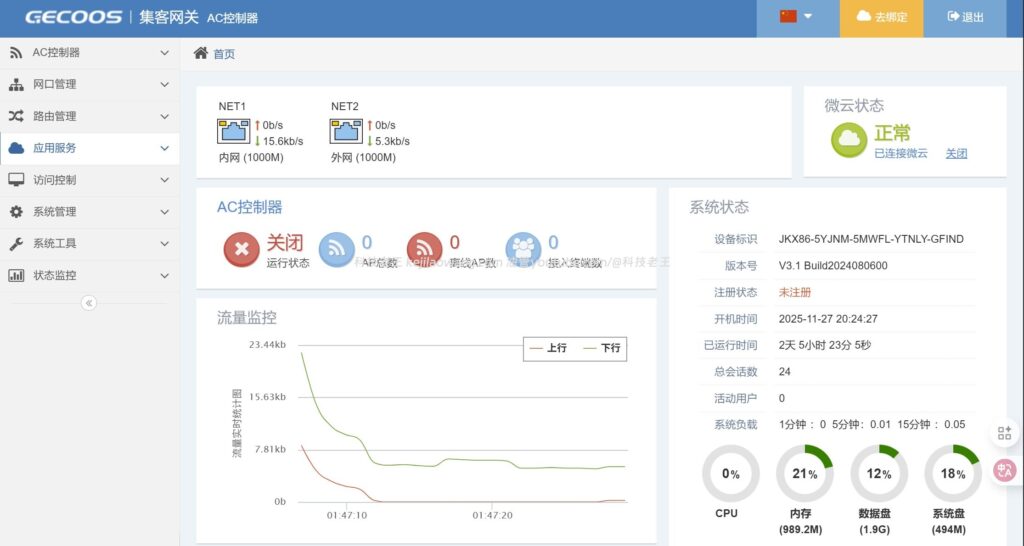
At this point the VM will successfully enter the Hub AC Manager X86 SystemsThe following is an example of the use of the "N" type of the "N" type of the "N" type.
You can access it in your browser:
http://集客AC的IP地址Log in to the background to configure APs, manage KVR roaming, set up mesh networking, and so on.
V. Additional Notes: About AP Brush & Video Tutorials
If you've swiped the Collector AP system before (e.g. my tutorial:Xiaomi Redmi AX3000 Flip into Setter AP Nanny Tutorials), then now with the X86 AC gateway deployed by Unraid, you can form a complete enterprise-class wireless network system:
- Seamless multi-AP indoor roaming
- KVR Quick Roam
- Mesh Backhaul Link
- Large Wi-Fi coverage
This is a very cost-effective combo for home gamers.
summarize
The advantages of deploying a Collector AC Gateway with Unraid virtualization include:
- No additional equipment required, saving costs
- Highly stable, independent of physical USB flash drive compatibility
- Can be co-located with soft routes, NAS, Docker
- Combine with Brush APs to build enterprise-class wireless networks
If you're running soft routing or a high-performance NAS, running a collector X86 AC controller with a virtual machine is definitely the optimal choice.






 Lan Xiaobo (1952-1997), PRC politician Protocol Not Supported The client and server do not support the general SSL protocol version or cipher suite. This error is prompted
  kittyzero Hi, https://www.youtube.com/watch?v=eJUWQqCKfW0 I set it up and the extranet won't go out, not sure why, emailed you, thanks.
  ericjin211 Hi, tried this solution and found that foreign sites going through openclash proxy will not go through adguardhome, what could be the problem 🤔
  666 Tried the copy, no other problems, dns test has Hong Kong and Japan, not sure if it's a leak or not
  Loong2004 Hello, I feel that the program is very good, but the white hand is handicapped, can you have paid remote guidance, thank you!
  Chinese
  English
  Spanish
  French
  German
  Japanese
  Portuguese
  Italian
  Dutch
Dutch