



Total 3495 characters, estimated reading time: 9 minutes.
With the prosperity of online video platforms, more and more users want to download their favorite videos for offline viewing. In order to meet this demand, a variety of video download tools have appeared, among which the command line tool yt-dlp has become a free tool preferred by many people due to its powerful features and cross-platform support.
To view, please open this page in an internet environment with access to YouTube.
A full graphic description is provided below and can be read on.
What is yt-dlp?
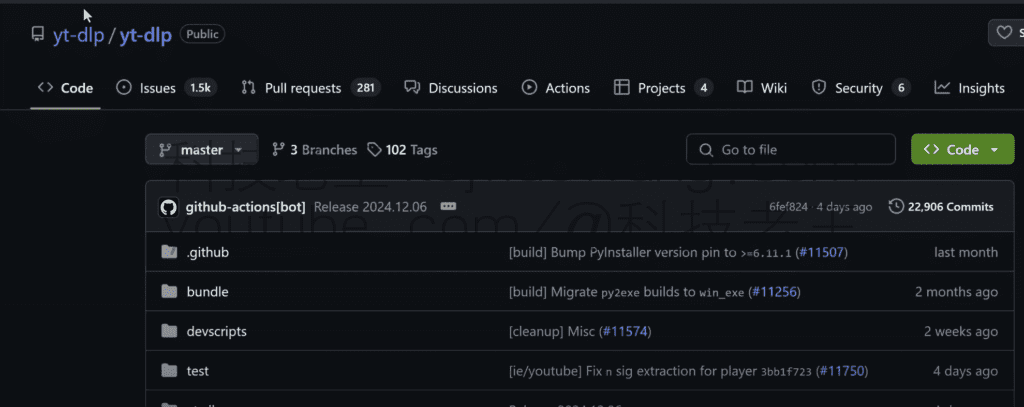
yt-dlp is a free, open source, cross-platform command line tool based on Python, designed to help users download audio and video content from a wide range of online video platforms. It supports more than 1800 websites, including mainstream domestic and international platforms, such as B Station, Weibo, Aichiye, Youku, Xiaohongshu, Himalaya FM, CCTV CCTV, Facebook, Instagram, Reddit, Twitter, TikTok and so on.
yt-dlp not only helps users to download videos, but also provides some very useful additional features that make the downloading process more efficient and convenient. It is easy to use and supports operating systems such as Linux, Windows and macOS, making it convenient for users of all kinds of devices.
Main functions of yt-dlp
As a feature-rich download tool, yt-dlp comes with a variety of useful features that make it stand out from the rest. Here are some of the main features of yt-dlp:
1. stop-and-go (computing)
yt-dlp supports breakpoint resumption, so even if there is an interruption in the download process, the download can be resumed from the location where it was interrupted without having to restart. This is especially important for downloading large files or for use in unstable network environments.
2. Video format conversion (relies on FFmpeg)
yt-dlp is capable of converting downloaded videos to different formats, which means you can choose the right format to download according to the requirements of your device. With FFmpeg integration, yt-dlp supports converting to a wide range of video formats and you can adjust parameters such as resolution, video quality and more.
3. SponsorBlock feature that automatically skips ads
yt-dlp integrates the SponsorBlock plugin, which can automatically skip ads and interruptions in videos to enhance the viewing experience. Users can choose whether to turn on this feature according to their needs, avoiding tedious ad interruptions.
4. Cookie Support
yt-dlp also supports the use of browser cookies for downloads, solving the problem of downloading many videos that require login authentication. With this feature, users are able to download content that requires login to view.
5. Video Chapter Splitting
For long videos, yt-dlp provides a video chapter splitting function, which is convenient for users to download or play by chapters. For some educational videos or long lectures, this feature is very useful.
6. Plug-in extensions
yt-dlp allows to extend more functionality through plugins. For example, users can install plugins such as YouTube Agegate Bypass to bypass age restrictions or use YouTube nsig Proxy to handle some encrypted streaming links. These plugins can further optimize the download experience according to the user's needs.
Install yt-dlp
Installation on Windows
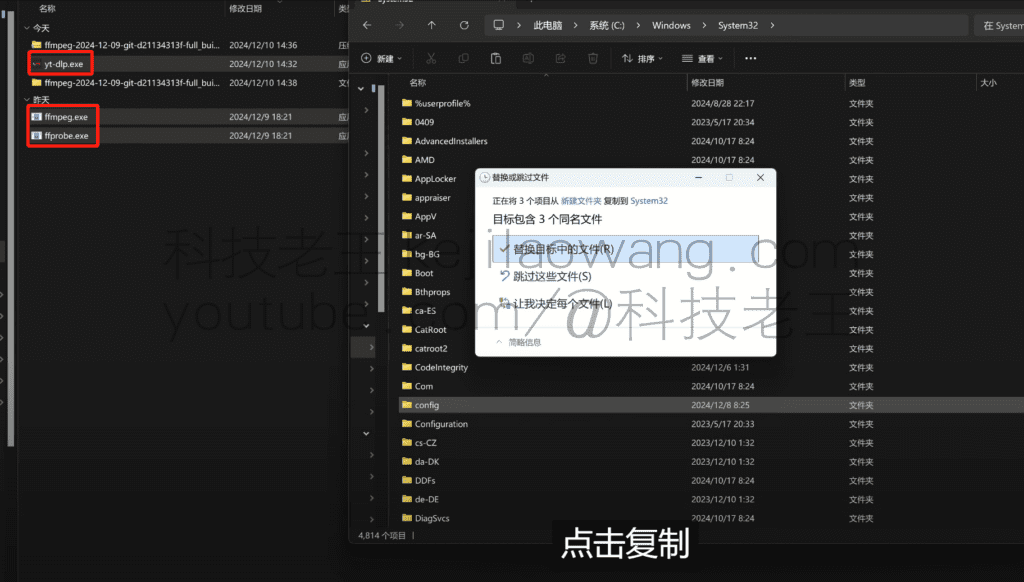
We logged into the author'sgithub Download the correspondingThe right version for you And then toFFmpeg Download to ffprobe ffmpeg and yt-dlp into the system files.
C:\Windows\System32 will do. Open the terminal and write yt-dlp [video link] to download the video.
yt-dlp Common Commands Examples
Hello.yt-dlp is a feature-rich command line audio and video downloader that supports downloading video and audio resources from multiple websites. If you want to download a video, you can use the following basic commands:
shellyt-dlp [video link]For example, if you have a link to a video, you can replace that link directly into the command as follows
shellyt-dlp https://www.youtube.com/watch?v=xxxxxxxxxxThis will download the video in its default best quality. If you need more options, such as choosing a specific video quality, format, or download playlist, theyt-dlp A variety of parameters are provided to meet different needs. The following are some examples of commonly used commands:
- Download the best quality video and audio: shell
yt-dlp -f "bestvideo+bestaudio" [video link] - Limit the maximum resolution of downloaded videos: shell
yt-dlp -f "bestvideo[height<=1080]+bestaudio" [video link] - Download videos in specific formats(e.g., to download videos in MP4 format only): shell
yt-dlp -f "bestvideo[ext=mp4]+bestaudio[ext=m4a]" [video link] - See all available formats for video: shell
yt-dlp -F [video link] - Download Playlist: shell
yt-dlp [link to playlist] - Download all videos of the channel: shell copy
yt-dlp [channel link]
Download Audio
If you only want to download the audio, you can use the-xParameters:
yt-dlp -x [video link]If there is an audio file, it will be downloaded directly; if not, the video will be downloaded and then converted to an audio file via FFmpeg, and finally the video file will be deleted automatically.
Download subtitles
1 First check what subtitles the video has:
yt-dlp --list-subs [video link]Download subtitles in a specific language (without downloading the video):
yt-dlp --write-subs --sub-langs [language-code] --skip-download [video link]Batch Download Video
- List multiple video links directly in the command:
yt-dlp [video link 1] [video link 2]- Save the link to the video in a text file and then pass the
-aparameter specifies the file path:
yt-dlp -a [text file path]Download Playlist
Use the playlist link or ID directly:
yt-dlp [link to playlist]
# or
yt-dlp [playlist id]
Specify video format, picture quality, and audio (commonly used)
The video offers a variety of format and resolution options, including mhtml, mp4, m4a, webm, and 256×144, 1280×720, 1920×1080, and more. You can use-Fparameter to see the available formats, resolutions, and audio for the target video in order to make a selection.
1View the available video formats, resolutions, and audio:
yt-dlp -F [video link]Download video + audio in the specified format:
yt-dlp -f [video format id + audio format id] [video link]Download the best quality videos
For quick downloads of the best quality videos, yt-dlp also offers several useful format selectors:
1 Download the best video and audio quality with automatic merging (recommended):
yt-dlp -f "bv*+ba/b" [video link]2 Specify the output format, such as MP4:
yt-dlp -f "bv*[ext=mp4]+ba[ext=m4a]/b" [video link]The format parameters here are described below:
bv*: Selecting the best video streambestvideoabbreviation, add the*The number indicates that all encodings are supported.ba: Selecting the optimal audio streambestaudioThe abbreviation for.b: If the single file already contains video and audio, it is downloaded directly.ext=mp4/m4a: Specify the output format as MP4/M4A.
3If you want to make sure that the final file must be in MP4 format, you can use the following command:
yt-dlp -f "bv*+ba/b" --merge-output-format mp4 [video link]Video tutorial address:https://youtu.be/sMD1b1R_J-c







 Lan Xiaobo (1952-1997), PRC politician Protocol Not Supported The client and server do not support the general SSL protocol version or cipher suite. This error is prompted
  kittyzero Hi, https://www.youtube.com/watch?v=eJUWQqCKfW0 I set it up and the extranet won't go out, not sure why, emailed you, thanks.
  ericjin211 Hi, tried this solution and found that foreign sites going through openclash proxy will not go through adguardhome, what could be the problem 🤔
  666 Tried the copy, no other problems, dns test has Hong Kong and Japan, not sure if it's a leak or not
  Loong2004 Hello, I feel that the program is very good, but the white hand is handicapped, can you have paid remote guidance, thank you!
  Chinese
  English
  Spanish
  French
  German
  Japanese
  Portuguese
  Italian
  Dutch
Dutch