



Total 2150 characters, estimated reading time: 6 minutes.

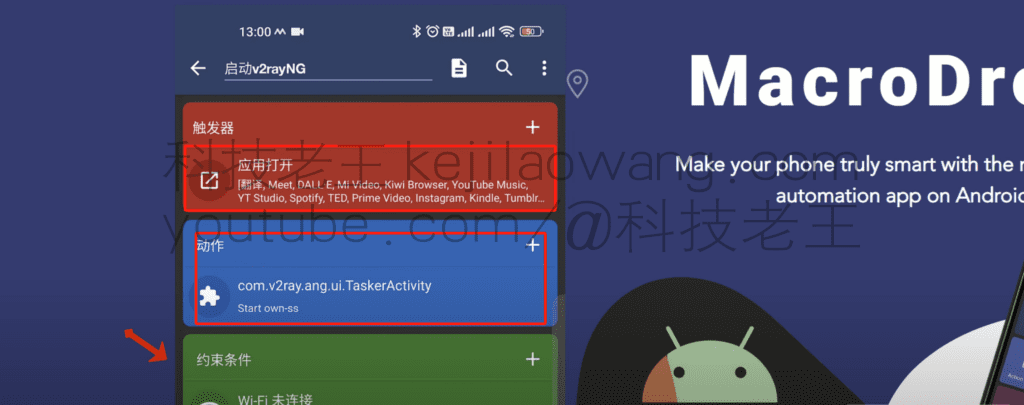
With the increasing intelligence of cell phones, our reliance on them is deepening. However, frequent operations often make our fingers feel tired. Today, I'd like to recommend MacroDroid Pro, a powerful task automation tool that can significantly reduce the burden of manual operations, making your phone smarter and more efficient, and saying goodbye to tedious and repetitive operations. It can senselessly when you open the need toscientific Internet accessThe software it automatically helps you to open v2rayNG to connect the corresponding node, when you close is also automatically closed v2rayNG, very convenient, you can set up a variety of their own strategy, with the trigger conditions.
To view, please open this page in an internet environment with access to YouTube.
A full graphic description is provided below and can be read on.
MacroDroid Pro - a tool to improve the overall efficiency of your cell phone
MacroDroid is an automation tool designed for Android that automates a variety of tasks based on preset trigger conditions. From simple operations, such as sending messages or connecting to the network, to complex tasks, such as automatically adjusting your phone's settings based on its geographic location, MacroDroid makes it easy. The app's clean and intuitive interface is easy to use, so even novice users can get started quickly.
Functional highlights and core advantages
1. Enriched trigger conditions
MacroDroid offers more than 65 triggers, such as time, date, receipt of a specific SMS, battery level status, etc. Users can choose flexibly according to their needs. For example, you can set it to automatically open an app at 9 a.m. every day, or send a reply when you receive a text message from a specific number.
2. Powerful operational support
The app offers more than 100 operation options, including sharing location, making calls, sending emails, etc., to meet the needs of different scenarios. With a simple setup, MacroDroid is able to automate these tasks under specific conditions to increase efficiency.
3. Flexible macro management
MacroDroid allows users to group created macros into built-in categories or custom categories. With color coding, users can easily distinguish between different types of macros for more efficient management and editing. Whether it's an automated process created for work or a setting that enhances convenience in your life, MacroDroid is organized to help you get organized.
4. Simple and intuitive editing interface
The application's editing interface is designed to be easy to use and supports function modules for adding, deleting or adjusting macros. With color markings, users are able to visually identify triggers and actions, dramatically reducing the difficulty of editing complex tasks.
5. Advanced functionality support
In addition to the basic functionality, MacroDroid supports custom variables, stopwatches, and control flows such as If/Else and While/Do. These features open up the possibility of automating more complex tasks, such as multi-conditional task flow or dynamic task tuning.

Wide range of application scenarios
MacroDroid is used in a wide variety of scenarios, from simple daily conveniences to productivity enhancement, it can help you.
- automatic clocking in and out: Automatically complete non-remote clocking in before you go to work to avoid the hassle of forgetting to clock in.
- Mute Management: Automatically turn off notifications at night so that you are not disturbed while you rest.
- Intelligent Setting Adjustment: Automatically switch networks or adjust volume based on geographic location.
Summary of key features
- easy operation: Intuitive interface designed to make it easy to create macros without specialized skills.
- Highly flexible: Supports a variety of triggering conditions and operating modes to meet different needs.
- Personalization: Freely define macro runtimes, events and conditions.
- Functionality Expansion: Plug-in support for integration with other applications to further enhance functionality.
- safe and reliable: Access equipment resources in a secure manner without misuse of sensitive data.
Taking intelligence one step further
Whether you're a tech enthusiast or a casual user, MacroDroid can revitalize your Android device. With a few simple settings, you can unlock a more efficient and convenient experience. From now on, your phone is no longer just a tool, but a powerful assistant that can proactively get things done.
Decryption code in Youtube video narration







 Lan Xiaobo (1952-1997), PRC politician Protocol Not Supported The client and server do not support the general SSL protocol version or cipher suite. This error is prompted
  kittyzero Hi, https://www.youtube.com/watch?v=eJUWQqCKfW0 I set it up and the extranet won't go out, not sure why, emailed you, thanks.
  ericjin211 Hi, tried this solution and found that foreign sites going through openclash proxy will not go through adguardhome, what could be the problem 🤔
  666 Tried the copy, no other problems, dns test has Hong Kong and Japan, not sure if it's a leak or not
  Loong2004 Hello, I feel that the program is very good, but the white hand is handicapped, can you have paid remote guidance, thank you!
  Chinese
  English
  Spanish
  French
  German
  Japanese
  Portuguese
  Italian
  Dutch
Dutch