



Total 1986 characters, estimated reading time: 5 minutes.
Build High-Speed Hysteria2 Nodes on Low-Configuration VPSs Tap Into High Performance
In the modern Internet, using a low-configuration VPS to build high-speed, efficient nodes is a very cost-effective technology option. This article will detail how to use the Hysteria2 protocol to maximize performance on a low-configuration VPS, thus providing users with a more stable network experience. Interested partners can also take a look at S-UI cap (a poem) 3X-UI The two versions of
To view, please open this page in an internet environment with access to YouTube.
A full graphic description is provided below and can be read on.
A VPS installation of three visual scientific Internet panel detailed video tutorials, such as with the playback failure please click the linkThe Old King of YouTube Tech
Why choose the Hysteria2 protocol?
Hysteria2 is a modern encrypted transport protocol designed for low latency and high performance, with benefits including:
- Efficient resource utilizationHysteria2 is a very powerful VPS that can take full advantage of CPU and memory performance, even on a low-profile VPS.
- low latency transmission: The protocol is optimized to significantly reduce network latency for scenarios that require real-time communication.
- Resistant to network fluctuations: Hysteria2 is more tolerant of packet loss and jitter, allowing it to maintain high-quality connections in unstable network environments.
- Easy to deploy: Compared to other protocols, Hysteria2 is relatively easy to install and configure, making it suitable for both novice and advanced users.
preliminary
Before starting the deployment, make sure the following conditions are met:
- Low Configuration VPSThe recommended minimum configuration is 1-core CPU, 512MB RAM, and bandwidth of 10Mbps or more.
- operating system: Common Linux distributions such as Ubuntu, Debian or CentOS are supported.
- base environment: Installed
curlmaybewgettool with sudo/root privileges. - Domain name (optional): To enhance the user experience, it is recommended to use a domain name for configuration.
One Click Installation Code
bash <(curl -fsSL https://raw.githubusercontent.com/jonssonyan/h-ui/main/install.sh)Originally Posted by GitHub
https://github.com/jonssonyan/h-uiUser name, password and port number
- Username and password default: new version of the account password will be randomly generated
- The default port number is: 8081
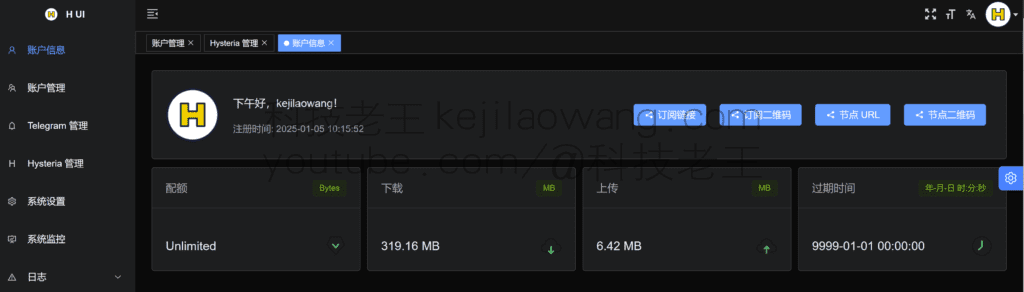
Panel settings (you can see the information for yourself))
Click Hysteria Management
Three must-have options: listening address, TLS, traffic statistics APIs
Listening address: you can choose 446, etc. (it is recommended not to choose 443 if it is not necessary)
Traffic statistics API: default is fine (choose your favorite)
Domain name instead of IP to access the panel
Click on “System Settings”, enable the https option in the panel, select “Yes”, and then click on “Use Hysteria2”s certificate" here, it will automatically recognize the The path of the certificate
Click “Save”
At this point, we'll need to access the panel via https, log in again, and that's it!
For detailed installation tutorials and setup notes please watch the video tutorials :https://youtu.be/ONk2b1qg_ek








 Lan Xiaobo (1952-1997), PRC politician Protocol Not Supported The client and server do not support the general SSL protocol version or cipher suite. This error is prompted
  kittyzero Hi, https://www.youtube.com/watch?v=eJUWQqCKfW0 I set it up and the extranet won't go out, not sure why, emailed you, thanks.
  ericjin211 Hi, tried this solution and found that foreign sites going through openclash proxy will not go through adguardhome, what could be the problem 🤔
  666 Tried the copy, no other problems, dns test has Hong Kong and Japan, not sure if it's a leak or not
  Loong2004 Hello, I feel that the program is very good, but the white hand is handicapped, can you have paid remote guidance, thank you!
  Chinese
  English
  Spanish
  French
  German
  Japanese
  Portuguese
  Italian
  Dutch
Dutch