



Total 2485 characters, estimated reading time: 7 minutes.
How to deploy 3x-ui and s-ui on the same VPS for scientific Internet multi-panel management
existscientific Internet accessenvironment, 3x-ui and s-ui, as popular panel management tools, have their own advantages. Deploying both tools to a single VPS not only improves management flexibility, but also meets the needs of different scenarios.
Advantages of s-ui: support for new protocols and powerful subscription features
The s-ui panel is unique in the field of scientific Internet management, especially in supporting the latest protocols and rich subscription features. First of all, s-ui is the first to integrate HY2 cap (a poem) TUIC HY2 provides more efficient traffic distribution capability, which is suitable for stable connections in complex network environments; TUIC combines highly efficient QUIC transmission and strong encryption technology, which not only reduces latency but also significantly improves blocking resistance, enabling users to enjoy a smoother network experience.
To view, please open this page in an internet environment with access to YouTube.
A full graphic description is provided below and can be read on.
In addition, s-ui's subscription function is extremely rich, supporting the generation and management of subscription links in various formats, compatible with mainstream client tools. Users can flexibly configure multi-node, multi-protocol subscription combinations according to their needs, while also supporting dynamic update of subscription content to ensure real-time synchronization of node information. This powerful combination of features not only brings users a more flexible management experience, but also makes the operation of scientific Internet access more convenient and efficient.
First we need a VPS and a domain name to resolve to theCloudflareOf course you can also register for aFree Domain Name, and when ready I proceeded with the following.
Author Code:GitHub - alireza0/s-ui: Advanced Web Panel - Built for SagerNet/Sing-Box

Rapid deployment of s-ui panels: one-click script installation
To quickly deploy the s-ui panel on your VPS, simply run the following one-click script command:
bash <(curl -Ls https://raw.githubusercontent.com/alireza0/s-ui/master/install.sh)
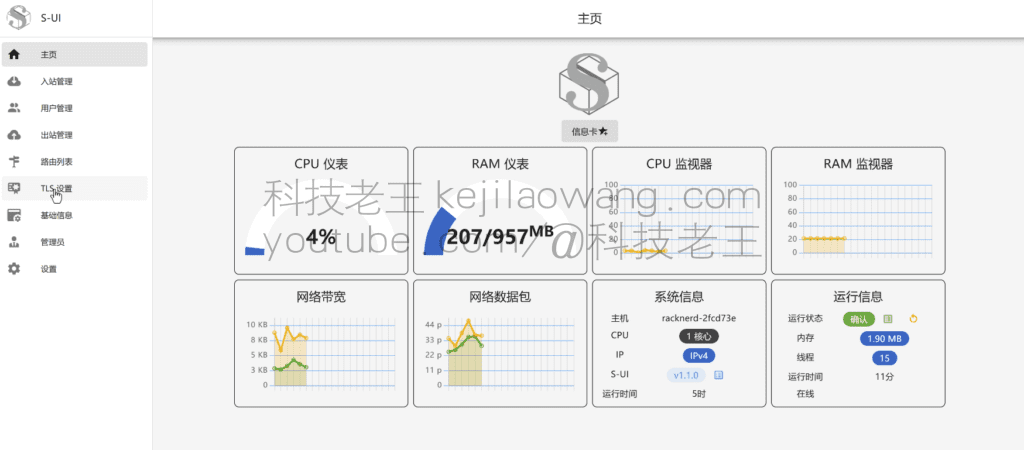
s-ui panel
concluding remarks
In today's network environment, scientific Internet access has become a necessary means for many people to pursue the freedom of information. For those who wish to deploy scientific internet service on their personal servers, choosing a suitable management panel is undoubtedly a crucial step. 3x-ui and s-ui panels, as two popular management panels in the market, have their own unique features and advantages. However, what many people may not know is that you can fully realize the coexistence of these two panels on a single VPS (Virtual Private Server), thus enjoying the flexibility and convenience brought by dual panels.
The benefits of co-deploying 3x-ui and s-ui panels are obvious. First of all, this deployment gives users the flexibility to choose which panel to use to manage ScienceNet nodes and users according to their different needs and preferences. For example, one panel may excel in certain features or have a more user-friendly interface, while the other panel has advantages in other areas. Secondly, dual-panel coexistence also means that when one panel encounters unsolvable problems or limitations, users can easily switch to the other panel to ensure the stable operation of the service, and the overall experience will not be affected by the problems of a single panel.
While this coexistence deployment may sound a bit complicated, it's actually something that most people are able to achieve with ease if they follow the right tutorials. If you encounter any problems during the deployment process, the tech veteran YouTube, provides a detailed guide to help you through the deployment. For example, you can visit the article mentioned inVideo LinksThis video describes in detail the whole process of coexistence deployment, not only step-by-step instructions, but also practical demonstrations, very suitable for beginners to learn.
Besides YouTube, joining related telegram groups is also a very good choice. In these groups, you can find a lot of users who are also using or deploying 3x-ui with s-ui panels, and we all help each other and share experiences and solutions. This kind of community support is invaluable for users who encounter difficult problems. It not only helps you to solve the problems quickly, but also gives you more tips and best practices to manage your scientific internet nodes and users more efficiently.
In short, by coexisting the deployment of 3x-ui and s-ui panels on a single VPS, you can fully utilize the advantages of both panels to manage the scientific Internet service flexibly and efficiently. Moreover, with the rich learning resources and active community support on the web, even first-time users can complete the deployment with relative ease and enjoy a smooth scientific Internet experience.







 Chinese
  English
  Spanish
  French
  German
  Japanese
  Portuguese
  Italian
  Dutch
Dutch