



Total 2739 characters, estimated reading time: 7 minutes.
在构建自用代理服务时,最让人头疼的问题莫过于安装复杂、配置繁琐,尤其是需要同时支持多种协议、TLS 自动化和高效管理功能的 VPS 环境。如果你很享受其中折腾的乐趣那你不放使用10美金一年的VPS 2000G/月的流量搭建多个面板多种翻墙科学上网服务比如3X-UI S-UI集合在一个VPS上 如果你觉得麻烦安装面板又要配置域名解析,只想愉快的使用的话,由233boyThis sing-box one-click installation script was developed to solve these pain points.
✅ Support for multi-protocol, one-click deployment, very fast configuration, designed for efficient operation and zero-basic users.
To view, please open this page in an internet environment with access to YouTube.
A full graphic description is provided below and can be read on.
Feature highlights: one command, deploy the full range of agents
The best feature of this script is thatSimple, efficient, full protocol supportThe installation of sing-box can be done quickly with a single command. With a single command, the sing-box is quickly installed and a usable VLESS-REALITY configuration is automatically generated, allowing users to quickly start testing and using it.
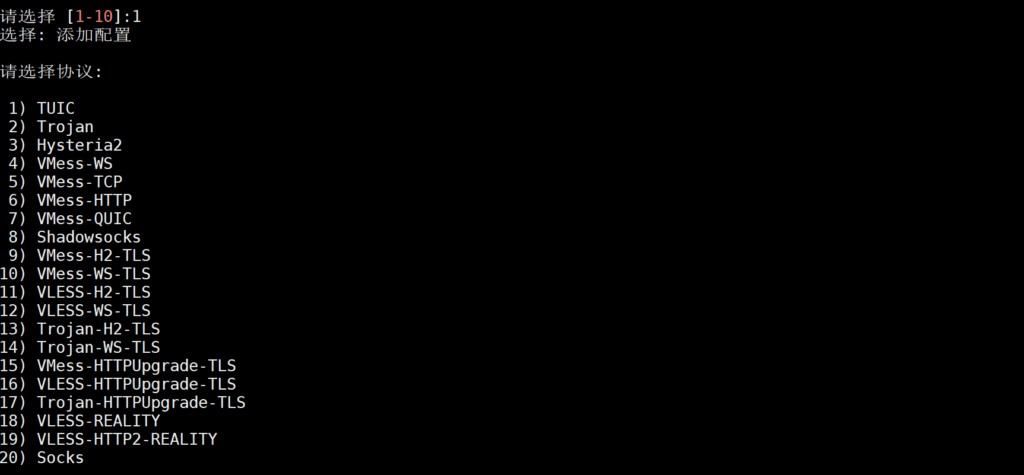
The main protocols supported include:
- REALITY / VLESS-REALITY
- TUIC
- Trojan / Trojan-H2/WS/HTTPUpgrade-TLS
- Hysteria2
- Shadowsocks 2022
- VMess(full mode of TCP, WS, QUIC, H2, HTTP, etc.)
- VLESS(WS, H2, HTTPUpgrade, etc.)
- Socks5
- Compatible with TLS, HTTP2, QUIC, AEAD and other encryption and transport mechanisms.
Overview of core strengths:
- 🚀 Extremely fast installation: One-click deployment with initial configuration in just a few minutes
- 🧠 zero learning cost: Clear panel commands and minimalist parameter design
- 🔄 Automating TLS Certificate Application and Renewal
- 🧰 Add/Modify/Delete any protocol configuration with one click.
- 🔧 Compatible with the sing-box command format, which can continue to be manually customized.
Installation: one command
Recommended Systems:Ubuntu 22+(CentOS is strongly discouraged.) Here I'm using a low-configuredMasonry VPSThe usedUbuntu18It's also running smoothly with no problems
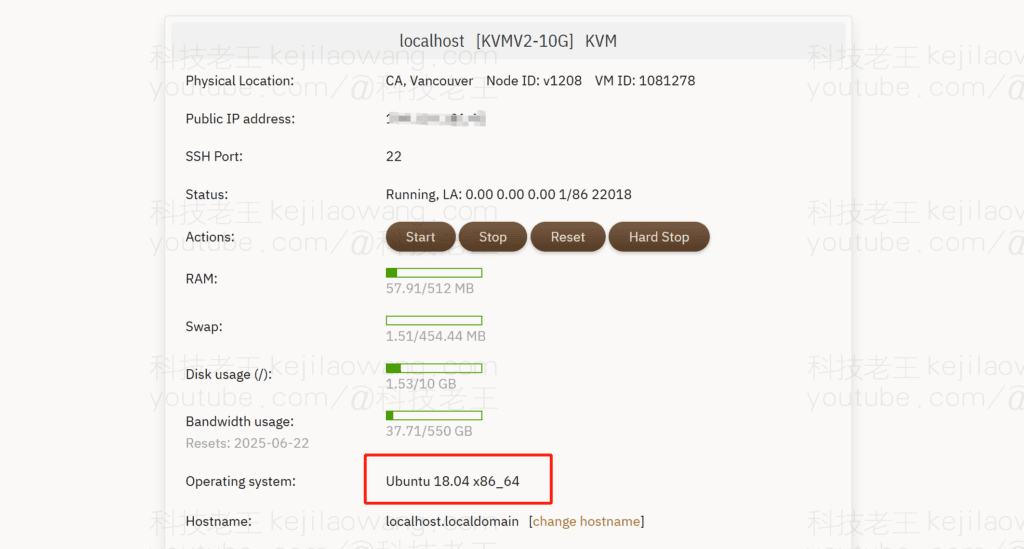
Run the following command on the VPS to start the installation:
bash <(wget -qO- -o- https://github.com/233boy/sing-box/raw/main/install.sh)💡 To specify the sing-box version, append the install command with -v version number
💡 To view the command help please add -h
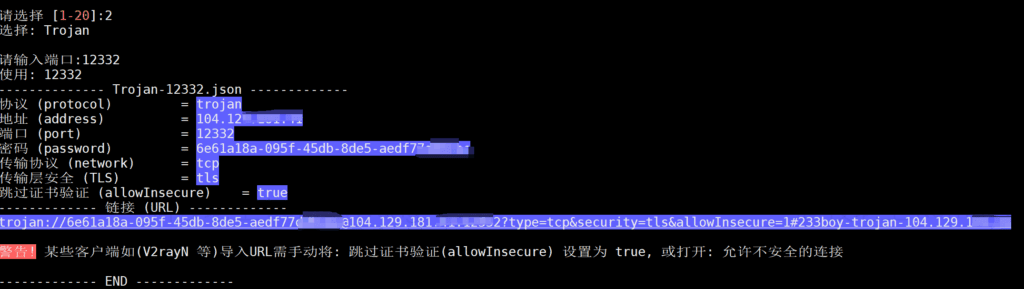
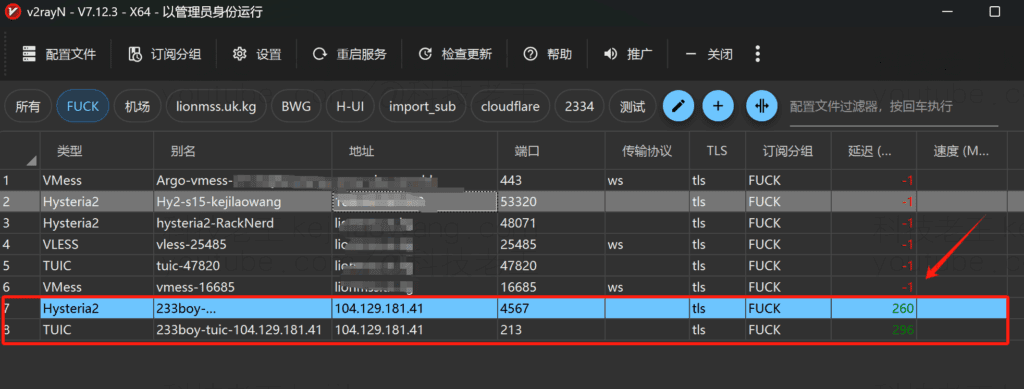
Once the installation is complete, the script will automatically generate the first VLESS-REALITY Configuration, and prompted to connect to the URL, can be used directly for v2rayN, v2rayNG and other client testing, but also according to their own node encryption method needs to autonomously add for example, here choose 2 TENNIS Trojan, enter the port and press enter to automatically generate the URL of the scientific Internet TRojan encrypted connection, you can import their own related clients can be used. Although the function does not have the previous3X-UIorS-UISo many, but the main one is convenience.
Minimal administration: one click with sb commands
After the installation is complete, the script creates sb Shortcut commands (i.e. sing-box command abbreviation) for configuration management.
Add Configuration
sb add reality # add default VLESS-REALITY
sb add tuic # add TUIC
sb add hy # add Hysteria2
sb add ss # add Shadowsocks 2022
sb add tcp # add VMess-TCP
Modify Configuration
sb change reality sni www.cloudflare.com # Change SNI for REALITY
sb change tcp port auto # change TCP port automatically
View/Delete Configuration
sb info reality # View reality configuration details
sb del reality # Delete corresponding configuration
🚨 Deletion is irreversible, use with caution! sb del
Network Troubleshooting Recommendations
If you encounter problems with connectivity, first make sure that the VPS firewall is not blocking the port:
systemctl stop firewalld; systemctl disable firewalld; ufw disableThe recommended website for testing port connectivity:
Input Format:IP:Port Perform the test, if successful it is clear.
Compatibility and Client Support Recommendations
- By default, sing-box uses the latest version of the kernel, and it is recommended that clients keep the same version.
- Client recommended:v2rayN, v2rayNG, SFI, Sing-box GUI, etc.
- Some protocols such as VMess-AEAD, REALITY, etc. are not supported in older versions of the client, so please use them after upgrading.
- If the connection fails, try changing the configuration or testing the Shadowsocks protocol as a troubleshooting measure
Highly efficient for self-use, highly recommended
This script is built by experienced users based on real-world usage scenarios and is especially suitable for the following people:
- Want to deploy quickly on a VPSscientific Internet accessTechnical users of proxy services
- Need to support multiple protocols at the same time to be compatible with different client users
- Ops personnel who want to easily manage multiple configurations and efficiently troubleshoot problems.
Whether you are deploying TUIC or set VLESS-REALITY, you only need to remember one command entry:sb. All operations revolve around it.Add, modify, view, and delete configurations in one fell swoop!that makes configuration management stress-free.







 Lan Xiaobo (1952-1997), PRC politician Protocol Not Supported The client and server do not support the general SSL protocol version or cipher suite. This error is prompted
  kittyzero Hi, https://www.youtube.com/watch?v=eJUWQqCKfW0 I set it up and the extranet won't go out, not sure why, emailed you, thanks.
  ericjin211 Hi, tried this solution and found that foreign sites going through openclash proxy will not go through adguardhome, what could be the problem 🤔
  666 Tried the copy, no other problems, dns test has Hong Kong and Japan, not sure if it's a leak or not
  Loong2004 Hello, I feel that the program is very good, but the white hand is handicapped, can you have paid remote guidance, thank you!
  Chinese
  English
  Spanish
  French
  German
  Japanese
  Portuguese
  Italian
  Dutch
Dutch