



Total 3949 characters, estimated reading time: 10 minutes.
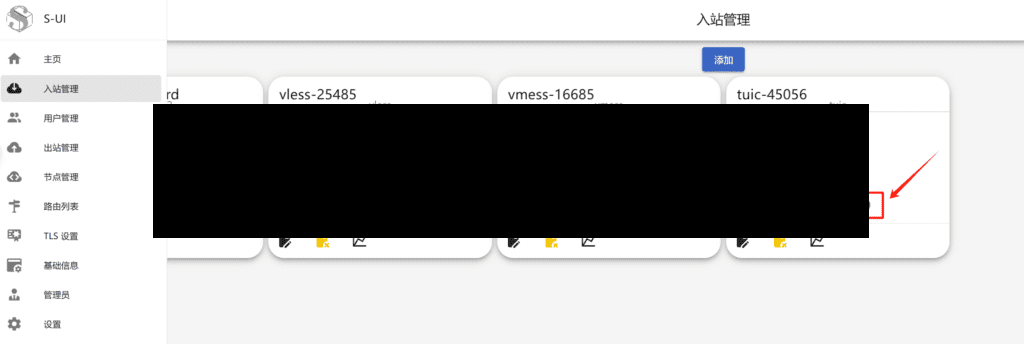
Today, we're going to go through the S-UI Panel The S-UI panel provides a simplified, graphical interface that makes it easy to configure the Scientific Internet Access tool even for users with no technical background.
To view, please open this page in an internet environment with access to YouTube.
A full graphic description is provided below and can be read on.
TUICIt's the same kind of thing asHysteria2 is also based on the QUIC proxy protocol proxy method, before I installed in the S-UI has been the installation of the use of failure, in the channel partners message me in the panel debugging test found that it can be used, TUIC “in order to reduce additional handshake delays due to relaying, to keep the protocol itself is simple and easy to implement”, compared to Hysteria2 “violent” acceleration to “mild” some, and comes with multiplexing so that we can use both efficient network and to ensure stability. Compared with Hysteria2's "violent" acceleration is "milder", and comes with multiplexing, so we can use both efficient network and ensure stability. And1.0.0The version applies thev5TUIC protocol, which is superior in terms of speed of use. And we have the iOS side of theShadowrocket,StashAnd so on APP can be used, cross-platform programClash.The TUIC protocol v5 version is also provided accordingly.
We're not very good at performance, like I am.Ten dollars a year for a VPS machine, before can I have also been using Hysteria2 this kind of protocol to solve, but easy to be checked like being attacked, in order to better stabilize the use. We can also use Tuic V5, both to ensure the speed and stability, TUIC protocol with its efficient encryption and low latency, has become the ideal choice to protect personal privacy and bypass network restrictions, just relatively it is currently relatively new a similar protocol. However, fewer clients are currently supported. This is a drawback.
Official Description:
If you use thehysteria2recurrentQoSYou can try this tool. It's more gentle compared to hysteria, in that theMaximize performance without compromising good usage.. According to the group test.It can be boosted several times, and no QoS issues were found if theLines as well as good VPS performance are not a significant upgradeIf there is RackNerdYou can try installing it using theS-UIpanel to try to use.
- 1-RTT TCP relay
- 0-RTT UDP relay with NAT type FullCone
- Congestion control in user space, i.e., bi-directional BBR can be implemented on any system platform
- Two UDP relay modes: native (native UDP characteristics, data is still encrypted by TLS) and quic (100% delivery rate, each packet stands alone as a separate QUIC “flow”, acknowledgement retransmission of one packet does not block other packets)
- Fully multiplexed, there is always only one QUIC connection between the server and the client, and all tasks are transmitted as “streams” in this connection (temporary blocking of one stream does not affect the other streams), so tasks other than those connected to the first relay task do not need to go through the QUIC handshake and TUIC authentication
- Smooth session transfer when switching networks, e.g. when switching from Wi-Fi to mobile data the connection does not simply drop as it does with TCP
- 0-RTT, authentication in parallel with relay tasks
- Supports QUIC's 0-RTT handshake (true 1-RTT TCP and 0-RTT UDP when turned on, but even if not turned on, the multiplexing feature guarantees 1-RTT and 0-RTT in most cases).
TUIC: A high-performance proxy based on the QUIC protocol to enhance the availability of weak network environments
In a world where scientific internet access and web acceleration technologies are evolving, theTUIC Being based on a QUIC protocol designed high-performance proxy tools that are gaining attention. Compared with the traditional proxy protocols, TUIC fully utilizes the QUIC The advantage of the network is that it provides more stable and efficient transmission capability while reducing handshake latency, which is especially suitable for environments with poor network quality.
Core features of TUIC
From the beginning, TUIC has been centered around QUIC protocol construction, which allows it to utilize the QUIC Multiplexing, low-latency connection recovery, and better flow control mechanisms are provided to improve agent stability and performance.
1. Low latency, high availability
TUIC uses QUIC flow regimeThis means that all tasks are integrated into the same QUIC connection. This means that as long as QUIC connection not forcibly terminatedor Data still flowing within the set maximum idle timeThis eliminates the need for a new QUIC handshake and TUIC authentication, greatly reducing handshake delays and improving connection reliability.
2. Efficient UDP relay mode
The TUIC provides two UDP relay modes to meet different transmission requirements:
- Local Mode::
- adoption QUIC datagram The UDP packets are transmitted in the same way as traditional UDP, where packet loss may occur, but the additional overhead of an acknowledgement mechanism can be avoided, while still being encrypted by the QUIC.
- Suitable for scenarios with high real-time requirements, such as Game acceleration, live streaming and voice callsThe
- QUIC Stream Mode (QUIC Mode)::
- commander-in-chief (military) UDP packets encapsulated into QUIC streams Transmission ensures that data 100% is delivered reliably.
- Since each UDP packet is treated as a separate QUIC stream, packet loss will not affect the data transmission of other streams, thus avoiding the problem of blocking the entire connection due to packet loss retransmission.
- pertain File transfer, video streaming and mission-critical communications, needing more stable transmission guarantees.
3. User space congestion control to optimize weak network transmission
Since the QUIC protocol is based on UDPThe TUICs are also designed to provide greater flexibility by eliminating the need for the operating system kernel to restrict its congestion control mechanism.
- Supports BBR congestion control algorithm: in the case of poor network quality.BBR (Bottleneck Bandwidth and Round-trip propagation time) Algorithms make more efficient use of bandwidth, reduce latency, and optimize data transfer.
- Dynamic Flow Control: TUIC enables each data stream to be managed individually through QUIC's own traffic regulation feature, preventing individual tasks from affecting overall connection quality.
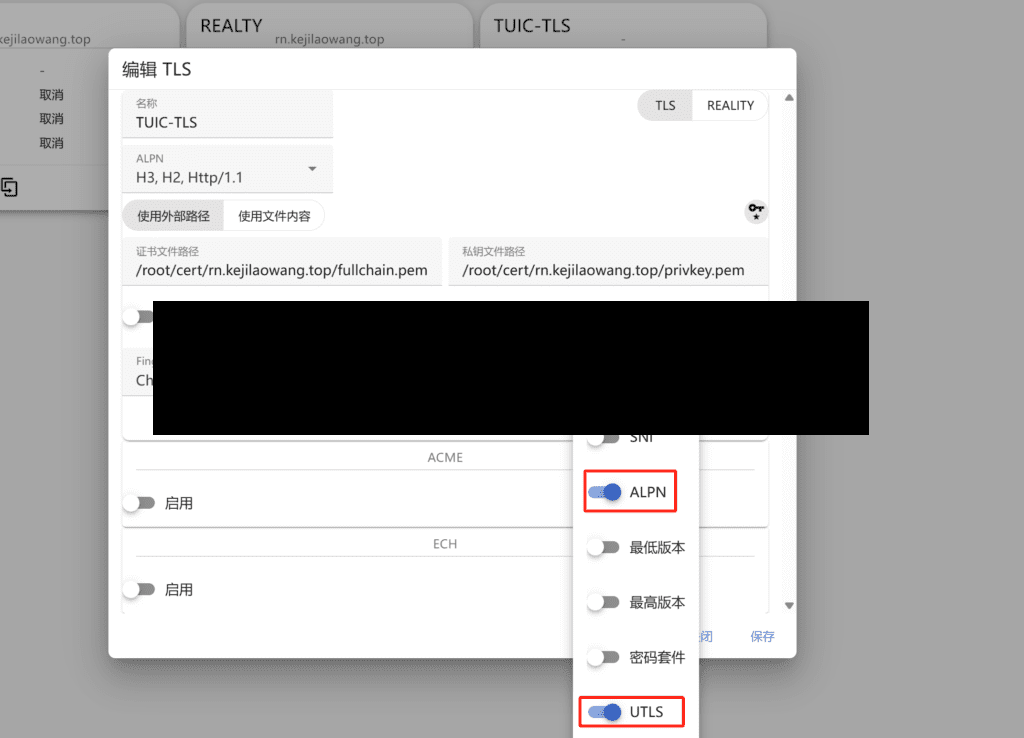
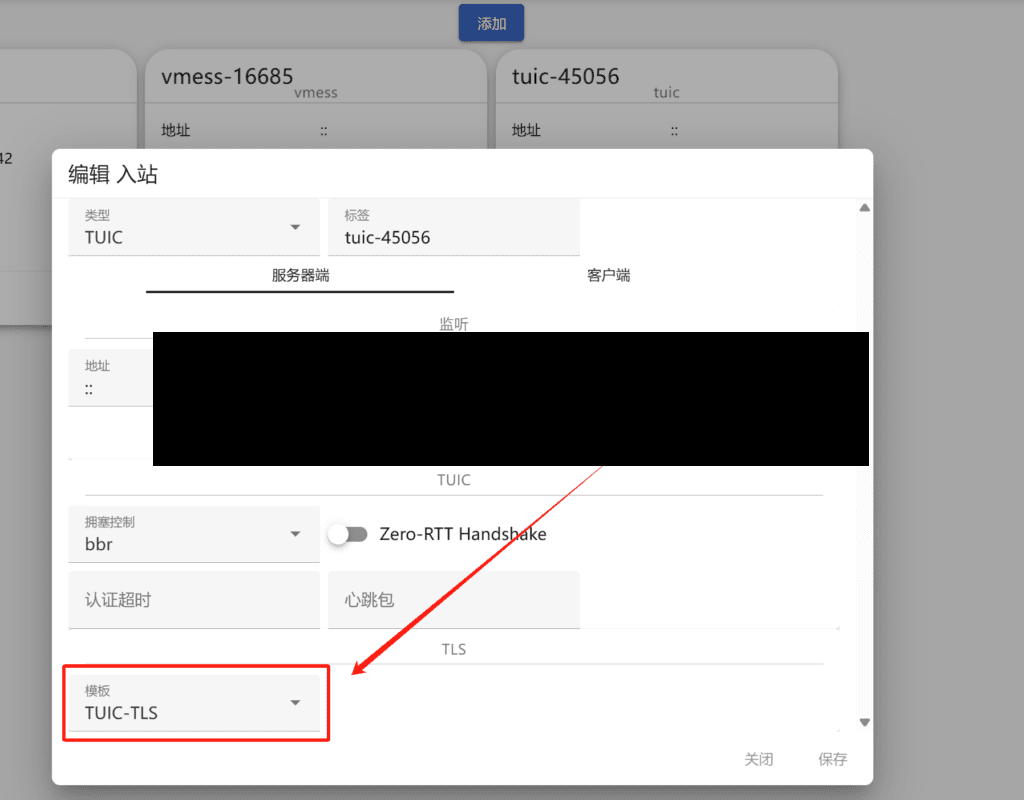
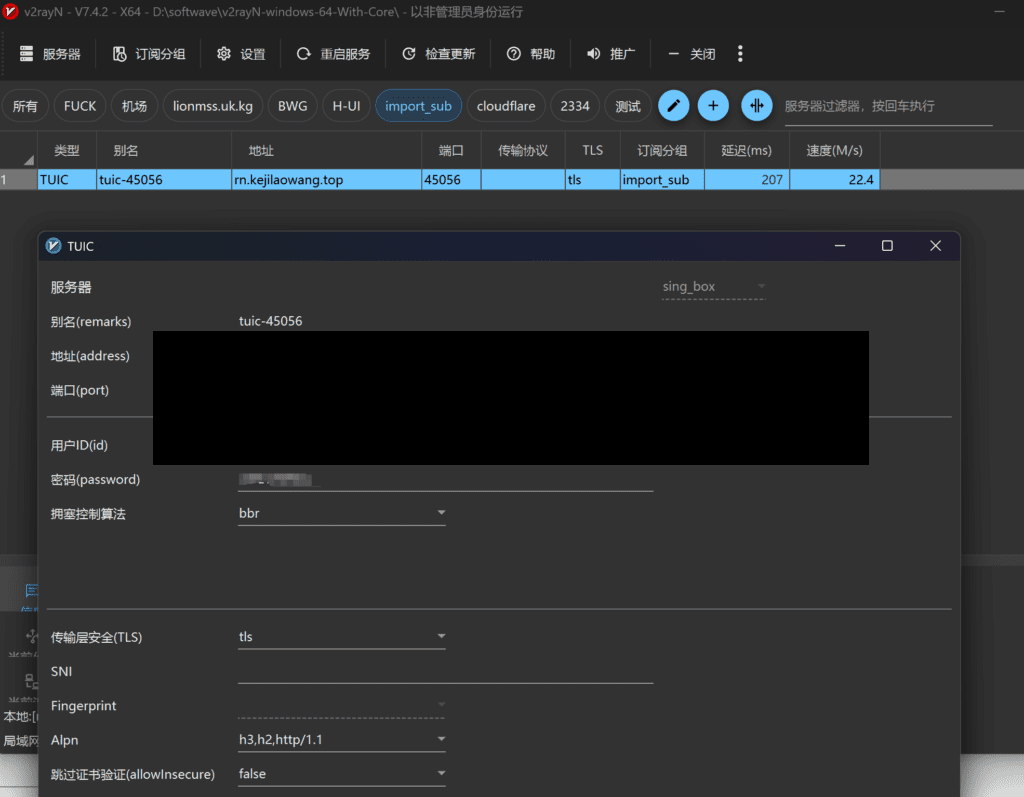
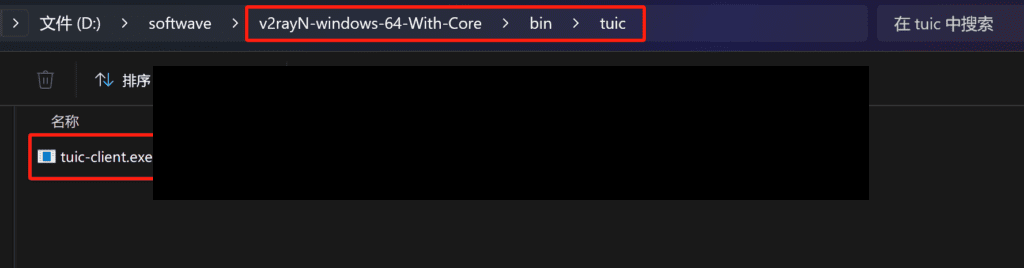
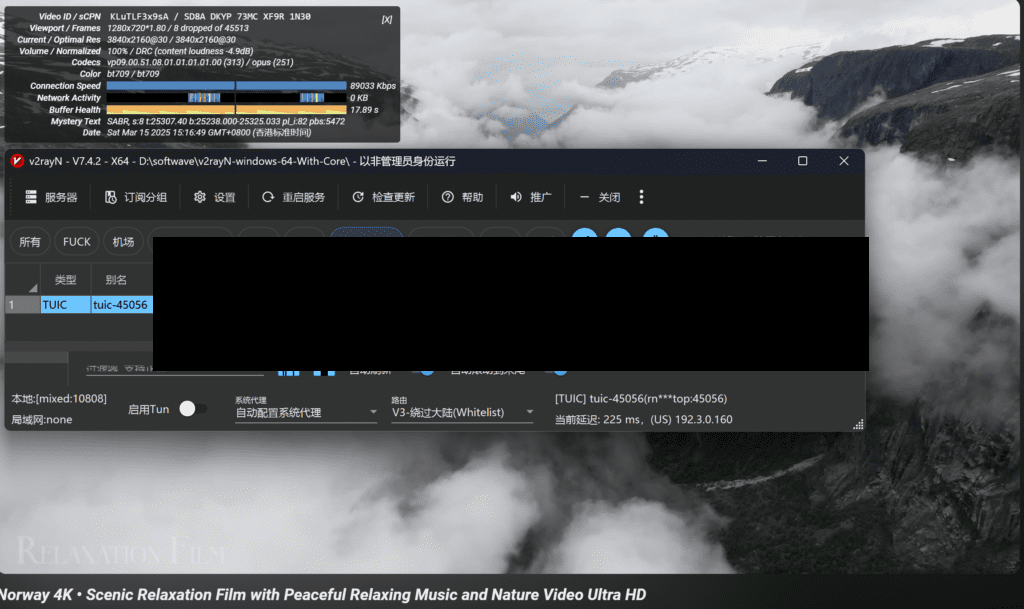
Tuic Visualization Client:v2rayN Tuic is already supported, in fact, it's just a change of Core v2rayN. But we need to do the following settings to use Tuic: download the latest finished which defaults to Tuic kernel withV5 is not supportedSo here's what you need to download manuallyTuic-client 1.0.0 to replace (do not download into the server side) , download the file name is usually tuic-client-1.0.0-x86_64-pc-windows-msvc.exe.
Name change after download is complete tuic-client.exe and replaces the originaltuic-client.exeThe file path is v2rayN-With-Core/bin/tuic/.
Advantages of TUIC over Traditional Proxy Agreements
| characterization | TUIC (based on QUIC) | Traditional TCP proxies (e.g. Shadowsocks) | Legacy UDP Proxy |
|---|---|---|---|
| handshake delay | Low, only first handshake requires authentication | High, handshake required for each new connection | No handshake delay, but unreliable |
| connection reuse | Yes, a single QUIC connection can handle multiple tasks | No, each connection is independent | clogged |
| congestion control | User customizable, e.g. BBR | TCP Congestion Control subject to operating system limitations | No congestion control |
| Packet Loss Handling | Only lost packets are affected, other data is not affected | TCP may cause overall congestion | Lost data cannot be recovered |
| data encryption | QUIC comes with encryption protection | Proxy-dependent encryption | Additional encryption required |
TUIC Scenarios
TUIC by optimizing streaming cap (a poem) connection management, which performs well in several scenarios:
- network-constrained environment: Bypass blockades and improve the cross-border access experience.
- streaming acceleration: Provides stable transmission with low latency and high throughput for viewing Netflix, YouTube, Disney+ etc.
- Game acceleration: Avoid high latency problems caused by TCP proxies and improve the experience of FPS, MOBA, and competitive games.
- telecommuting: Provide more stable connectivity in global remote connections SSH, RDP, video conferencing Support.
summarize
TUIC is a new generation of products based on QUIC protocol, QUIC's low-latency, high-reliability proxies take full advantage of QUIC's low-latency, high-reliability proxies to maintain excellent performance in weak network environments. With the help of Streaming with QUIC,Efficient UDP processing as well as User customizable congestion controlTUIC has shown great potential in areas such as scientific Internet access, streaming media acceleration and telecommuting.
If you want to enjoy a smooth, secure and efficient proxy experience in all kinds of network environments, TUIC is undoubtedly a solution worth trying.
💡 Are you already using TUIC, feel free to share your experience in the comments section! 🚀






 Lan Xiaobo (1952-1997), PRC politician Protocol Not Supported The client and server do not support the general SSL protocol version or cipher suite. This error is prompted
  kittyzero Hi, https://www.youtube.com/watch?v=eJUWQqCKfW0 I set it up and the extranet won't go out, not sure why, emailed you, thanks.
  ericjin211 Hi, tried this solution and found that foreign sites going through openclash proxy will not go through adguardhome, what could be the problem 🤔
  666 Tried the copy, no other problems, dns test has Hong Kong and Japan, not sure if it's a leak or not
  Loong2004 Hello, I feel that the program is very good, but the white hand is handicapped, can you have paid remote guidance, thank you!
  Chinese
  English
  Spanish
  French
  German
  Japanese
  Portuguese
  Italian
  Dutch
Dutch