



Total 4179 characters, estimated reading time: 11 minutes.
Free permanent DDNS, why is it becoming more and more necessary now?
As long as the device or server you have is using theDynamic Public IP, there is bound to be a problem:
Today, I can access it via IP, but in a few days, when the address changes, the original remote access method will not work.
These types of scenarios are very common, for example:
- Home broadband public IP will change
- NAS, home servers, soft routes, surveillance devices, etc. all want to fix an access portal
- I don't want to memorize a new IP every time and change the configuration over and over again.
At this time, **DDNS (Dynamic Domain Name Resolution)** is a very practical solution. Its core role is simple:
Automatically binds changing IPs to a fixed domain name.It is free of charge and supports secondary encryption of account logins.Free Domain Name Resolution Service | Dynu Systems, Inc.Of course, to start everything here you need to have a public IP first, otherwise you can use the one I shared with my little buddy earlier.Cloudlfare Intranet Penetration TunnelThe way to use the speed is good also safe and reliable.
To view, please open this page in an internet environment with access to YouTube.
A full graphic description is provided below and can be read on.
Why previous DDNS programs may not be right for everyone?
Previously we have actually shared related content, including:
- 用 Cloudflare + own domain name Implementing DDNS
- HTTPS / TLS Certificate Application
- Further enhance remote access security
This program is certainly good and flexible, but it has an obvious premise:
You need to have your own domain name first.
For many regular users, this means:
- Additional domain name purchase required
- You need to configure DNS resolution yourself
- Slightly higher threshold for newbies to get started at first
Remarks:Of course we have such a need for autonomy then we can also refer to my earliernamesilodomain name and use the coupon code kejilaowangAnd we'll take a dollar off.
Some common DDNS platforms in China, such as Gongyun and Peanut Shells, also have free programs, but they usually encounter several problems:
- Some require real-name authentication
- Some of the free features are more obviously limited, with limited updates or fewer domains to choose from.
- Not enough hassle for users who just want to “get it up and running”.
So for today's post, share a scenario that is more suitable for newbies and also for light usage scenarios:

Dynu: a free, long-term available DDNS platform that requires no real-name authentication
Dynu officially provides a free dynamic DNS service, supporting users to use the free third-level domain names it provides, as well as supporting the binding of their own top-level domain names; the official also explicitly states that the free accountIt won't expire.If a credit card is not required, the Dynamic DNS service will remain available until the user removes it.
What are the noteworthy benefits of Dynu?
Compared to many similar services, Dynu is more appealing for the following reasons.
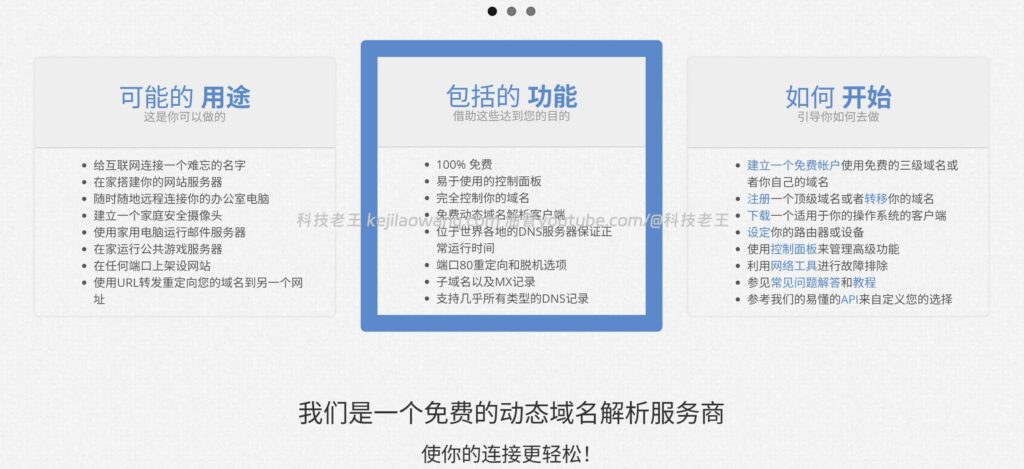
1、Free account can be used for a long time
The official Dynu membership page clearly states that the free account does not expire, there are no fees, no credit card information is required, and the Dynamic DNS feature will continue to work.
2、Support free domain name, also support customized domain name
Dynu supports both the direct use of free third-level domain names provided by the platform and access to your own top-level domain names. For newbies, you can directly use the free domain name it gives you; for advanced users, you can also subsequently switch to your own domain name.
3. More optional suffixes
On Dynu's New DDNS page, you can see that the platform offers a variety of free domain suffixes, such as ddnsfree.com,ddnsgeek.com,freeddns.org,kozow.com,mywire.org,webredirect.org etc.; there are also some suffixes labeled as available to members only.
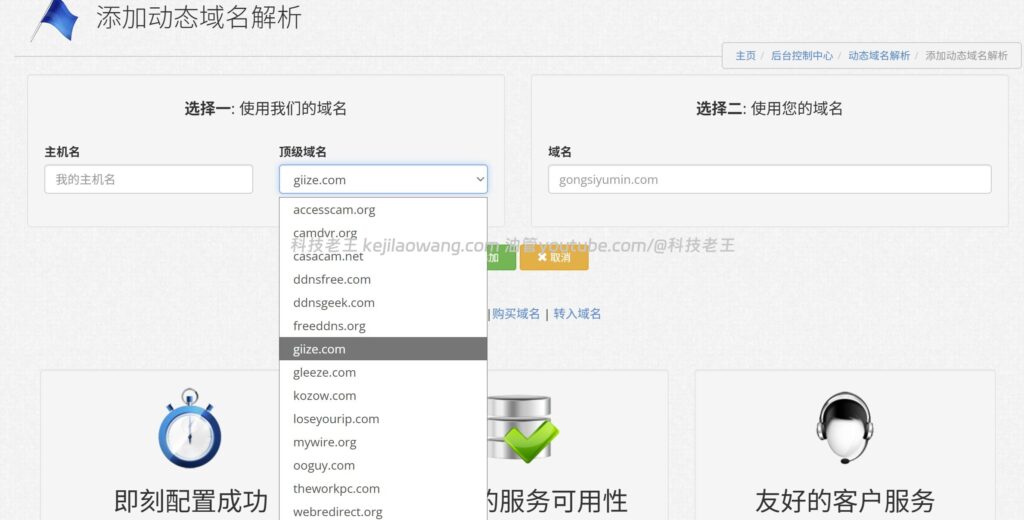
4, does not rely on real-name authentication
For many users who just want a usable DDNS domain name, the experience is much easier without having to go through an additional real name authentication process.
5、Support API, client, router/device update
Dynu officially provides IP Update Client, and also provides an API to allow systems, routers, NAS or third-party devices to automatically update resolution records.
6、Account support two-step verification, more suitable for long-term use
Dynu offers free double authentication (2FA), and it is official that with 2FA turned onDoes not affect dynamic IP updatesThe website login can be done using 2FA, while the DDNS update can be done with a separate update password, API Key, or the corresponding authentication method.
Who is Dynu for?
If you have any of the following needs, Dynu is well worth trying:
- Don't have your own domain name but want to use DDNS first
- Home broadband public IP will change
- NAS, soft routes, home servers require remote access
- VPS with Dynamic IP, want to minimize the hassle of IP changes
- Don't want additional real-name authentication
- Looking for a free DDNS platform that will be available for a long time
Dynu is especially useful for scenarios like Flying Bull NAS, Unraid, OpenWrt, routers, and light servers.
Dynu Free DDNS Registration and Adding Tutorials
The official demo begins below.
Step 1: Register for a Dynu account
First visit the Dynu website and register an account. Dynu provides dynamic DNS, domain name, email, SSL and other services.
Once you have registered, go to the backend control panel.
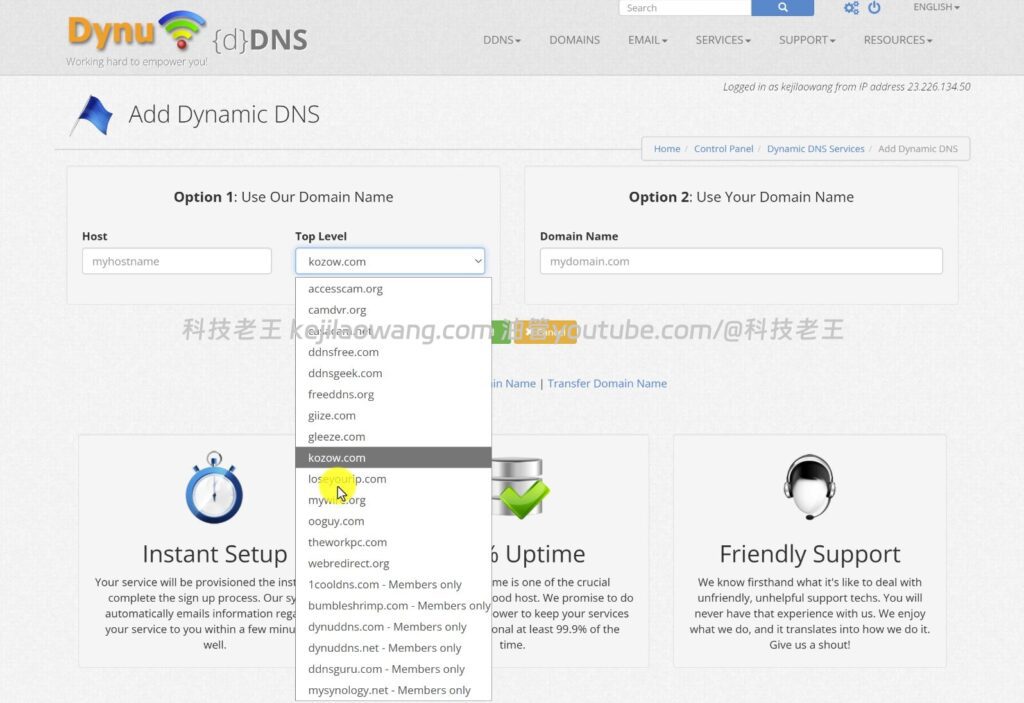
Step 2: Enter the dynamic domain name resolution service
In the control panel, find the Dynamic DNS / Dynamic Domain Name Resolution Service, and then click Add.
The official Dynu New DDNS page offers two ideas:
- Use a free domain name provided by Dynu
- Use your own domain name
If you just want to use it quickly first, it's recommended to just go with the first one.
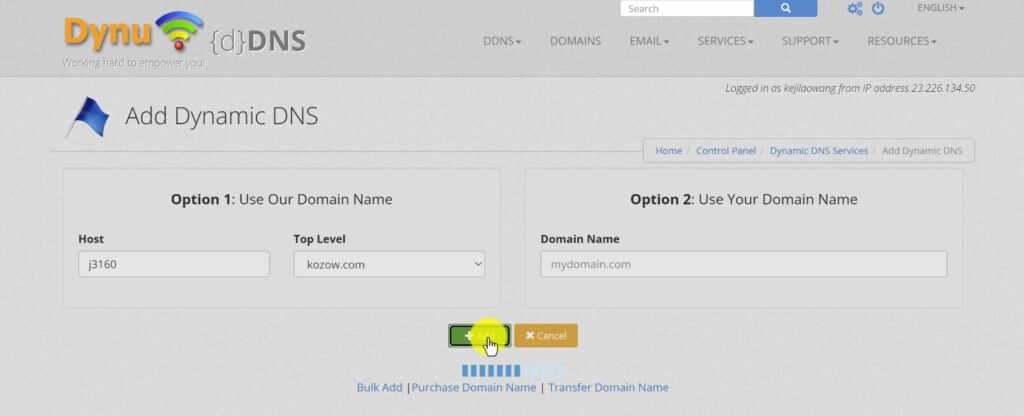
Step 3: Choose a free domain extension and create a hostname
Enter the hostname you want, for example:
mynashomepcvpsnodefnos
Then choose one of your favorites from the suffixes provided by the platform, for example:
ddnsfree.comfreeddns.orgkozow.commywire.org
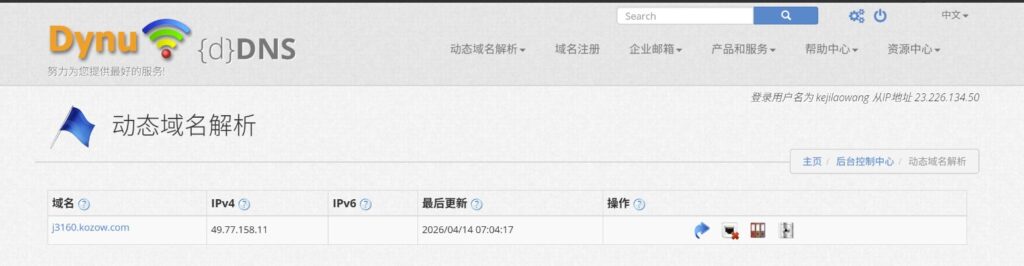
The final domain name effect looks similar to this:
mynas.kozow.com
The official Dynu page shows that there are a variety of options for free suffixes and some suffixes are exclusive to members.
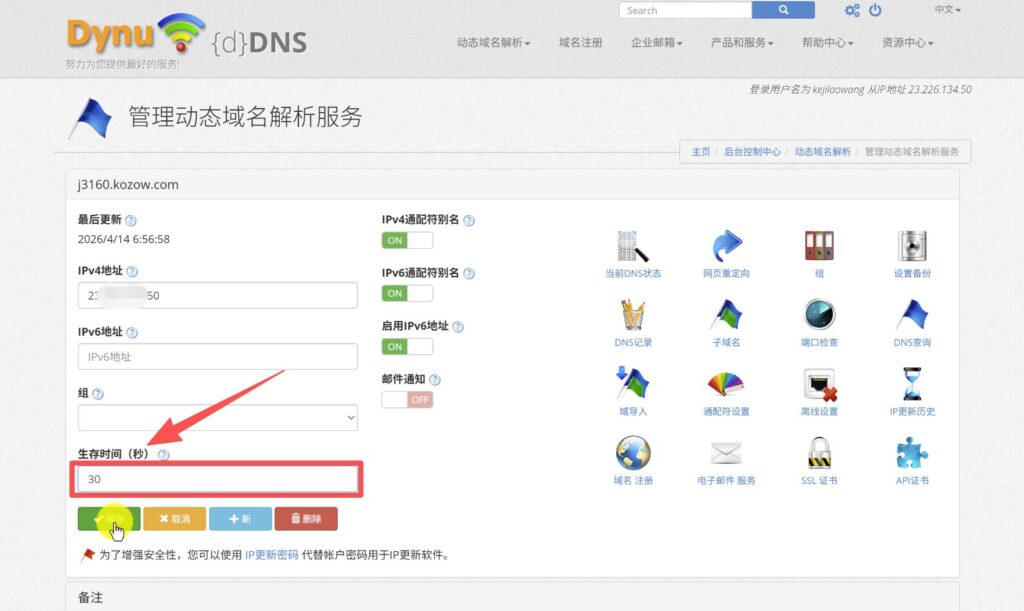
Step 4: Fill in the initial IP and TTL
When adding, the IP address can be filled in randomly first, or just keep the default. The real effect is the public IP address that will be automatically updated by the device later.
TTL (Time to Live) can be set to your needs, it is common in tutorials to set a lower value to make it easier to synchronize as soon as possible after an IP change.
After saving, this DDNS domain is created.
How to configure Dynu DDNS in Flying Bull NAS?
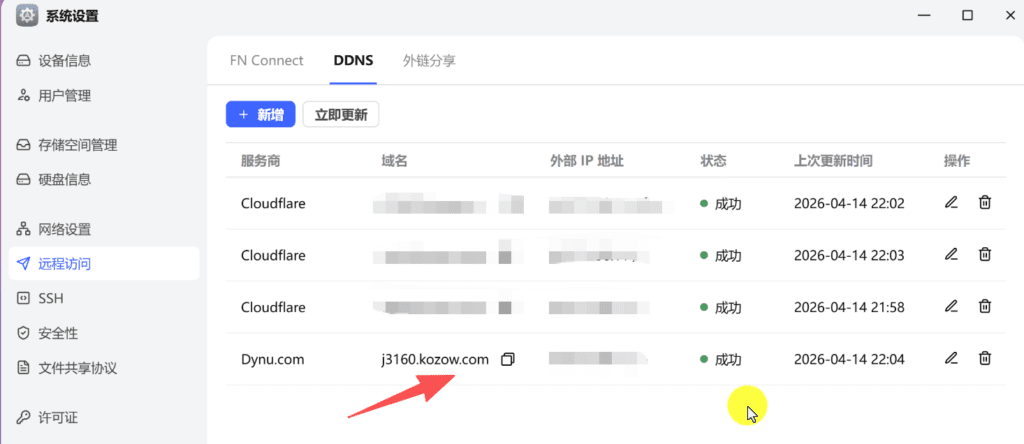
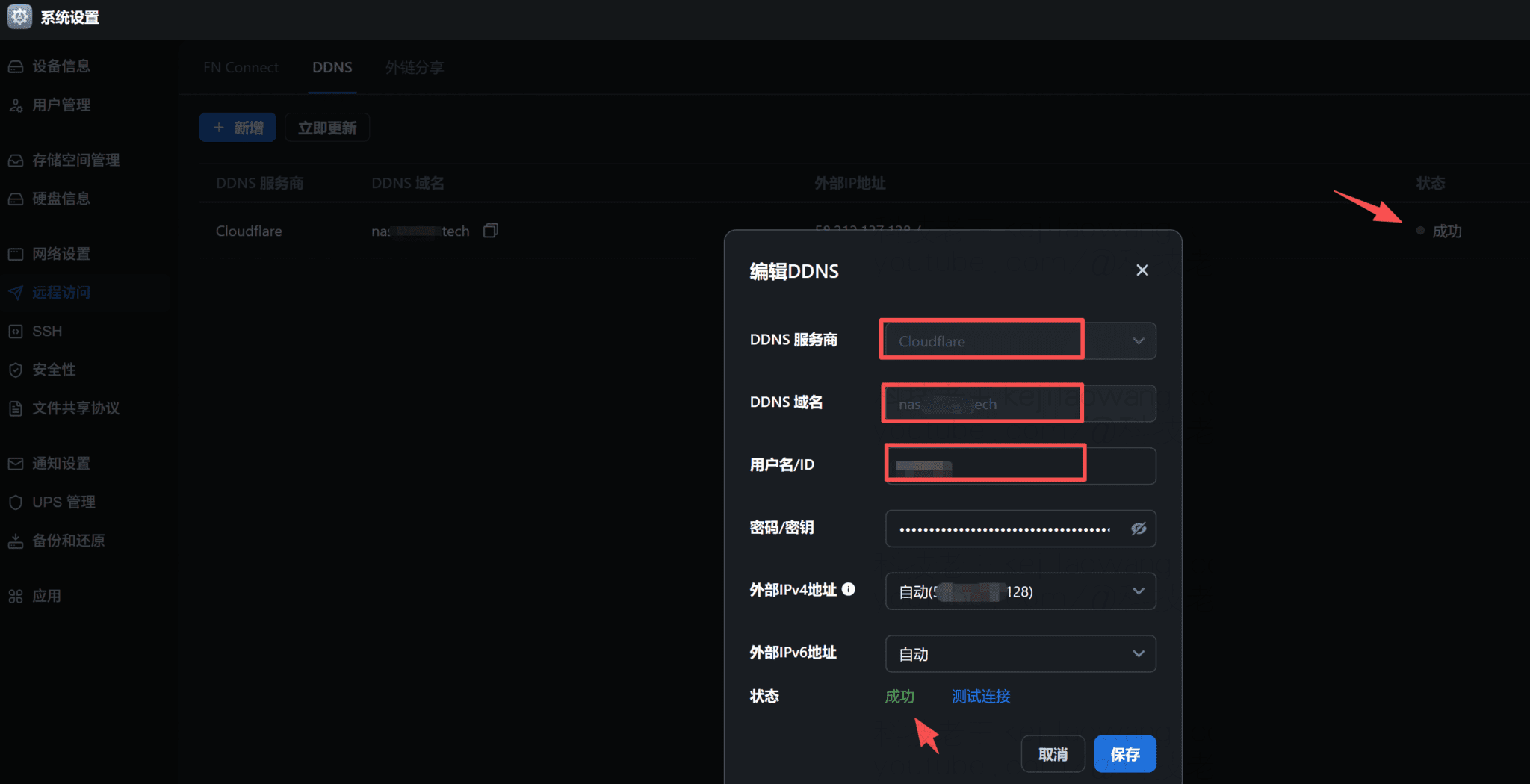
Combined with the screenshot you provided, the idea of configuring Dynu in FlyingNiu NAS is very clear, the core is to fill in the authentication information provided by the Dynu backend.
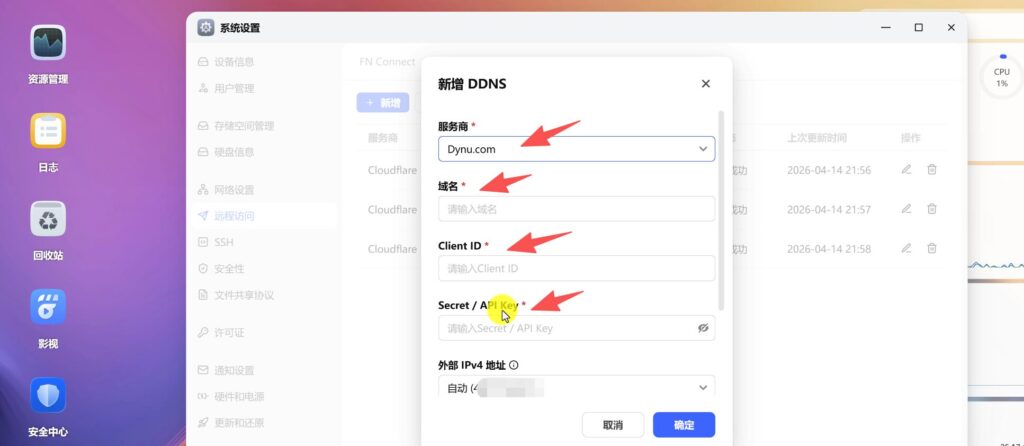
- service provider: Selection
Dynu.com - domain name: Fill in the DDNS domain name you just created.
Example:j3160.kozow.com - Client ID
- Secret / API Key
- External IPv4 address: automatic detection is usually selected
Here's something to keep in mind:
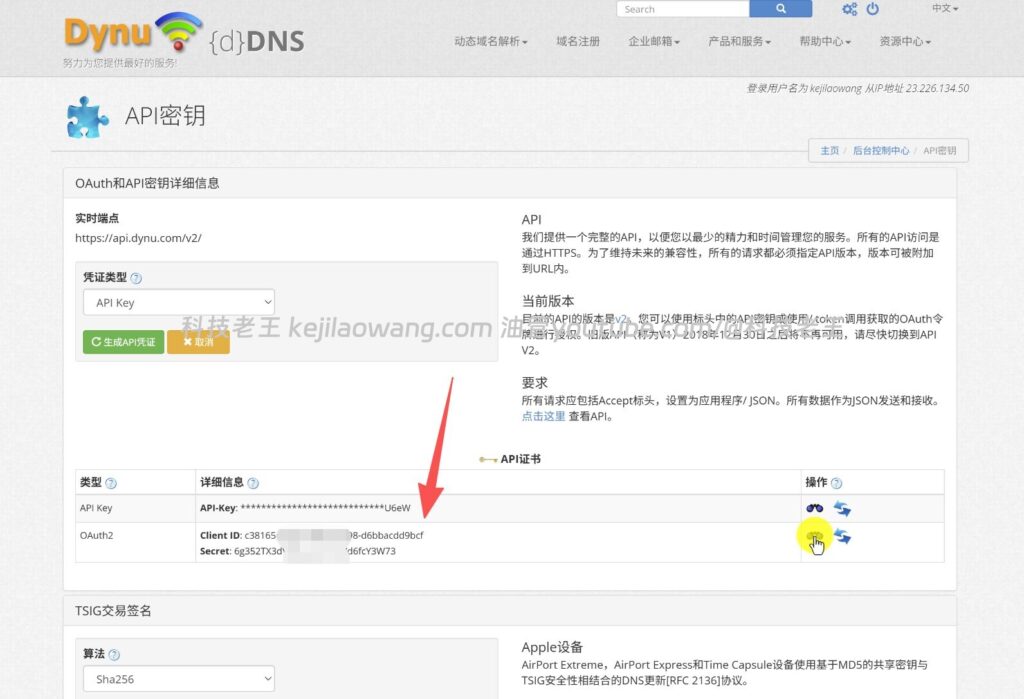
The official Dynu API documentation states that there are two main types of authentication methods:
- API Key
- OAuth2 (Client ID + Secret)
The API Key does not expire by default, while the OAuth2 access token needs to be obtained by Client ID and Secret, and has a time limit.
So you see in the Flying Bull NAS Client ID cap (a poem) Secret / API Key This combination of fields is normal. Different devices, systems or plug-ins may have slightly different ways of accessing Dynu, with some recognizing only the API Key, and some also supporting OAuth2 credentials.
A more straightforward way of understanding
You can read into it:
- domain name: tell the system which DDNS domain you want to update
- Client ID / Secret / API KeyTell Dynu, “You're operating on your own.”
- Automatic acquisition of external IPv4Tell the system to “auto-synchronize the current public IP.”
As long as these items are configured correctly, as soon as the public IP changes, the system will automatically update the new IP into your domain name resolution record.
Configuration Recommendations in Flying Bull NAS
If you're going to use Dynu to do DDNS for a Flying Cow NAS, I'd prefer to set it up this way:
1、Domain name fill in complete
Don't just fill in the hostname prefix, just fill in the full domain name, for example:
fnosxxxx.kozow.com
2. External IPv4 Selection Auto Detection
It's the most hassle-free.
The screenshot shows this:
Automatic (XX.XX.XXX.XX)
This means that Flying Bull has been able to detect the current public IP and can automatically synchronize it as long as the DDNS is configured correctly.
3、The authentication information is copied from the Dynu background, do not type it by hand.
Especially for fields like Client ID, Secret, API Key, it is recommended to copy and paste them directly to avoid failure due to spaces or wrong characters.
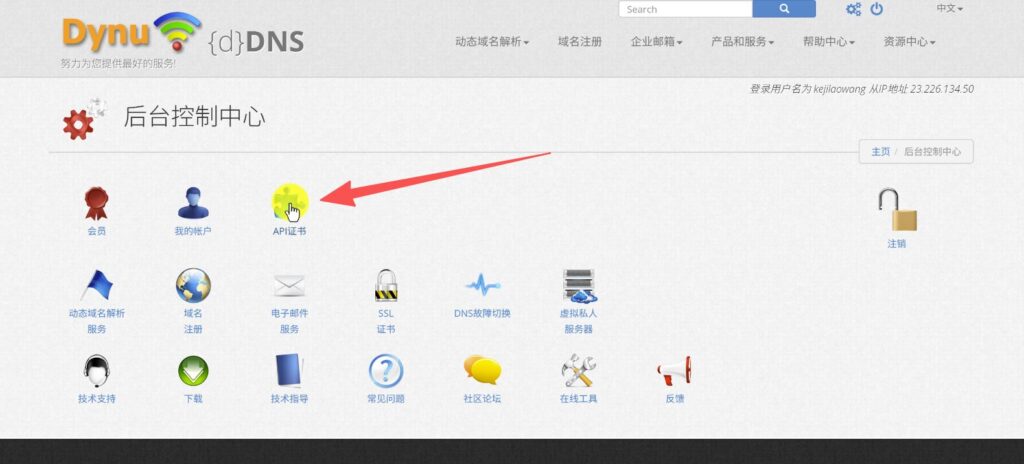
Go to the backend settings, and then click on the API certificate to copy and paste the API Key or Client ID, Secret
4、First test whether the resolution is effective
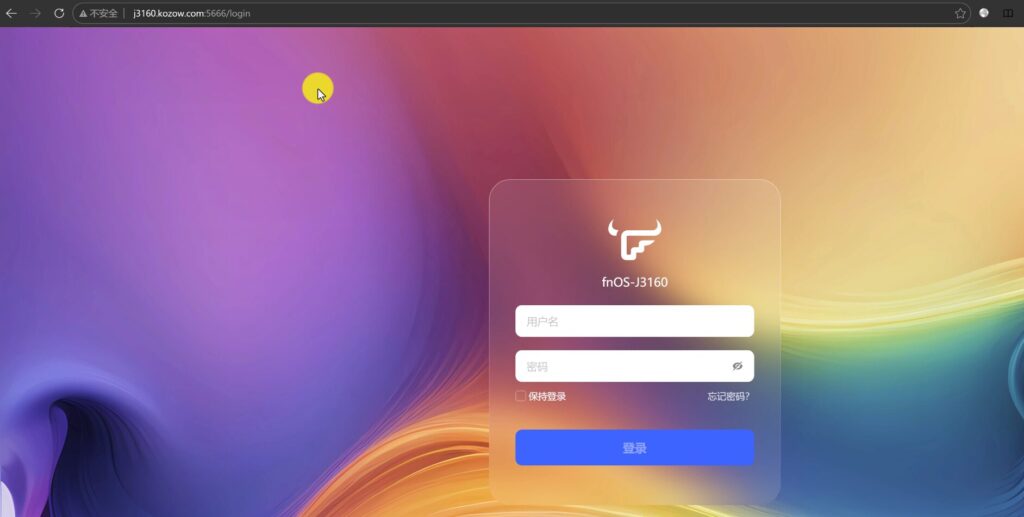
Once the configuration is complete, you can simply test it in the following way:
- Ping your DDNS domain locally
- Check if it resolves to the current public IP
- Reboot the network and observe if the IP changes are synchronized.
Dynu and Cloudflare DDNS, what should I choose?
Both programs actually work, but for different people.
Suitable cases for Dynu
- No domain name of your own
- I'd like to use it right away.
- I don't want to spend more time with DNS.
- Would like to get a free dynamic domain name that can be used for a long period of time
- I just want to solve the core problem of “access after IP change”.
eligible Cloudflare present situation
- You already have your own domain name.
- Want more flexible control over DNS
- Want to pair with reverse proxy, CDN, WAF and other capabilities
- Want to further toss HTTPS, TLS certificates and more advanced play
Simply put:
Dynu is more “out of the box”.”(math.) genus
Cloudflare is more of an “advanced play” game.”The
If you're new to DDNS, Dynu is a much easier way to get started.
Does Dynu Free DDNS work with HTTPS / TLS?
It can be, but it depends on the situation.
1, if you just do ordinary DDNS
It's essentially just pointing the domain name to your dynamic IP, which solves the problem of “address changes”, not automatically accomplishing HTTPS for you.
2. If you still want to enable HTTPS
Then you need to look again at your specific service environment, for example:
- Does the NAS support certificate requests?
- Do you have port 80/443 open?
- Whether to use a reverse proxy
- Access to Cloudflare
- Whether to use your own domain name instead of the platform's free domain name
That is to say:
DDNS is responsible for “domain name follows IP” and HTTPS/TLS is responsible for “access encryption”.
The two can work together, but they are not the same thing.
Dynu's security advice: always turn on two-step verification
This is something I would very much recommend emphasizing separately.
Dynu officially offers a free 2FA Dual AuthenticationThe official explanation is that turning on 2FA will not affect the dynamic IP update process. Because website login security and DDNS update authentication are separate.
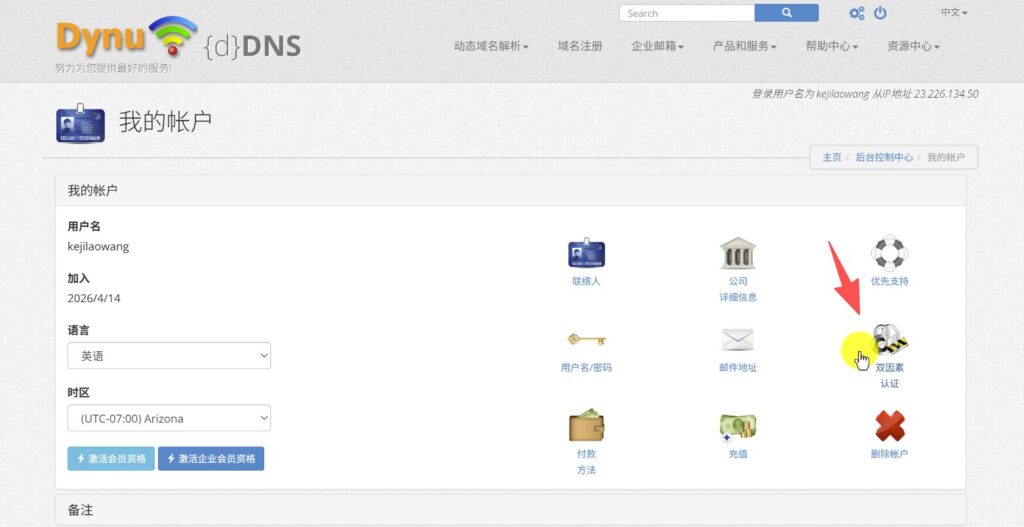
So it's more prudent to do so:
- Complicated account login password settings
- Open 2FA
- API Key / Secret should not be disclosed
- Don't publicize Dynu credentials in scripts or screenshots.
- Periodically check that DDNS is still pointing to your public IP address.
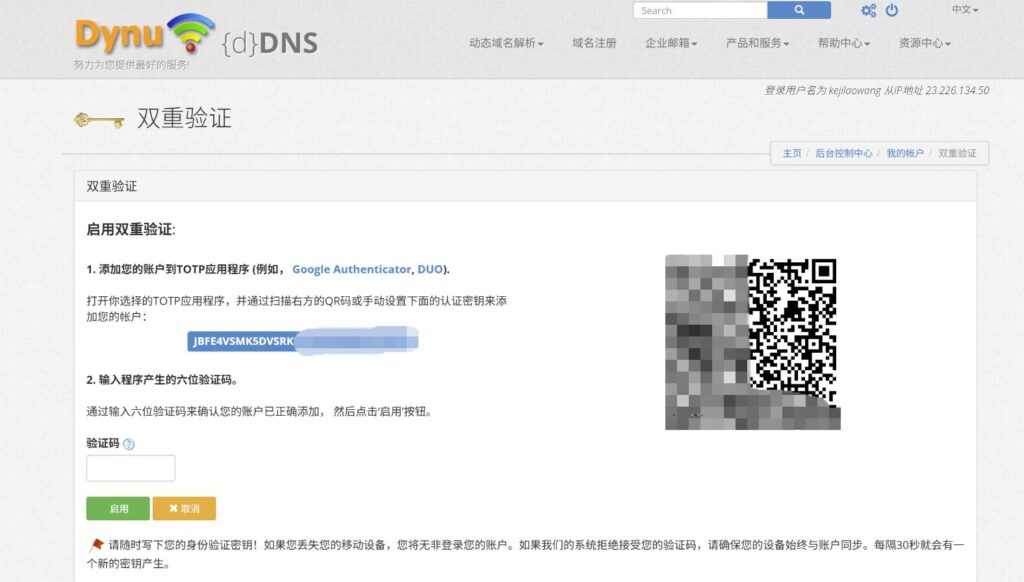
This step is necessary for NASs that are exposed to the public network for long periods of time.
For many users, the key to a good DDNS solution is not how fancy it is, but these points:
- able to register
- It's free.
- refrain from tossing and turning
- Not prone to failure
- Automatic synchronization of IP changes
- Even newbies can get started
Dynu is just such a service.
It's not necessarily the most functional, but for:
- Flying Bull NAS
- Home Server
- OpenWrt
- Dynamic public home broadband
It's perfectly adequate for this type of need.
put at the end
If you already have your own domain name and are looking for a higher degree of freedom, the Cloudflare + own domain name + TLS certificate Still very much a program worth tossing around for the long haul.
But if you just want a quick fix to a real problem right now:
Dynamic IP is always changing, I need a free, stable, no real name authentication, but also long-term dynamic domain name.
Then Dynu is indeed an option well worth trying.
Especially for NAS users, home broadband public access users, and some dynamic IP VPS users, this program can significantly reduce the subsequent maintenance costs. Register once, fill in the parameters in the device, and then basically leave it to the system to update automatically.


 Lan Xiaobo (1952-1997), PRC politician Protocol Not Supported The client and server do not support the general SSL protocol version or cipher suite. This error is prompted
  kittyzero Hi, https://www.youtube.com/watch?v=eJUWQqCKfW0 I set it up and the extranet won't go out, not sure why, emailed you, thanks.
  ericjin211 Hi, tried this solution and found that foreign sites going through openclash proxy will not go through adguardhome, what could be the problem 🤔
  666 Tried the copy, no other problems, dns test has Hong Kong and Japan, not sure if it's a leak or not
  Loong2004 Hello, I feel that the program is very good, but the white hand is handicapped, can you have paid remote guidance, thank you!
  Chinese
  English
  Spanish
  French
  German
  Japanese
  Portuguese
  Italian
  Dutch
Dutch