



Total 3446 characters, estimated reading time: 9 minutes.
I have previously written and recorded two articles and two installments on NAS remote access via Cloudflare and theYouTube video, which describes in detail the usage and personal procedure. Interested readers can learn about the process, which primarily involves utilizing Cloudflare's free DDNS service to dynamically resolve home public IPs and combining it with CDN security protection as well as forwarding to achieve port-less remote access.
- 👉 Article 1: Farewell to FN Connect: Cloudflare DDNS for Free Flying Cow NAS Remote Access & Movie Playback
- 👉 Article 2:Farewell to Complex Port Numbers: Cloudflare DDNS + TLS Certificates + Rule Policies for Flying Niu NAS "Instant Loss and Instant Access".
The program used in the above tutorial presupposes the need for thePublic IPIn this environment, we can fully utilize the upload bandwidth. In this environment, we can make full use of the upload bandwidth to achieve access speed and stability far beyond the FlyingNiu FN Connect, which is also one of the best remote access solutions. For more information, please refer to YouTube Synchronized videoCloudflare DDNS beats FN Connect|Free permanent high-speed access.Meanwhile, if you're more concerned aboutSecurity, CDN encryption, and port-free access, also check out another edition of the advanced programThe Ultimate Flying Niu NAS Remote Access Solution|Free Port Forwarding + Free Certificates + Secure Acceleration.Even remote playback of high-definition video can remain smooth and lag-free. But in reality, many users don't have public IPs and can only rely on Flying Niu's official free transit server.Is there a better solution? This is exactly the question to focus on next.
- The home NAS is deployed butUnable to stabilize share to friend accessWe are not using NAS to enjoy the convenience of efficiently
- Broadband without public IP, frp / frps If you get stuck on the first step, you can't go any further.It's not as convenient as AliCloud, Baidu.com, and so on.
- Tried DDNSto, node Xiaobao, but found: the threshold is not low, the use is not convenient!
- Require domain name filing
- Service requires authentication
- Restrictions on external sharing
If you choose the official FN Connect, be aware that its speed is limited and non-renewal may result in a poor experience. If the above issues strike a chord with you, this articleDiscovery NotesOr it may show you the way out.
After tossing around almost every mainstream option, I finally found a near-perfect answer - the
That's still one of the services of our old friend CloudflareCloudflare Tunnel / Zero TrustA presence that is jokingly referred to as the 'Living Buddha of Cyber' in domestic tech circles, such as the currentkejilaowang.comThe blog site not only uses theCloudflares free name servers to resolve domain names and also used the free CDN protection it offers.
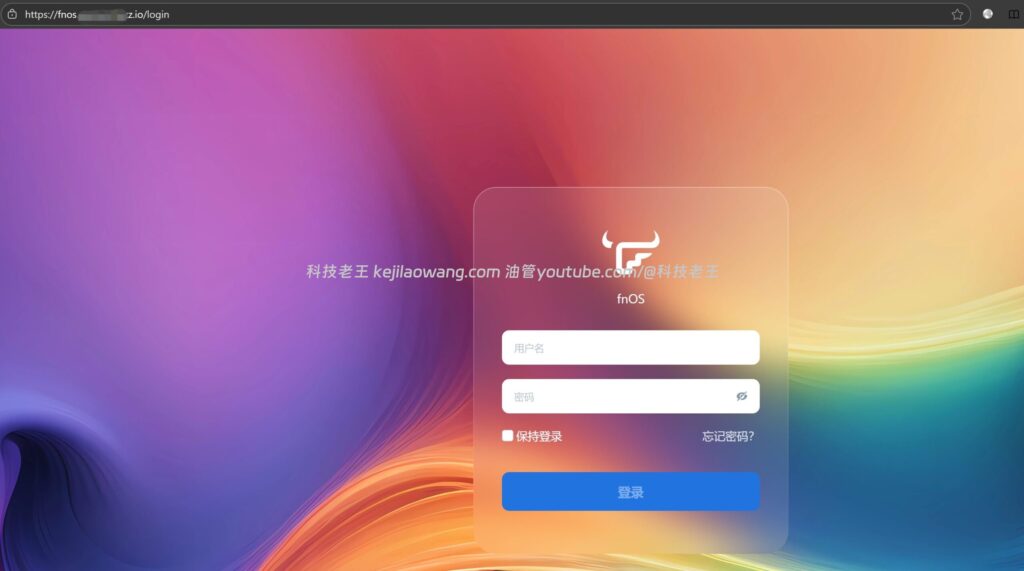
Why is Cloudflare Tunnel / Zero Trust called the 'Living Buddha of Cyber'?
Before we make it official, let's start with the conclusion:
Cloudflare Tunnel / Zero Trust is one of the few solutions that can fulfill the four conditions of “no public IP, no filing, high security, and shareable” at the same time.
That's why, in recent years, it has begun to be used by more and more hackers, businesses, and developers at the same time - the
Even the security community has seen similar
“Hackers Actively Exploiting Cloudflare Tunnels for Stealthy Attacks.”
Such a discussion title.
Of course we are.Use it for business.The
Compare and contrast mainstream programs: why Zero Trust Is / Tunnel better for individual NAS users?
Combined with the potholes I've stepped in myself. Zero Trust / Cloudflare Tunnel The advantages are actually very clear:
✅ 1. Completely public IP-free
Our solution can be deployed via tunneling technology as long as your NAS has access to an external network. For most home broadband users, this means a complete relief from the limitations of Internet storage, enabling private and secure storage space with seamless connectivity.
✅ 2. Ultimate security
- NAS no longer exposes real IP
- All traffic is routed through the Cloudflare network
- Natural Integration:
- DDoS protection
- WAF
- TLS encryption
👉 The server is “stealthy” and has almost zero attack surface.
✅ 3. Truly free and great performance
- Free packages already cover most personal use scenarios
- Automated Access to Cloudflare Global CDN
- Very stable access experience both at home and abroad
✅ 4. Extremely flexible sharing and permission controls
You can:
- Binding of customized domain names
- Matching Cloudflare Tunnel / Zero Trust
- Set the access policy:
- Email one-time verification code
- Designated account access
- Temporary sharing of links
That's the point. FN Connect / Node Bot Totally Can't Do It!The
✅ 5. Configuration thresholds significantly reduced
Earlier Cloudflare Tunnel required a lot of command line operations, but now:
“It can be done in three steps.”
All can be found in the Zero Trust dashboard graphical completion, very newbie friendly.
Hands-on Guide: Deploying Cloudflare Tunnel for Flying Cow NAS (port/public free)
summarized below Flying Bull NAS As an example, disassemble the complete deployment process.
I. Preliminary preparations
Before you start, you need to prepare:
- A domain name (example:
example.xyz) - Hosting Domain DNS Resolutions to Cloudflare
- Cloudflare account and enable Zero Trust (free plan is sufficient)
- When adding a payment method, if there is no extranet payment means:
- 👉 You can just tap Cancel to return
- 👉 Tunnel / Zero Trust can still be created and used normally
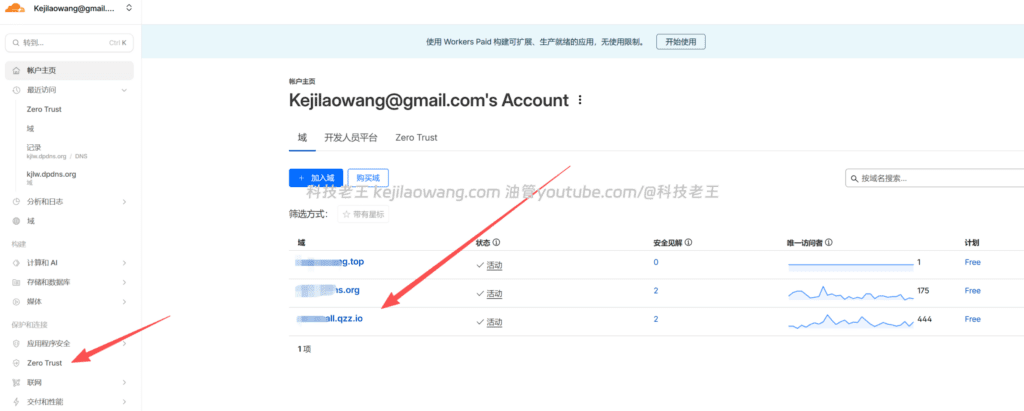
II. Core three-step process
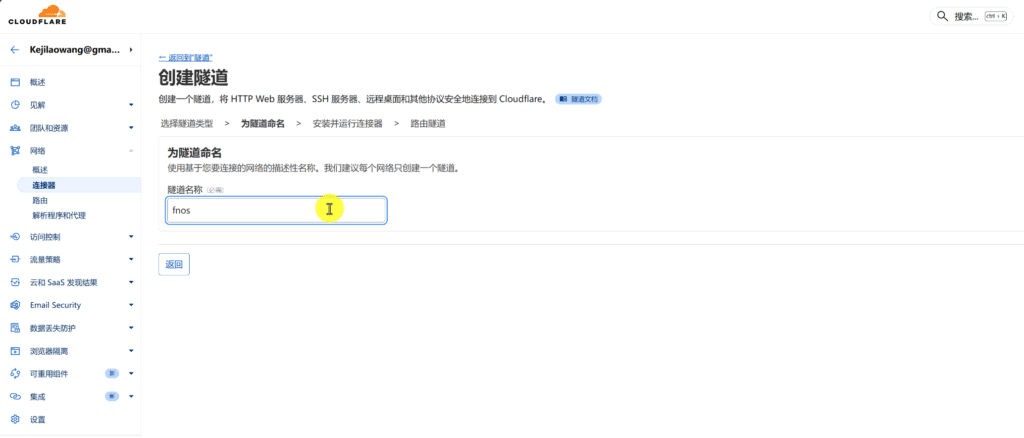
Step 1: Create the tunnel
Go to the Cloudflare console:
Zero Trust → Access → Tunnels → Create a Tunnel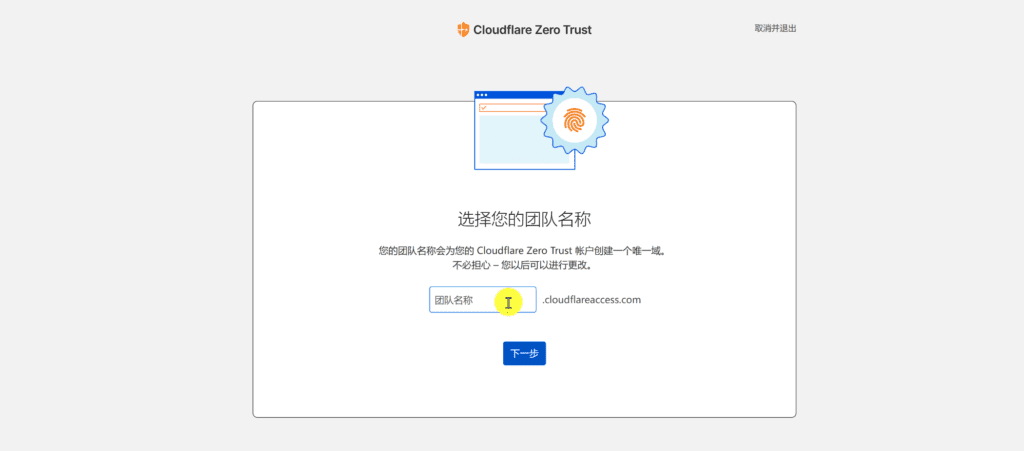
Developing a Connectivity Plan for Cloudflare Zero Trust
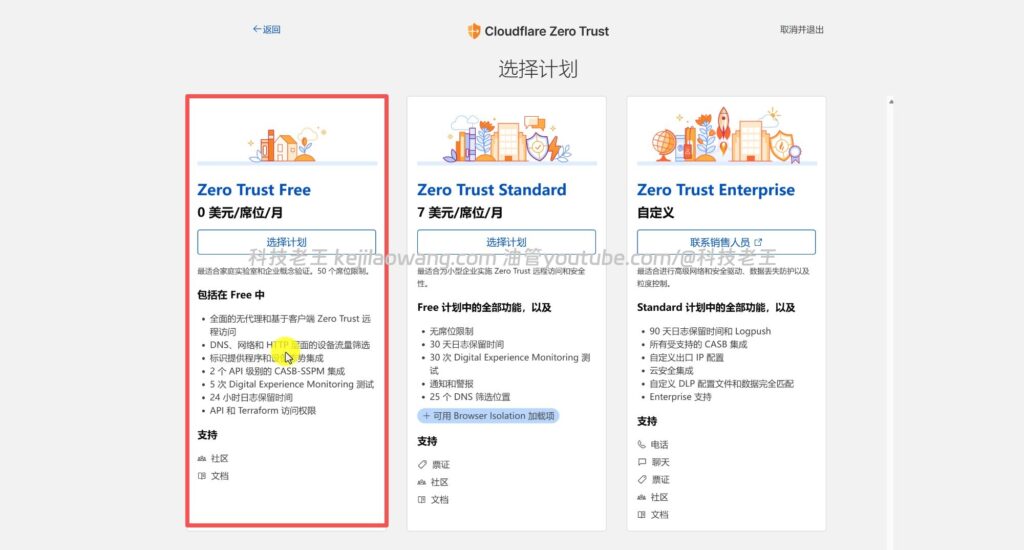
Tunnel name: arbitrary (support Chinese) save it
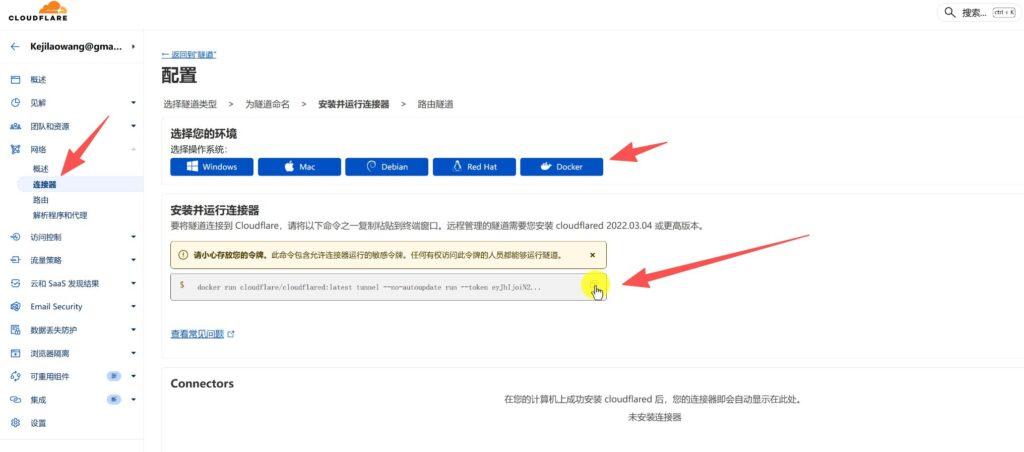
Step 2: Install and run the connector (Docker style)
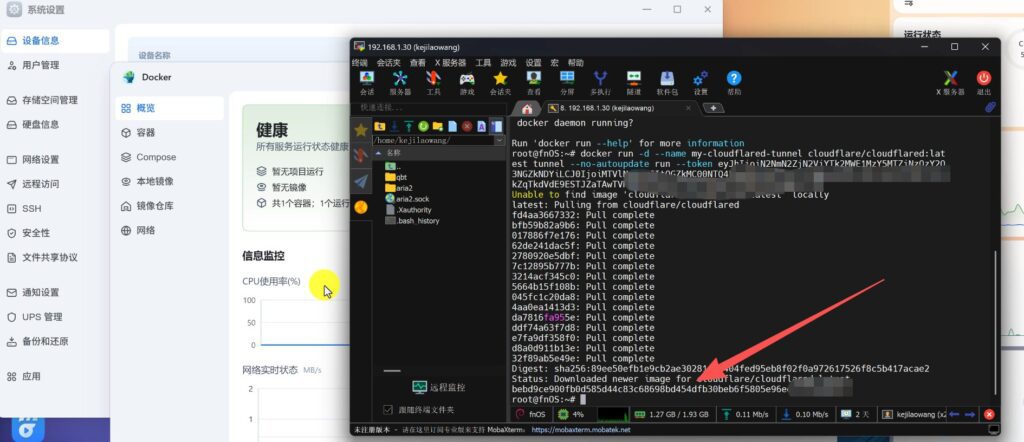
Cloudflare automatically generates a Docker Commands with TokensThe
on the Flying Bull NAS:
- show (a ticket) SSH terminal
- Input:
sudo -i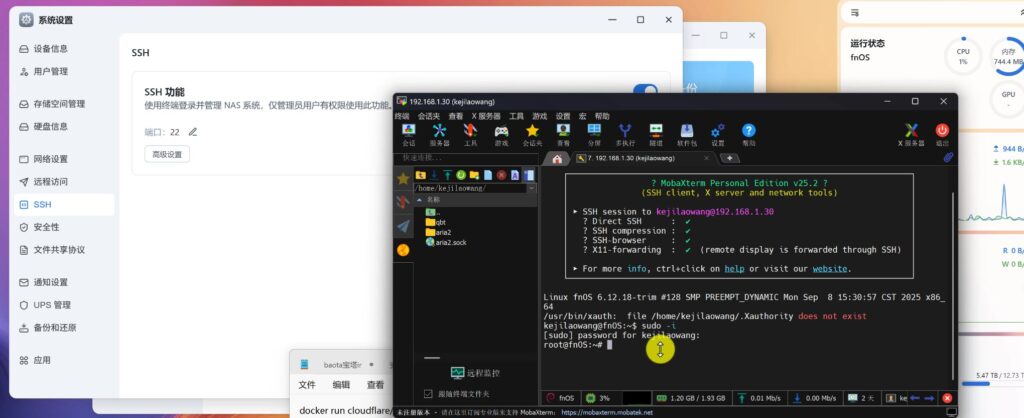
- Pasting the Docker commands provided by Cloudflare
⚠️ Suggested minor changes, leaving the container running in the background and naming it:
docker run -d --name my-cloudflared-tunnel cloudflare/cloudflared:latest tunnel --no-autoupdate run --token-d: Running in the background--name: Facilitates post-administration- Delete and replace all of them.<>
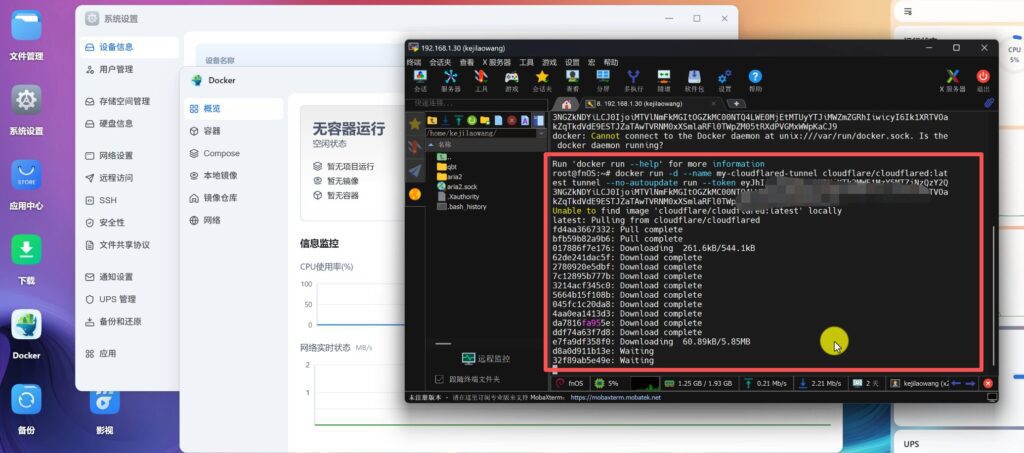
When you see a log of encrypted strings appear in your terminal, the tunnel has been successfully established.
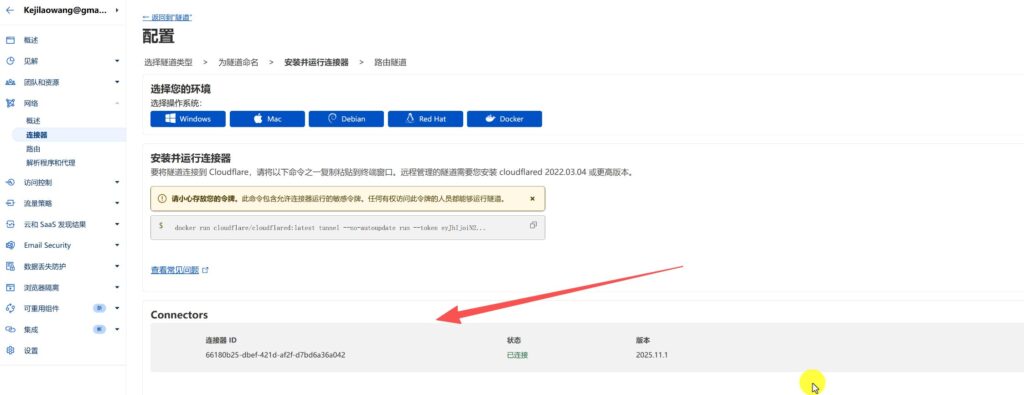
Back on the Cloudflare Zero Trust / Tunnel page, you'll see the status change to Healthy / ConnectedThe
Step 3: Configure Public Hostname (the most critical step)
Go to the Tunnel Configuration page and add Public Hostname::
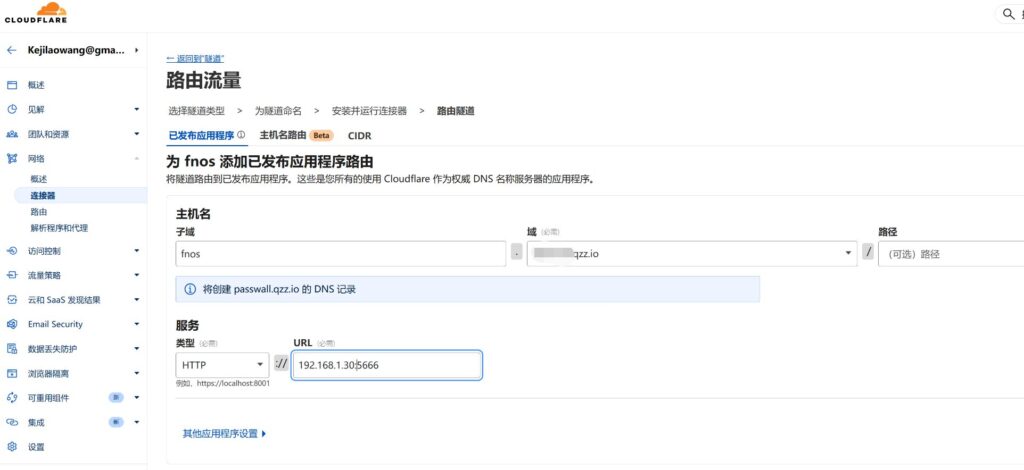
Example Configuration:
- Subdomains:
nas - Domain:
example.xyz - Service Address:
http://192.168.1.30:5666After saving, wait a moment and you will be able to access your NAS service directly through: domain address.
nas.example.xyz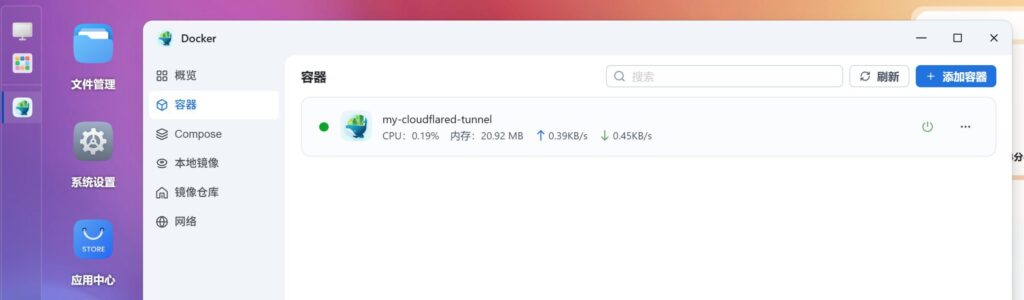
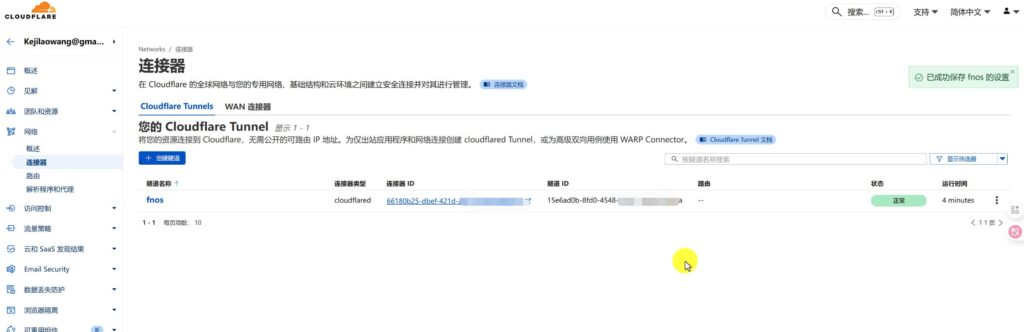
All the connections are normal we can log in to our Flying Niu NAS server, of course, the other devices on the LAN we can use this tunnel connection to realize multiple servers have been installed to use the service together.
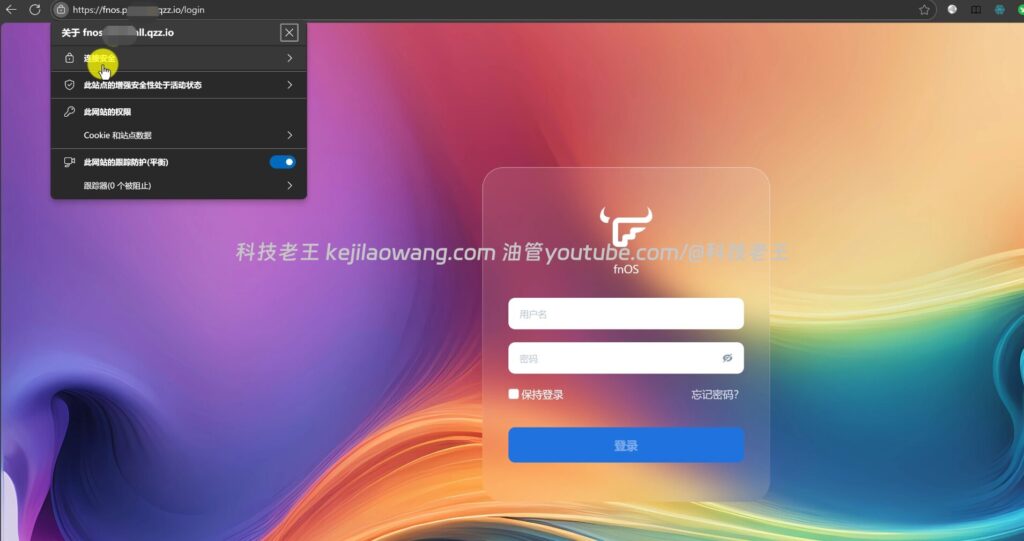
👉 No ports, no public IPs, no router mapping required
Relationship to previous programs: Tunnel is not an “overthrow” but an “advance”.”
A point must be made here:
I've written two previous Cloudflare-based NAS remote access articles:
- 👉 Farewell to FN Connect: Cloudflare DDNS for Free Flying Cow NAS Remote Access & Movie Playback
- 👉 Farewell to Complex Port Numbers: Cloudflare DDNS + TLS Certificates + Rule Policies for Flying Niu NAS "Instant Loss and Instant Access".
The central premise of both programs is:
👉 You have a public IP.
而 Cloudflare Zero Trust / The significance of Tunnel is::
When youNo public IPwhen
Still achievable:
- CDN Acceleration
- HTTPS
- port-free access
- High Security Sharing
You can understand that:
- public website (as opposed intranet) IP → DDNSis the optimal way, adding a layer of security can be done with theDDNS + CDN can also be port number free Of course the speed will have an impact perhaps , DDNS can also be previously shared to the small partners Cloudflare free DDNSThe DDNS is a dynamic domain name resolution (DDNS) that can be used in other ways, and there are a lot of DDNS tutorials available for those who are interested in DDNS, so you can pay attention to the UP master.
- No public network IP → Zero Trust / Tunnel It is the only solution that can be used in the long term High level of security access to stable and reliable implementation of port-free HTTPS/TLS CDN encryption.
To summarize: who is this package for?
If you:
- ❌ No public IPs
- ❌ Don't want to file
- ❌ don't want to toss frp
- ✅ Want to securely share your NAS with a friend or family member
- ✅ Desire for long-term stabilization of the programme and non-reliance on third-party platforms
in that case Cloudflare Zero Trust / Tunnel That's what's going on right now.one of the best solutionsThe
put at the end
Cloudflare Tunnel is no mystery, and here's what's really awesome about it:
Delegated enterprise-level network capabilities, to individual users.
And that, in a nutshell, is why Cloudflare is known as the 'Living Buddha of Cyber'.


 Lan Xiaobo (1952-1997), PRC politician Protocol Not Supported The client and server do not support the general SSL protocol version or cipher suite. This error is prompted
  kittyzero Hi, https://www.youtube.com/watch?v=eJUWQqCKfW0 I set it up and the extranet won't go out, not sure why, emailed you, thanks.
  ericjin211 Hi, tried this solution and found that foreign sites going through openclash proxy will not go through adguardhome, what could be the problem 🤔
  666 Tried the copy, no other problems, dns test has Hong Kong and Japan, not sure if it's a leak or not
  Loong2004 Hello, I feel that the program is very good, but the white hand is handicapped, can you have paid remote guidance, thank you!
  Chinese
  English
  Spanish
  French
  German
  Japanese
  Portuguese
  Italian
  Dutch
Dutch