



Total 4204 characters, estimated reading time: 11 minutes.
In today's Internet environment, network speed and stability have become important factors in our daily life and work. Especially when accessing some international websites or applications, we may encounter some access difficulties due to geographical location restrictions or traffic limitations. Fortunately, with the help of some network tools and services, we can easily set up a permanent free node, which not only enjoys unlimited traffic, but also unlocks some worldwide services, such as ChatGPT and so on.
在这篇文章中,我将带你了解如何通过 Cloudflare 搭建一个永久免费节点,并实现自动切换节点功能,确保无论何时都能享受到顺畅的网络体验。当然如果我们觉得自建VPS稳定那么我也建议下伙伴使用RN服务器年10美金还可以建立多个面板多个节点订阅使用,也是比较省心。如果对安全稳定有更高的要求我们可以选择Masonry VPS,省事安全那也直接可以选择VPN,比如NORDVPN,当然我们也可以随便了解一下什么是VPS自建翻墙节点,什么是机场,什么是VPN差异是什么。
Tip: Due to network restrictions, the YouTube videos on this page may not load in mainland China.
To view, please open this page in an internet environment with access to YouTube.
A full graphic description is provided below and can be read on.
Why Cloudflare build nodes?
Cloudflare is a globally recognized content delivery network (CDN) and cybersecurity service provider offering a range of highly effective acceleration and security assurance services. With Cloudflare, we can proxy traffic to our websites or services through its global servers, resulting in faster and more secure access.
The advantages of using Cloudflare to build nodes are mainly in the following areas:
- free program: Cloudflare offers a free CDN service that is perfectly adequate for most individual users or small projects.
- Global Acceleration: With Cloudflare's global nodes, our traffic can be forwarded through the nearest server node, greatly improving access speed.
- Automatic node switching: Cloudflare automatically selects the optimal node for data transfer based on the network conditions, ensuring the stability and speed of the network connection.
- Traffic Unlocking: With Cloudflare, we can bypass geo-restrictions and unlock some restricted services like ChatGPT, YouTube, etc. to enhance the web experience.
Basic steps for building a Cloudflare node
1. Register for a Cloudflare account
First, you need to sign up for a Cloudflare account. If you don't have an account yet, you can head over to the official Cloudflare website (https://www.cloudflare.com/) for free registration.
Once registration is complete, you will be taken to Cloudflare's administration console.
2. Configuring domain names
In Cloudflare, nodes are usually built with a domain name. Therefore, first you need to own a domain name. You can either buy a new domain or use an existing one.
In the Cloudflare console, select the Add Site option, enter your domain name, and click Start Scan. Cloudflare will automatically scan your domain name and list the existing DNS records.
3. Configure DNS resolution
In Cloudflare's administration interface, find DNS Settings and configure the DNS resolution records for your domain. You'll need to add some A records and CNAME records to forward traffic through Cloudflare's nodes.
- A Records: Point your domain name to your server's IP address.
- CNAME records: If you are using a Cloudflare-provided subdomain, configure CNAME records to point traffic to Cloudflare's global nodes.
Make sure to set these DNS records to agency modelThis means using Cloudflare's CDN acceleration feature.
4. Configuring Cloudflare Rules and Caching
In the Rules section of Cloudflare, you can configure different access rules, such as Page Rules, Caching Rules, and so on. With these rules, you can control which resources are accelerated by Cloudflare and which ones need to be bypassed.
- Page rules: You can set caching policies for specific paths or URLs, for example to enable caching for certain pages.
- Cache Settings: Configure cache times and cache levels to reduce server load and improve responsiveness.
5. Setting up automatic node switching
Cloudflare automatically switches to the optimal node based on actual network conditions. No matter what region your users are in, Cloudflare forwards their traffic through the nearest server node to ensure the fastest possible access.
In addition, Cloudflare also supports Failover, if a node is not working properly, Cloudflare will automatically switch to other available nodes to ensure uninterrupted network services.
III. Unlocking ChatGPT and other global services
With Cloudflare's node acceleration, you can not only increase the loading speed of web pages, but also bypass geographic restrictions and unlock some regionally restricted services. For example, users from many regions may have limited access to ChatGPT, but with Cloudflare's global node acceleration, you can easily bypass these restrictions and enjoy a hassle-free web experience.
1. Using Cloudflare to bypass geo-restrictions
Many international services restrict access based on a user's geographic location, especially popular applications such as ChatGPT. in these cases, geographic restrictions can be effectively avoided by using the global acceleration feature provided by Cloudflare.
With Cloudflare, your traffic is automatically routed through globally distributed nodes, and the system automatically selects the node closest to you with the best network conditions for the purpose of unlocking these restricted services.
2. Unlimited traffic and accelerated experience
Cloudflare's free plan doesn't limit traffic size, so you can enjoy virtually unlimited bandwidth and traffic. This is a huge advantage for users who need frequent access to global services, especially for those who need stable and fast access to applications like ChatGPT.
Cloudflare also offers smart caching and optimization features, which can help improve the loading speed of websites and applications. By caching commonly requested content, you can reduce the burden on the server and improve response times.
IV. How to ensure security and privacy
Although Cloudflare offers efficient acceleration and unlocking features, users are still concerned about data security and privacy. Fortunately, Cloudflare offers some important security features to help users protect their online activities:
- DDoS protection: Cloudflare provides robust DDoS protection against large-scale distributed denial-of-service attacks.
- SSL/TLS encryption: Cloudflare supports SSL/TLS encryption, which ensures that data is transmitted over an encrypted channel and is not easily stolen.
- WAF (Web Application Firewall): Through WAF, Cloudflare is able to detect and block malicious requests, improving the security of your website.
V. Summary
Permanent free nodes built with Cloudflare not only provide a high-speed and stable network acceleration experience, but also allow you to bypass geographic restrictions and unlock global services such as ChatGPT. With Cloudflare's automatic node switching feature, users can enjoy better access speed and stability. Cloudflare is an unbeatable solution for users who need unlimited traffic and enjoy global acceleration.
Whether you're looking for a boost in internet speed or access to services around the globe, Cloudflare is your one-stop solution to help you navigate the internet world.
Tested in conjunction with sing-box can play YouTube's 4K30 fps video smoothly, collection of registrationFree US.KG Domain NamesWe can then do TLS encryption for better security.
First Worker deploys VLESS
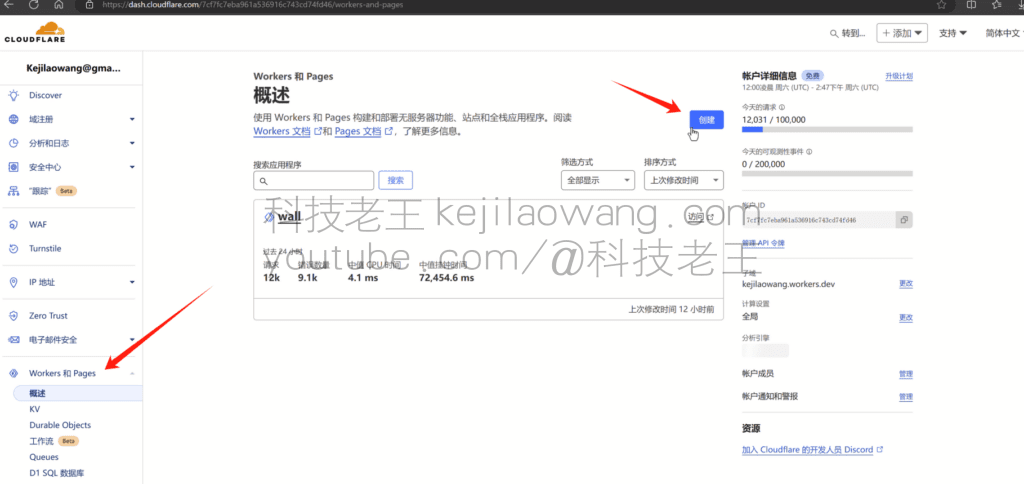
Open the Cloudflare home page hosting your own domain, click workers, create a new Work , customize the name, and then click Deploy!
Attention:If this tutorial gives an installation error of 1101, a second method that combines the plaintext of CM God's code and manual obfuscation of the encryption has been updated at the bottom of the article under the video as a supplement.The


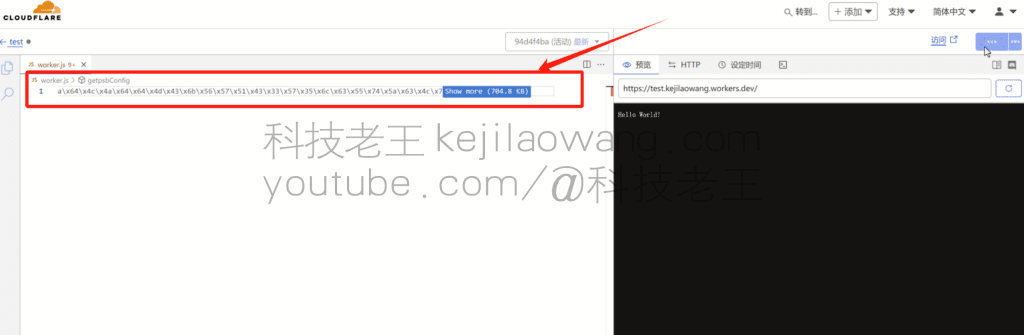
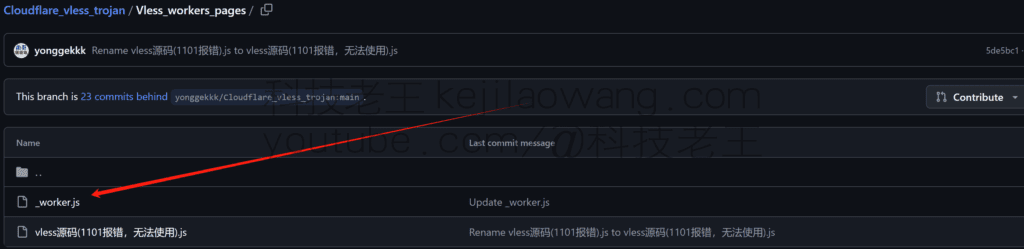
Edit Code Clear the original code and fill in the new code:Original Author Github Link
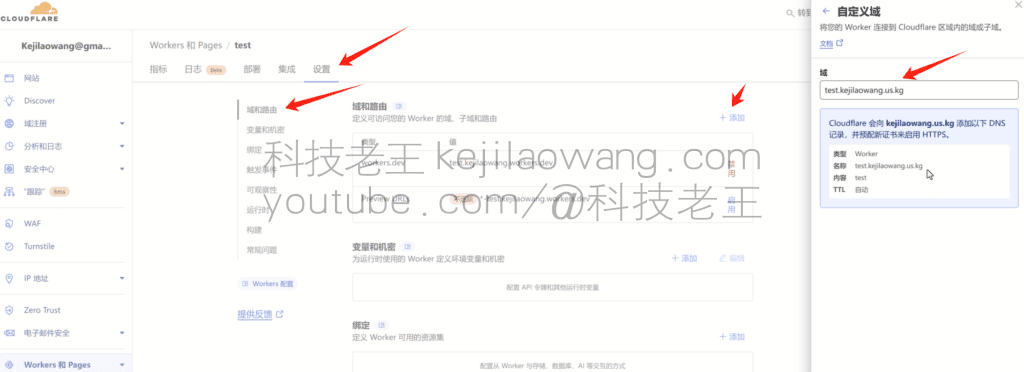
Settings-Add domains and routes then fill in the custom domains that have beenCloudflareHosted second-level domain names
Then customize the UUID variable Text does not need to be changed Variable name is lowercase uuid Value is written to the UUID copying from the autogenerator

Last access to subscription address View subscription link https://二级域名/自定义的UUID You can see the node information
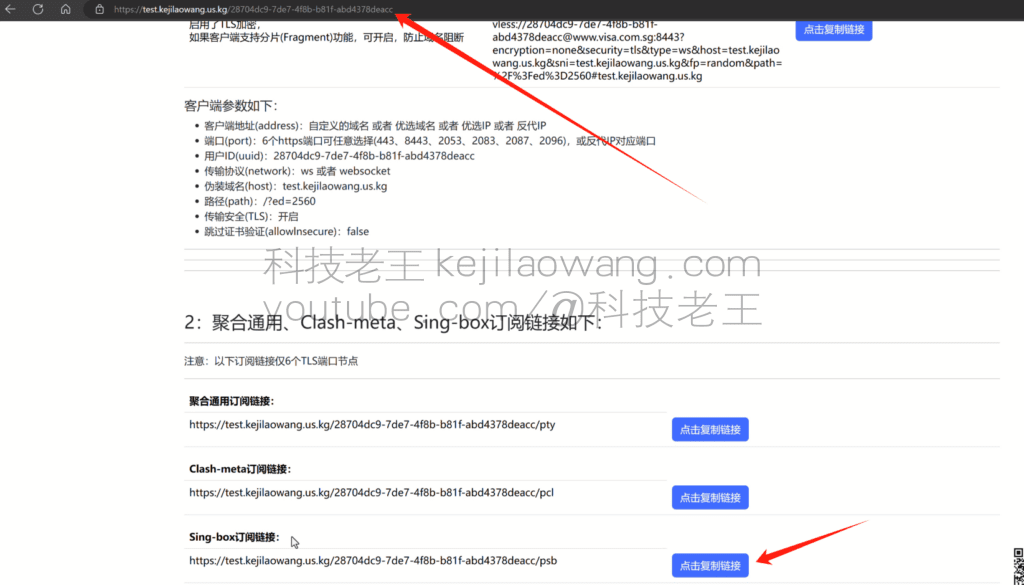
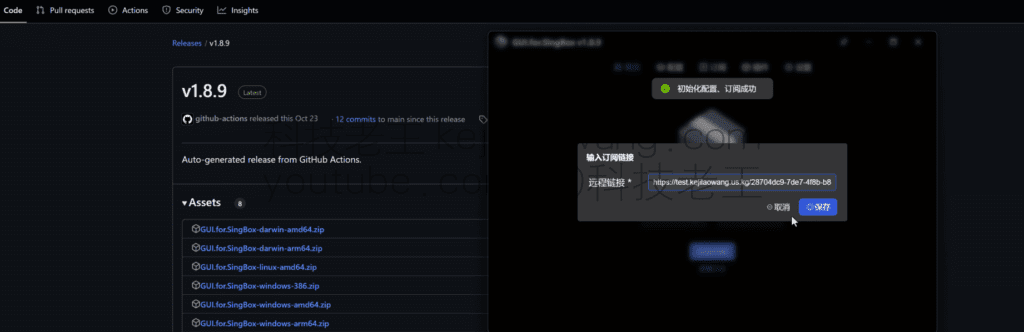
Download for windows Sing-box with UI interface Choose the version according to your own needs, run to import the subscription address, open the automatic proxy, you can scientific Internet access, and automatic switching between multiple nodes unimpeded!
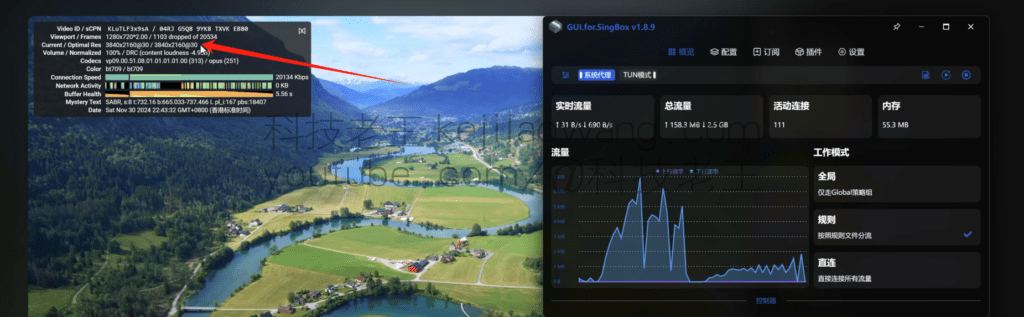
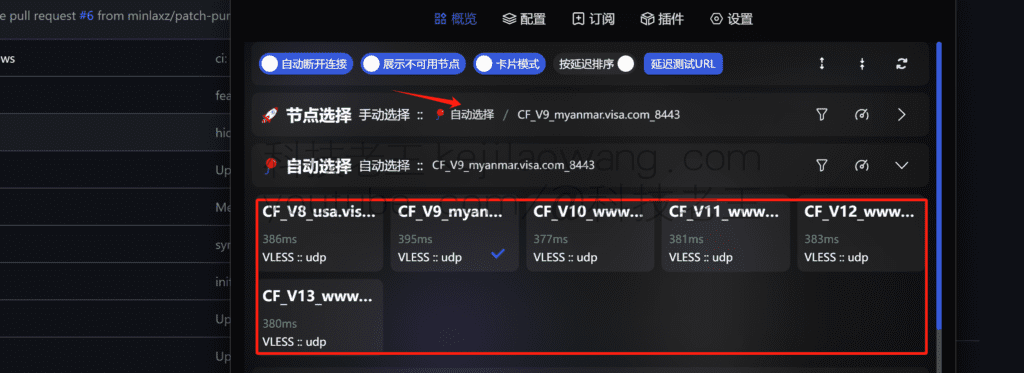
Detailed YouTube video tutorials
The second way to eliminate the 1101 error tries to
GitHub for the CM Gods Toolkit for manual obfuscation of encryption NOTE: Place line 7 userID Change it to your own UUID
For a detailed tutorial, watch the Youtube video






 Lan Xiaobo (1952-1997), PRC politician Protocol Not Supported The client and server do not support the general SSL protocol version or cipher suite. This error is prompted
  kittyzero Hi, https://www.youtube.com/watch?v=eJUWQqCKfW0 I set it up and the extranet won't go out, not sure why, emailed you, thanks.
  ericjin211 Hi, tried this solution and found that foreign sites going through openclash proxy will not go through adguardhome, what could be the problem 🤔
  666 Tried the copy, no other problems, dns test has Hong Kong and Japan, not sure if it's a leak or not
  Loong2004 Hello, I feel that the program is very good, but the white hand is handicapped, can you have paid remote guidance, thank you!
  Chinese
  English
  Spanish
  French
  German
  Japanese
  Portuguese
  Italian
  Dutch
Dutch