



Total 2151 characters, estimated reading time: 6 minutes.
In recent years, with the popularization of open source technology and the rise of Internet TV, Internet Web TV and free video viewing channels are instead becoming less and less, so then more and more people are starting to use IPTV (Internet Protocol Television) to watch global channels. And TVBoxIs a free all-round function all-in-one streaming media playback customized software, an open source based development of IPTV software, with its efficient, flexible, convenient features, has become the first choice of many users, but it is, the playback software is very good to find, TVBOX playback source is really not good to find, I'm here to give the partners to share the fully automated TVBOX subscription source of the update integrated together with the APP, simple and convenient no longer look around for sources. Simple and convenient to never look around for the source.
This article will take you through the basic features of TVBox, how to use it, and how to load a playback subscription feed to watch TV programs through it smoothly complete with some series of tutorials.
To view, please open this page in an internet environment with access to YouTube.
A full graphic description is provided below and can be read on.
Detailed video tutorials to watch a more comprehensive, encountered playback is not smooth we can switch to YouTube search Technology Lao Wang
What is TVBox?
TVBox is an open source IPTV application that supports multiple video formats and IPTV link protocols. Users can quickly access global live TV channels and on-demand resources by importing playlists.
Its open source nature not only ensures that users can use it for free, but also allows developers to modify the code according to their own needs to create a more personalized viewing experience.
Key Benefits of Using TVBox
- free and open source: Experience rich TV content without paying a subscription fee.
- Cross-platform supportCompatible with Android, Windows, Linux and other platforms.
- dexterity: Supports a variety of IPTV protocols such as M3U, XSPF, and even JSON-formatted playlists.
- High customizabilityThe user can import their own IPTV playlists and have complete control over what they watch.
- Community Support: An active developer community provides continuous updates and a wealth of resources.
How to install and use TVBox
Installation steps
- Get software::
- Go to TVBox's official open source code repository (e.g. GitHub) or third-party trusted sites to download the latest version of the app.
- https://github.com/o0HalfLife0o/TVBoxOSC/releases
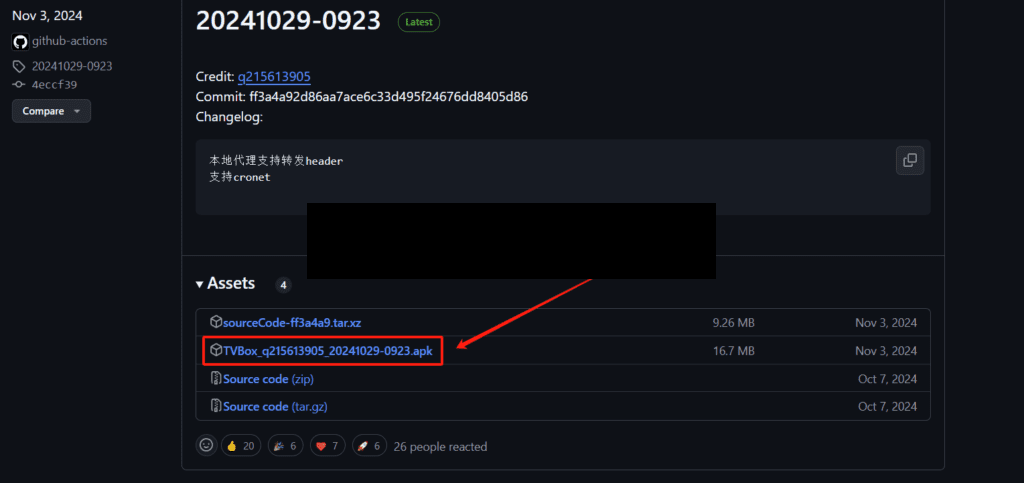
Download the APK file and use Dangbei Market or Sofa Butler to push it to the TV to install or use a USB flash drive to plug into the TV to install the TVbox software.
TVbox Assistant Automatically find the source, so that you can find the resource is no longer annoying. Fully automatic update live broadcast sources, movies and TV dramas all network resources streaming free VIP free to watch, one-stop fully automatic update the latest TVbox source address large and complete, never look around for the source address.
Download Address:Link: https://pan.baidu.com/s/1sk7vA15fy39nMg8cVZUH_g?pwd=twav
https://pan.lanzoub.com/b0aigoq2h
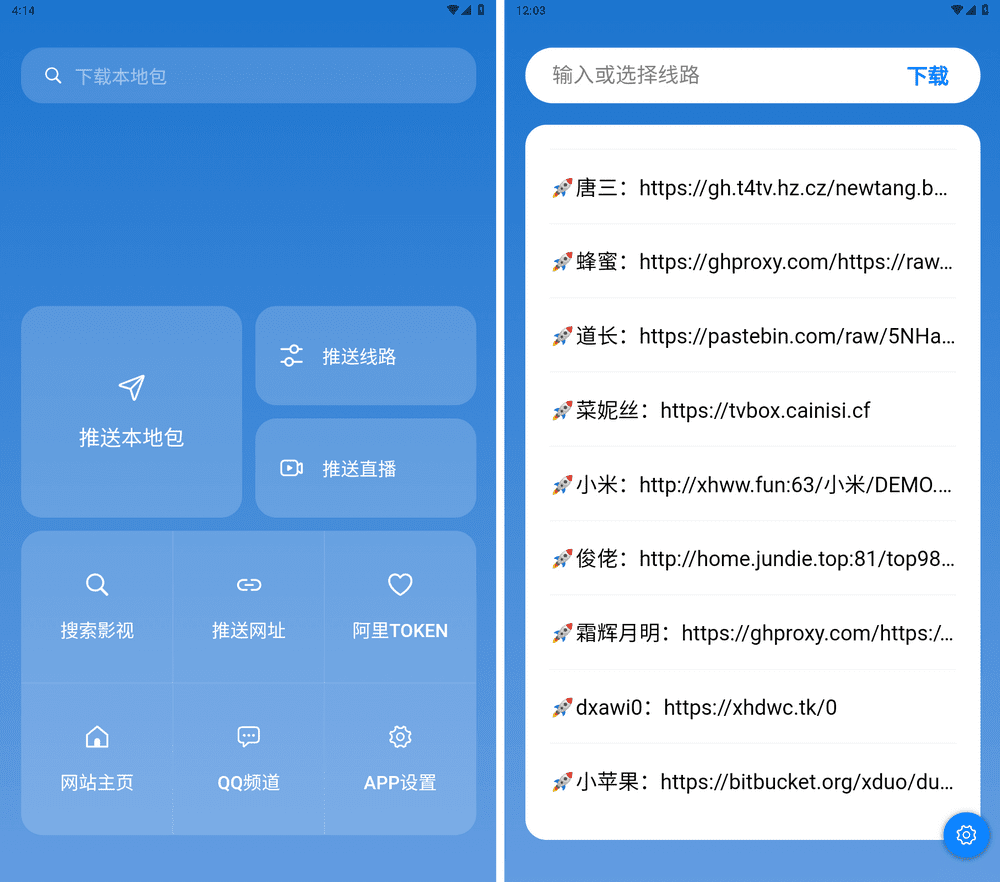
Use TVbox Assistant Push function to push the latest updated source address to the TV in LAN, simple and fast, never export to find the playback address.The perfect partner for TVbox.
TVBox is a powerful open source IPTV tool that not only provides the convenience of watching global TV, but also gives users a high degree of freedom and flexibility. With simple installation and configuration, you can enjoy rich TV content anytime, anywhere. If you are looking for a free and efficient IPTV application, TVBox is undoubtedly a worth-trying choice. Install TVBox and start your Internet TV journey!
high speedFree to watch movies and TV dramas god All platforms:http://www.kejilaowang.com/free-movie-free-tv/
Watch the video for the full tutorial :https://youtu.be/ld4zv6g4Ais







 Lan Xiaobo (1952-1997), PRC politician Protocol Not Supported The client and server do not support the general SSL protocol version or cipher suite. This error is prompted
  kittyzero Hi, https://www.youtube.com/watch?v=eJUWQqCKfW0 I set it up and the extranet won't go out, not sure why, emailed you, thanks.
  ericjin211 Hi, tried this solution and found that foreign sites going through openclash proxy will not go through adguardhome, what could be the problem 🤔
  666 Tried the copy, no other problems, dns test has Hong Kong and Japan, not sure if it's a leak or not
  Loong2004 Hello, I feel that the program is very good, but the white hand is handicapped, can you have paid remote guidance, thank you!
  Chinese
  English
  Spanish
  French
  German
  Japanese
  Portuguese
  Italian
  Dutch
Dutch