



Total 2926 characters, estimated reading time: 8 minutes.
I. What isOpenWrt?
OpenWrt is a Linux-based operating system widely used on routers and embedded devices. It provides an open, flexible environment that supports a variety of network protocols and configuration options. With it, users can customize the functionality of their routers, add more security and control, and even use it as an operating system for other devices. Exceptional compatibility X86 ARM Virtual Machine Everything.
II. Application Scenarios of OpenWrt
OpenWrt is not only used in routers, but also in all kinds of embedded devices, and can even be used as an operating system for PCs or other hardware. It supports a wide range of hardware platforms and allows users to install and configure different packages to increase functionality, we can not only be used toscientific Internet access(math.) genusDNS shunt anti-pollution, efficient use of internal and external network shunts, we have many more web features to explore.
How to activate Windows and office via OpenWrt KMS server?
In today's era of rapidly changing information technology, computer software has become an indispensable tool in our daily work and study. Among them, Windows operating system and Office software are undoubtedly one of the most widely used software. However, in order to ensure the legitimate use of software and the legitimate rights and interests of developers, the use of these software is subject to legal authorization. This process involves a number of steps, including the input of product keys, the acquisition of licenses, and genuine authentication. Each of these steps is essential and cannot be completed without the other.
First of all, the product key is the first step in the activation process. When a user purchases Windows or Office software, they are usually given a unique product key. This key is the credential for legitimate use of the software, and each key is unique and is used to verify that the user's purchase is legitimate. Next, license acquisition is usually automatic after the product key is entered for verification. A license is an authorization issued by the software developer to the user, proving that the user has the right to use the software. Finally, Genuine Verification is a process that takes place over the Internet, which verifies that the software's license is valid and ensures that the software installed by the user is genuine, and that unauthorized software will not pass Genuine Verification.
In this process, the stability and security of the Internet connection is particularly important. However, in some areas, users may encounter situations where they cannot access the activation server properly due to network censorship or regional restrictions. This is where OpenWrt shows its unique value. OpenWrt is a Linux-based open source router operating system that is highly customizable and flexible. While OpenWrt itself does not provide activation services for Windows and Office, it can provide network support for the activation process. For example, by configuring a VPN client on an OpenWrt router, users can bypass regional network restrictions and connect to an activation server for software activation. This method not only helps users solve network access problems, but also enhances network security and privacy protection.
In conclusion, the legal activation of Windows and Office is a necessary process to ensure the legitimacy and security of software usage. In this process, OpenWrt can help users overcome the network limitation problems they may encounter during the activation process by providing network support. In this way, OpenWrt facilitates the legitimate use of software while safeguarding users' network security and privacy.
To view, please open this page in an internet environment with access to YouTube.
A full graphic description is provided below and can be read on.
Detailed video tutorials can be searched on YouTube if the link opens incorrectly.King of Science and Technology
Here's an example using OpenWrt/iStoreOS
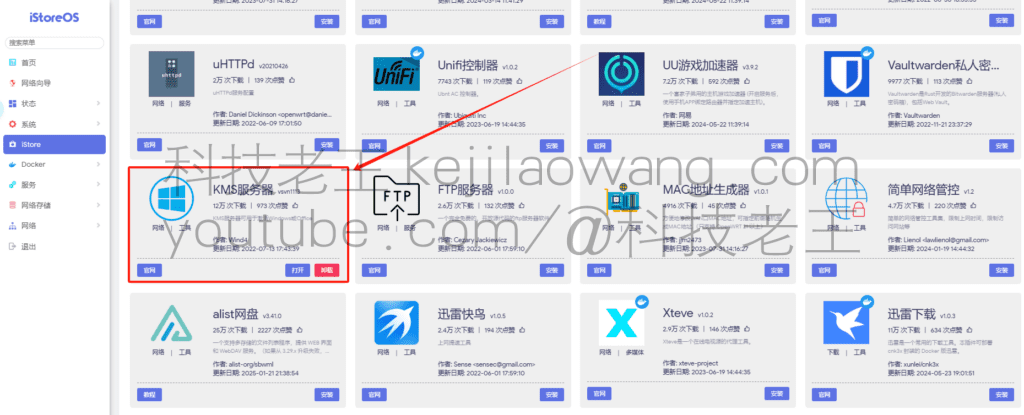
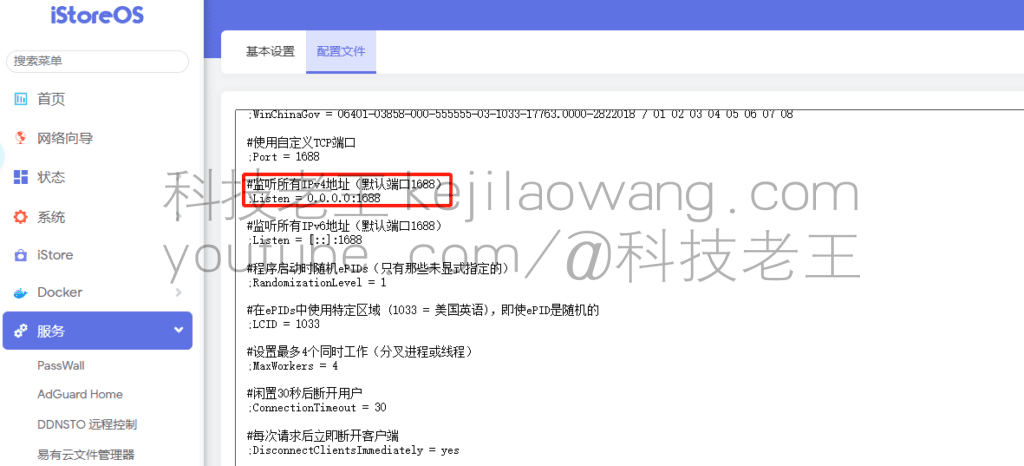
We can see that if we want our KMS server can also be used remotely, if you want to realize it is also very simple, we only need to map the IP port 1688 out of the soft route can be, for KMS it is a specific port is 1688, partners can see from the following figure example.
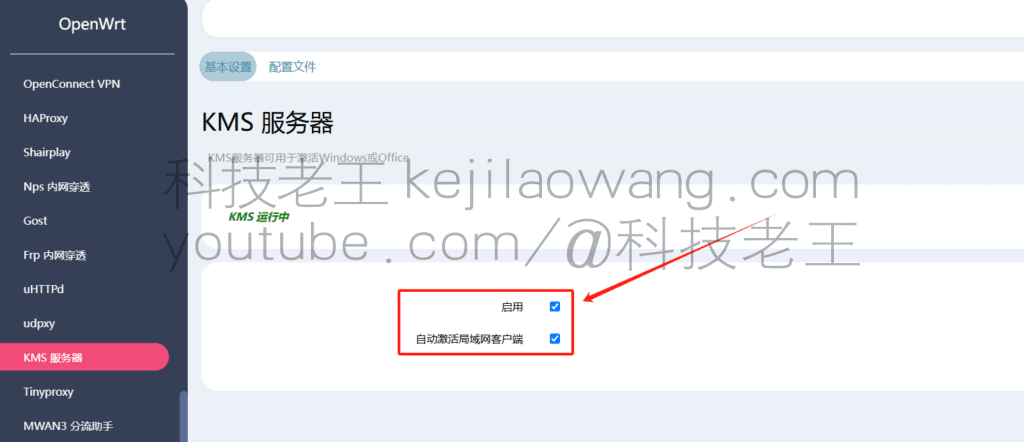
OpenWrt/istoreOS The same operation, we only need to enable and automatically activate the LAN client can be, for the public network ip we also need to ensure that the activation of the device is in the LAN, that is, you can proceed to the next step.
Activate Windows
1, at the same time press Win + X, and then select Windows PowerShell (Administrator), or use CMD administrator privileges, type slmgr /upk Enter, uninstall the original key first!
slmgr.vbs /upk2, enter slmgr /ipk M7XTQ-FN8P6-TTKYV-9D4CC-J462D Enter to replace the key, the key can activate Win7/8/10/11 and other systems, as shown below:
slmgr /ipk M7XTQ-FN8P6-TTKYV-9D4CC-J462D3. Type slmgr /skms soft route IP address or remote dynamic domain name address to let the KMS server be designated as our soft route and then press Enter, please replace the address by yourself, as shown below:
slmgr /skms Soft-route IP address or remote dynamic domain address4. Enter slmgr /ato to activate your Windows system using OpenWrt's KMS server function, as shown below:
slmgr /ato5, slmgr /xpr or use Slmgr.vbs -dlv we can also manually late to view the activation status of the relevant information
slmgr /xprSlmgr.vbs -dlv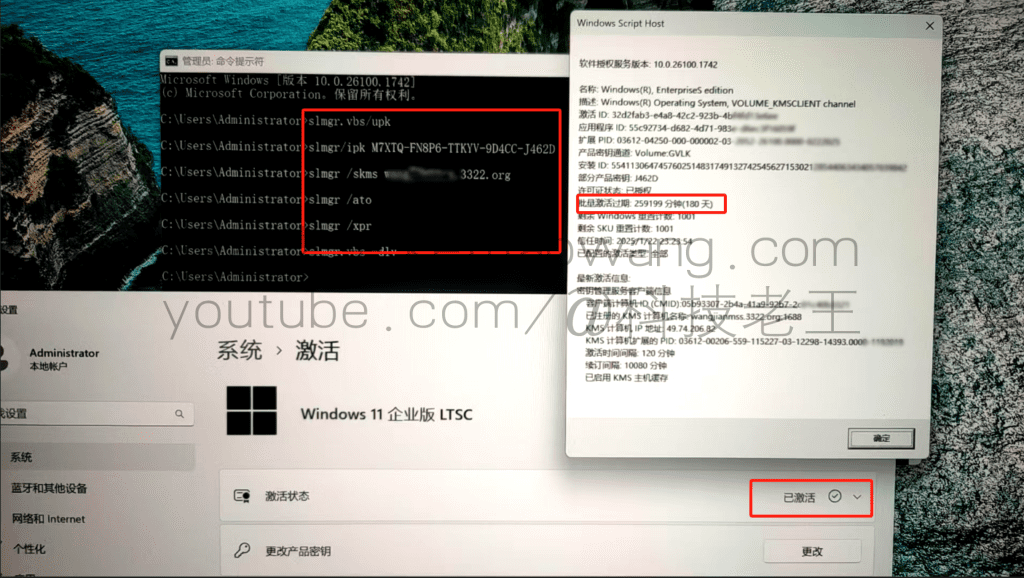
More windows 10 or 11 universal permanent activation code KEY
Windows 10 LTSC 2021 Long Term Service Edition: M7XTQ-FN8P6-TTKYV-9D4CC-J462D

Windows 10 LTSC 2021 Long Term Service Edition : 92NFX-8DJQP-P6BBQ-THF9C-7CG2H

Windows 10 LTSC 2019 Long Term Service Edition : W269N-WFGWX-YVC9B-4J6C9-T83GX






 Lan Xiaobo (1952-1997), PRC politician Protocol Not Supported The client and server do not support the general SSL protocol version or cipher suite. This error is prompted
  kittyzero Hi, https://www.youtube.com/watch?v=eJUWQqCKfW0 I set it up and the extranet won't go out, not sure why, emailed you, thanks.
  ericjin211 Hi, tried this solution and found that foreign sites going through openclash proxy will not go through adguardhome, what could be the problem 🤔
  666 Tried the copy, no other problems, dns test has Hong Kong and Japan, not sure if it's a leak or not
  Loong2004 Hello, I feel that the program is very good, but the white hand is handicapped, can you have paid remote guidance, thank you!
  Chinese
  English
  Spanish
  French
  German
  Japanese
  Portuguese
  Italian
  Dutch
Dutch