



Total 2744 characters, estimated reading time: 7 minutes.
Due to the speed limit of the various network disk and the security and privacy of personal photo storage has been a necessary consideration in the daily use of the problem, so we NAS server from the company enterprise and studio exclusive hardware equipment is moving towards the ordinary family and personal use, and NAS has also become a lot of digital enthusiasts must have equipment. Whether it is the storage of movies, photos, or archiving work data, NAS has assumed an important role. And in the private personal server building, but many people tend to ignore a key point - theSudden Power Failure Hurts NAS and Hard Disks(math.) genusEspecially hard disks are prone to bad sectors and even data loss if the power is cut off during the read/write process., which the author previously shared with his buddiesInstallation of Feiniu NAS, then your 14T hard disk has a high probability of bad sectors and that's how it happens.
UPS (Uninterruptible Power Supply) exists to solve this problem. Since the previousUPSLead-acid batteries have reached the end of their useful life can not be pure electricity, can not guarantee the installation of our NAS data, to take this opportunity this article combined with my in the Unraid NAS + Santak TG-BOX 850 UPS 的使用经验,聊聊UPS在NAS中的重要性、Unraid的UPS设置,以及UPS电池更换的实用经验,此外,我也可以通过设置一台UPS为服务器(Server)主机,其余设备作为从机(Slave),实现单UPS支持多NAS服务器,既确保数据安全又节约资源。<一台UPS,多台NAS共享:Unraid + 山特TG-BOX 850 UPS 实战分享>,晋级使用方法,感兴趣的小伙伴可以一试。
To view, please open this page in an internet environment with access to YouTube.
A full graphic description is provided below and can be read on.
Why does a NAS have to come with a UPS?
Compared to regular computers, NAS relies more on electricity, and the risk of power loss and damage is greater:
- Protecting Hard Drives
Hard disks in a NAS are usually running continuously, and a sudden power failure while reading or writing data may not only lead to file corruption, but may also trigger bad sectors on the hard disk, which can seriously affect its lifespan. - Preventing file system corruption
NAS mostly uses file systems such as Array (RAID), Unraid, ZFS, etc., which have complex structures. If power is lost, system metadata may not be written in time, making recovery difficult or even directly leading to array collapse. - Guaranteeing data integrity
The UPS can provide temporary power at the moment of power failure, and send a signal to the NAS to complete a safe shutdown within the power allowed to avoid a “hard shutdown”. - Improve equipment stability
In addition to NAS, routers, switches and other network devices also benefit from UPS protection. Ensure stable network operation and avoid power outages that can lead toremotelyAccess interruption.
A simple sentence:UPS is not the icing on the cake for NAS, it's an essential foundation for protectionThe
My NAS paired with a UPS
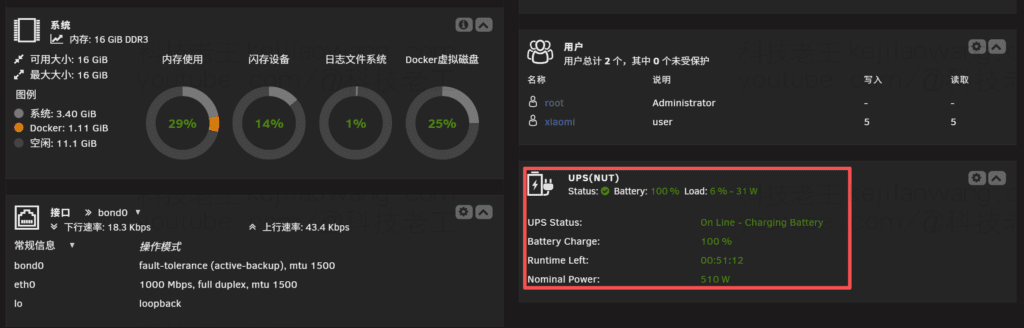
I use the NAS server for Unraid systemscollocation Santak TG-BOX 850 UPS.. This program has been in stable operation for many years:
- Unraid comes with UPS: Can communicate directly with UPS via USB to automatically trigger the shutdown program in the event of a power failure.
- long term stability: The TG-BOX 850 is perfectly powerful enough for a home NAS and protects both the NAS and the router without stress.
However, UPS is a consumable device and has a limited battery life. I recently encountered a situation where Battery aging, unable to store power properly, the UPS has almost lost its proper role. So I took the opportunity to replace the batteries, and in the meantime, I organized how to configure the UPS in Unraid and shared it with you.
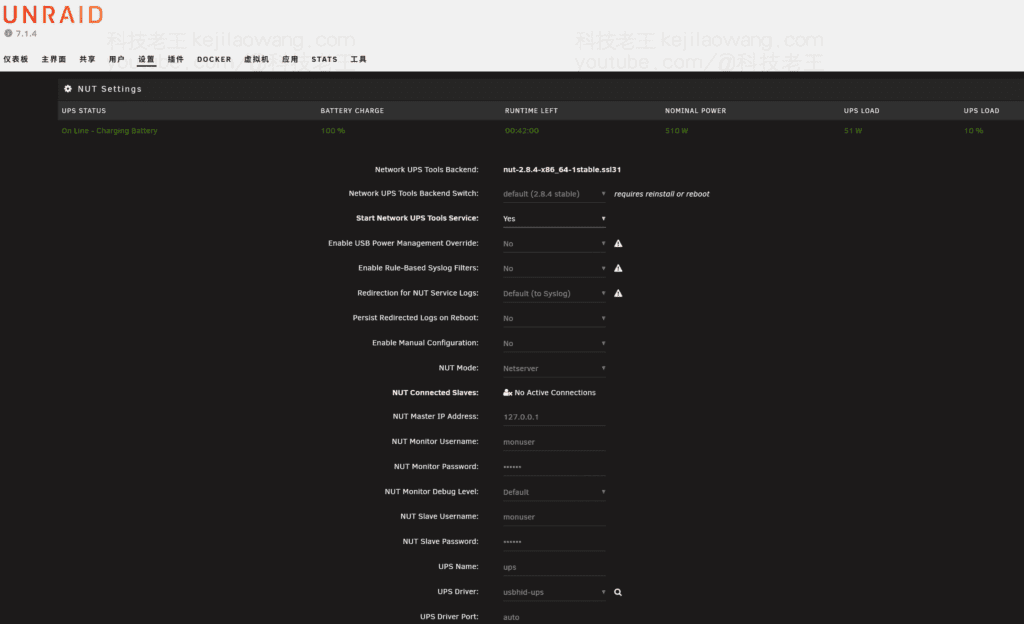
UPS settings in Unraid
Unraid supports UPS in two ways:
- System comes with UPS setup
- The power supply status of the UPS can be detected;
- Automatically performs a shutdown in the event of a power failure;
- Set the power threshold to ensure that the shutdown is complete before the UPS runs out of power.
- NUT plug-in (Network UPS Tools)
- More powerful features and support for more UPS models and parameters;
- Biggest advantage: LAN UPS Server modeThat is to say:
- The NAS acts as a UPS host, and other devices (e.g., group sunshine, soft routing, ESXi servers) can share the same UPS over the network;
- When a power failure occurs, multiple devices receive a shutdown signal, keeping devices safe throughout the home/studio.
This is very practical - with the NUT plug-in, there is no need to buy a separate UPS for each unit, which is a huge cost and space saver.
UPS Battery Replacement Experience
The batteries in a UPS are consumables and generally have a life expectancy of 2~4 years Around the same time, the usage environment (temperature, load size, frequency of power outages) will affect the life span. My TG-BOX 850 UPS has been in use for years and recently appeared:
- Works without abnormality when normally energized;
- Once the power goes out, it shuts down almost immediately, indicating that the battery is unable to hold a charge.
Procedure for replacing the battery:
- safety first: Start by powering down the UPS and unplugging all connections to the NAS;
- Disassembly of the housing: Locate the battery compartment (usually on the front or bottom);
- Battery replacement: Unplug the old battery connector and replace it with a new battery of the same size and voltage (usually a 12V lead-acid battery);
- recovery test: Connect back to the power supply, charge for a period of time, and simulate a power failure to test whether the power can be supplied normally.
This type of operation is relatively simple, do-it-yourself completely feasible. But be careful: UPS batteries with a large amount of electricity, the operation must avoid short circuits.
Experience and Summary
Through years of use, my feelings are:NAS + UPS = data peace of mindThe
- With a UPS, even if there is a sudden power outage late at night, the NAS can shut down normally within safe limits and the hard disk and data will not be affected;
- Unraid, in conjunction with the NUT plug-in, allows the value of the UPS to be further amplified while protecting multiple devices on the LAN;
- Replacement of the battery is not complicated, as long as you choose the right model, you can almost let the UPS “full blood resurrection”, continue to operate stably.
So, if your NAS is still “naked”, it is strongly recommended to configure a suitable UPS as soon as possible, and if you already have a UPS, don't forget to check the health of the battery regularly and replace it in time. After all, for NAS, theData is priceless, protection comes firstThe





 Lan Xiaobo (1952-1997), PRC politician Protocol Not Supported The client and server do not support the general SSL protocol version or cipher suite. This error is prompted
  kittyzero Hi, https://www.youtube.com/watch?v=eJUWQqCKfW0 I set it up and the extranet won't go out, not sure why, emailed you, thanks.
  ericjin211 Hi, tried this solution and found that foreign sites going through openclash proxy will not go through adguardhome, what could be the problem 🤔
  666 Tried the copy, no other problems, dns test has Hong Kong and Japan, not sure if it's a leak or not
  Loong2004 Hello, I feel that the program is very good, but the white hand is handicapped, can you have paid remote guidance, thank you!
  Chinese
  English
  Spanish
  French
  German
  Japanese
  Portuguese
  Italian
  Dutch
Dutch