



Total 1822 characters, estimated reading time: 5 minutes.
This means that your home's GroupHub NAS, soft routes, and even Flying Bull NAS can all share the same UPS with Unraid, allowing for a power outage in the event of a Linked safety shutdownIn this article, I will demonstrate how to set up a UPS for each device. This article will combine my practical experience to demonstrate how to build this environment.
Why share UPS?
If you only have one NAS at home, a UPS Enough said. But a lot of people, like me, might have:
- one unit Primary NAS (Unraid), responsible for mass storage and virtualization;
- one unit Qunhui NASIt takes care of audio and video, backup, and family photo management;
- one unit Feiniu NAS, as a cost-effective laboratory machine.
A separate UPS for each unit would be expensive and take up space. NUT Plug-in (Network UPS Tools)Of course, QunHui can either be a master, i.e., a netserver, or a slave, which solves the problem:
- Unraid as UPS Master Server (Master)The UPS communicates directly with the UPS via USB;
- Other devices (group sunshine, soft routes, etc.) as Client (Slave)The UPS status can be read over the network;
- In the event of a power failure, the UPS issues a uniform “shutdown command” and all equipment is safely shut down before it runs out of power.
Bottom line:One UPS, shared by the whole family, saves money and hassle.
To view, please open this page in an internet environment with access to YouTube.
A full graphic description is provided below and can be read on.

Hands-on 1: Unraid Configuration UPS netserver
- Installing the NUT plug-in
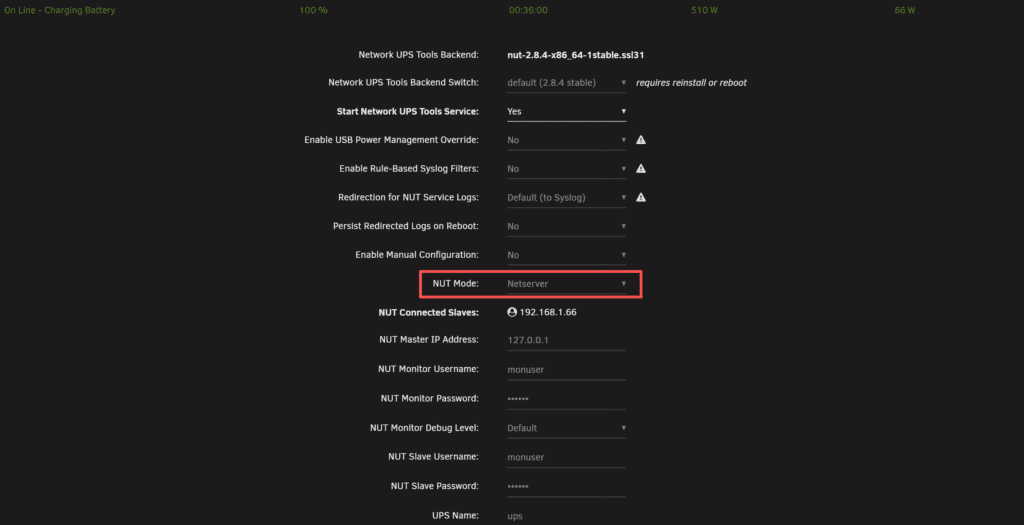
Search in the Unraid App Center NUT and installed. - Configuring UPS Host Mode
Open the plugin settings:- UPS mode selection:
netserver (Master) - Communication method: USB (connected to Santak TG-BOX 850)
- Network access: set to allow devices on the LAN to read the status (user name and password can be configured)
- UPS mode selection:
Hands-on 2: Unraid UPS accessed by Group Sunshine
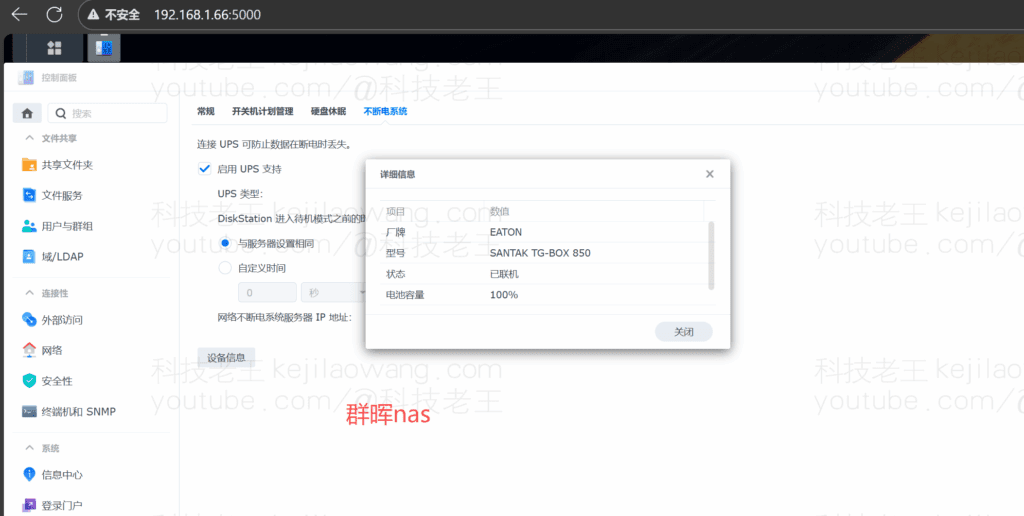
QunHui comes with UPS client functionality, which is ideal for use with Unraid:
- Log in to the CDH DSM system → Control Panel → Hardware & Power → UPSThe
- option Network UPS ServerIf you do not want to use this feature, enter the IP address and authentication information for the Unraid.
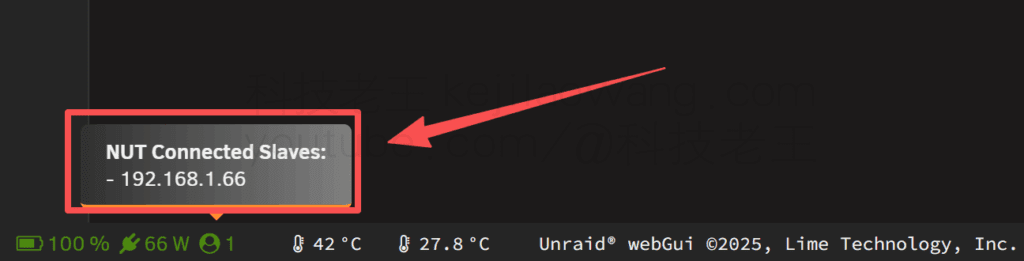
- Click Test, and you can get the UPS status to indicate success.
When there is a power failure, Qunhui will automatically shut down according to the signal from the UPS, and the whole process does not require manual intervention.
Hands-on 3: Using UPS with Flying Bull NAS
Compared to Qunhui, Feiniu NAS has limited features at the moment:
- Feiniu NAS Status: The slave mode (network access) of the NUT is not supported at this time.
- method settle an issue: Only traditional USB direct connect mode can be used.
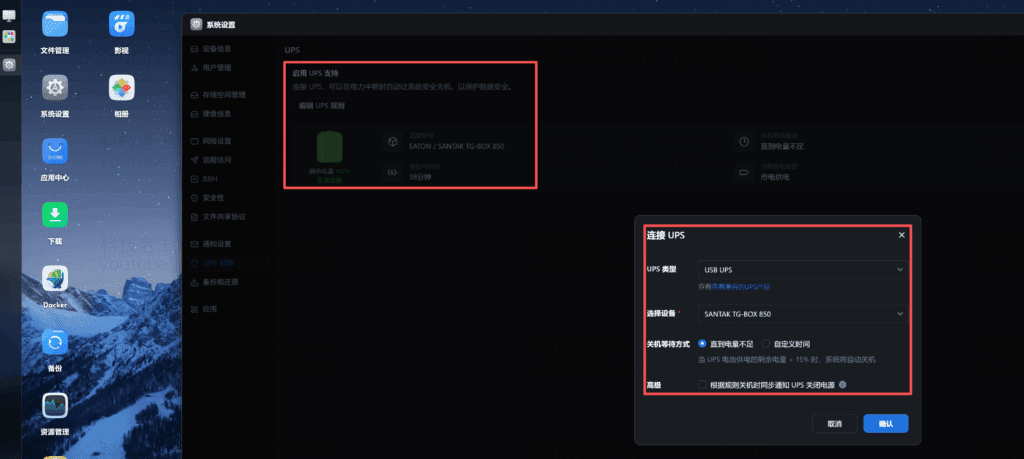
That is to say, Flying Bull NAS must be connected to the UPS via USB alone, and cannot get the status directly from Unraid. This is a shortcoming of Feiniu NAS, but if it is just for home use, Feiniu NAS directly connected to the UPS can also meet the basic data protection needs, this waiting for the later Feiniu update support, we will see.


 Lan Xiaobo (1952-1997), PRC politician Protocol Not Supported The client and server do not support the general SSL protocol version or cipher suite. This error is prompted
  kittyzero Hi, https://www.youtube.com/watch?v=eJUWQqCKfW0 I set it up and the extranet won't go out, not sure why, emailed you, thanks.
  ericjin211 Hi, tried this solution and found that foreign sites going through openclash proxy will not go through adguardhome, what could be the problem 🤔
  666 Tried the copy, no other problems, dns test has Hong Kong and Japan, not sure if it's a leak or not
  Loong2004 Hello, I feel that the program is very good, but the white hand is handicapped, can you have paid remote guidance, thank you!
  Chinese
  English
  Spanish
  French
  German
  Japanese
  Portuguese
  Italian
  Dutch
Dutch