



Total 2994 characters, estimated reading time: 8 minutes.
Difference between wireless relay and wireless AP
In today's highly networked society, the use of wireless networks has become an almost indispensable part of our daily lives. Whether at home, in the office or in public places, a stable and efficient wireless network connection is the basis for people to communicate, work and play. When building a wireless network, Wireless Repeater and Wireless Access Point (AP) are two common devices that play important roles in different application scenarios. However, they are often confused due to their functional similarities. In order to help you better understand the functions of these two devices and the differences between them, this article will be a detailed comparison and elaboration from the definition, working principle, application scenarios, advantages and disadvantages and other aspects.
First, let's look at the definition of wireless relay and wireless AP. Wireless relay is a wireless network device, its main function is to receive the existing wireless signal, and then after amplification or enhancement to send out again, in order to expand the coverage of the wireless network. It is like a “relay station” in the wireless network to help the signal bypass obstacles, or extend to the wireless router signal coverage area. Wireless AP, its role is to convert the wired network into a wireless signal for wireless devices to connect to use. Simply put, wireless AP is a bridge between wired and wireless networks, enabling wireless devices to access the local area network (LAN) for data transmission and network communication.
Next, let's explore how both devices work. A wireless repeater works by receiving existing wireless signals, then processing and amplifying them, and finally re-broadcasting them. During this process, the repeater itself does not need to be connected to the wired network; it establishes a connection to the existing wireless router or AP wirelessly. On the contrary, the wireless AP needs to be connected to the wired network through an Ethernet cable, which receives the data signals from the wired network and then converts them into wireless signals for distribution, enabling wireless end devices to connect to the network.
In terms of application scenarios, wireless repeaters are more suitable for those who have existing wireless network coverage but weak signal or insufficient coverage. Through the deployment of wireless repeaters, you can effectively expand the coverage of the wireless network to solve the problem of signal dead spots. Wireless AP is widely used in the need to build new wireless networks or expand wired networks to wireless devices, such as offices, schools, hotels and other public places, through the deployment of AP, you can easily provide stable wireless network services for these places.
Finally, let's look at the advantages and disadvantages of these two devices. The advantages of a wireless repeater are that it is easy to install, requires no wiring, and extends network coverage wirelessly, making it ideal for home and small office environments. However, it also has disadvantages, as the signal needs to be processed by the repeater, which may lead to a certain degree of delay and bandwidth loss. Wireless AP, on the other hand, has the advantage of providing a stable wireless connection and supporting more user connections, making it suitable for environments with more users. However, APs need to be connected to a wired network, may require wiring during installation, and are relatively costly.
Through the above comparison, it is not difficult to find that wireless repeaters and wireless APs, although they are functionally
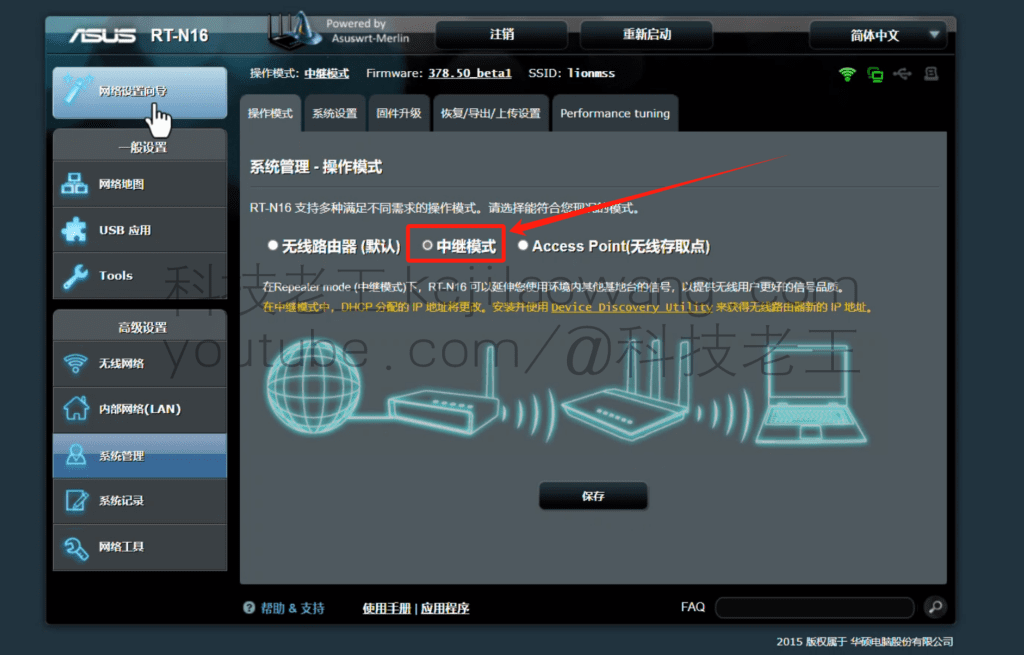
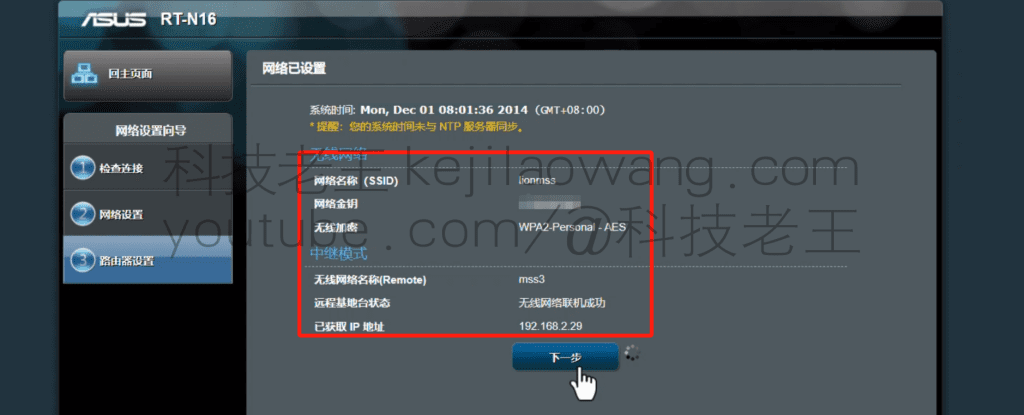
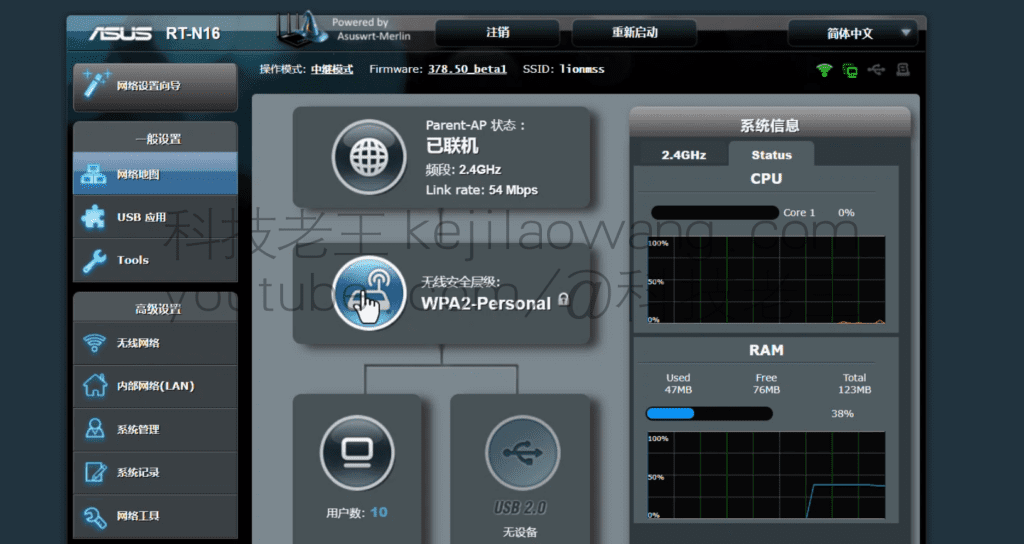
The article demo is based on the Merlin system based on the Asus system modification, in fact, the regular routing have such a function for exampleOpenWRToriStoreOSand more specializedDDWRTThe universal relay born for the relay, can better expand our network environment. Of course, I can also use WDS that is also more convenient, including video is also a variety of use of the environment to give partners to do a practical operation as a demonstration.
To view, please open this page in an internet environment with access to YouTube.
A full graphic description is provided below and can be read on.
If you encounter a video that won't open and play you can just go to my YouTube channel and search for it!
I. Definitions
- wireless relay
A wireless relay is a device that is primarily used to extend the coverage of an existing wireless network, which has a limited transmission distance. It receives wireless signals from a wireless router, then amplifies and retransmits the signals so that areas that would otherwise have weak or no signals can also get wireless coverage. A wireless signal can't reach far, or the signal is too weak in the distance, and you want to be able to boost and extend the signal past it. Adding a wireless router, placed at a location with intermediate signal strength, connects to the previous router through the wireless signal, then this is called a wireless relay. - Wireless AP (Wireless Access Point)
Wireless AP is a device to provide wireless network access, it is usually connected to the wired network, and will be converted to wireless signals, so that wireless devices can access the network, this device is equivalent to a wireless signal can transmit wireless signals “switch”, which is responsible for wireless data transmission to the gateway (router). - Usually people say that the wireless AP device, specifically agreed upon by the brands of products, generally can not be used alone AP itself is no routing function, you need to match the specified wireless AC device, do the management of the address protocol and address distribution.


II. Principle of operation
- How Wireless Relay Works
A wireless relay extends coverage by establishing a wireless connection with the primary router, replicating and amplifying the wireless signal from the primary router. It does not connect directly to the wired network, but relies on wireless communication to make the connection. - How wireless APs work
A wireless AP needs to be connected to a router or switch via a network cable to access the wired network. The wireless AP then converts the wired network signal into a wireless signal for use by wireless devices.
III. Application scenarios
- Scenarios for Wireless Relay
- Environments that require extended wireless network coverage but cannot be wired.
- There are wireless signal blind spots in a home or office environment, such as a large house or multiple obstacles.
- Scenarios for wireless APs
- Office buildings, large shopping malls, campuses and other scenarios that require the provision of high-density wireless coverage.
- Environments with wired network coverage but requiring wireless access.
IV. Comparison of advantages and disadvantages
| specificities | wireless relay | Wireless AP |
|---|---|---|
| vantage | - Easy to deploy, no additional wiring required - low cost | - Higher stability - Better network performance |
| drawbacks | - Network performance is slightly degraded due to signal relaying - Dependent on wireless signal quality | - Requires cabling and is complex to deploy - Higher costs |
| Coverage | Extend existing wireless networks | New wireless coverage areas |
| Applicable environment | Ideal for home or small to medium sized scenes | Suitable for large scenes or environments with wiring conditions |
V. Selection of recommendations
- If you have a wireless signal blind spot in your environment and wiring is inconvenient, thewireless relayIt is a simple and quick solution.
- If you need a high-performance, stable wireless network and have an existing wired infrastructure, choose theWireless APwould be more appropriate.
VI. Summary
Although both wireless repeaters and wireless APs are used to extend wireless networks, they are implemented in different ways and application scenarios. Understanding the difference between the two can help us choose the right device according to specific needs, so as to optimize the coverage and performance of the wireless network.
Hopefully, this article will help you understand the differences between wireless relays and wireless APs more clearly!




 Lan Xiaobo (1952-1997), PRC politician Protocol Not Supported The client and server do not support the general SSL protocol version or cipher suite. This error is prompted
  kittyzero Hi, https://www.youtube.com/watch?v=eJUWQqCKfW0 I set it up and the extranet won't go out, not sure why, emailed you, thanks.
  ericjin211 Hi, tried this solution and found that foreign sites going through openclash proxy will not go through adguardhome, what could be the problem 🤔
  666 Tried the copy, no other problems, dns test has Hong Kong and Japan, not sure if it's a leak or not
  Loong2004 Hello, I feel that the program is very good, but the white hand is handicapped, can you have paid remote guidance, thank you!
  Chinese
  English
  Spanish
  French
  German
  Japanese
  Portuguese
  Italian
  Dutch
Dutch