



Total 2356 characters, estimated reading time: 6 minutes.
Our OpenWRT's more efficient parsing we set up theMosDNS and Adguard home Triage allows DNS resolution with DNS leak prevention and ad removal to be an optimized setup. Today we continue to optimize the web application in pursuit of a non-sensitivescientific Internet accessWeb use.
在探索网络自由的过程中,很多人都曾对老版OpenWRT中的passwall插件赞不绝口。这个功能强大的插件,能在检测到无法连接时,自动切换到备用的节点列表,从而保证用户在各种网络环境下都能顺畅地进行科学上网,不受阻断。这种无缝切换的体验,对于追求网络稳定性的用户来说,无疑是一个巨大的福音。
然而,随着时间的推移,不论是OpenWRT还是后来的iStoreOS系统,其最新版本的passwall插件似乎已经不再包含这一功能。这对于习惯了passwall插件所带来便利的用户来说,无疑是一大损失。为了解决这一问题,很多用户开始寻找替代方案。他们或是自己搭建VPS节点,尝试通过不同的方法来维持科学上网的通畅。
在众多尝试中,一种被发现的有效方法是使用Socks设置进行自我代理。这种方法,可以视为一种“套娃模式”,即通过一个代理去连接另一个代理,从而达到类似passwall自动切换节点的效果。尽管这种方法初看起来似乎有些复杂,但实际操作过程却出奇的简单。更重要的是,通过长时间的使用验证,这种方法被证实能够有效地检测并切换代理节点,保证网络连接的稳定性。
对于那些对网络稳定性有较高要求,但又不想深陷各种配置文件的用户来说,这种自我代理的方法无疑是一个值得尝试的好选择。而对于那些对技术有一定了解,又喜欢折腾的用户,通过自己搭建VPS节点,再结合Socks设置自我代理的方式,不仅能够更好地掌控自己的网络环境,还能享受到定制化服务带来的乐趣。
因此,在这里,我们希望通过分享这个技巧,能帮助那些在网络连接稳定性上遇到问题的朋友们找到一个新的解决方案。无论是通过Socks设置的自我代理,还是通过其他方法,只要能够实现稳定、快速的科学上网体验,那么这些尝试和努力都是值得的。在这个信息爆炸的时代,掌握这些网络技巧,不仅能够让我们更自由地浏览信息,也能在必要时刻提供巨大的便利。
To view, please open this page in an internet environment with access to YouTube.
A full graphic description is provided below and can be read on.
Video details if the playback fails to open you can click on the click to open link youtube technology old king
1, passwall bottom “Socks Settings”, the “Socks main switch” check box, select one of the valid “Socks node”, set the “Socks listening port” and HTTP port customized according to their own needs, and then save the application can be.
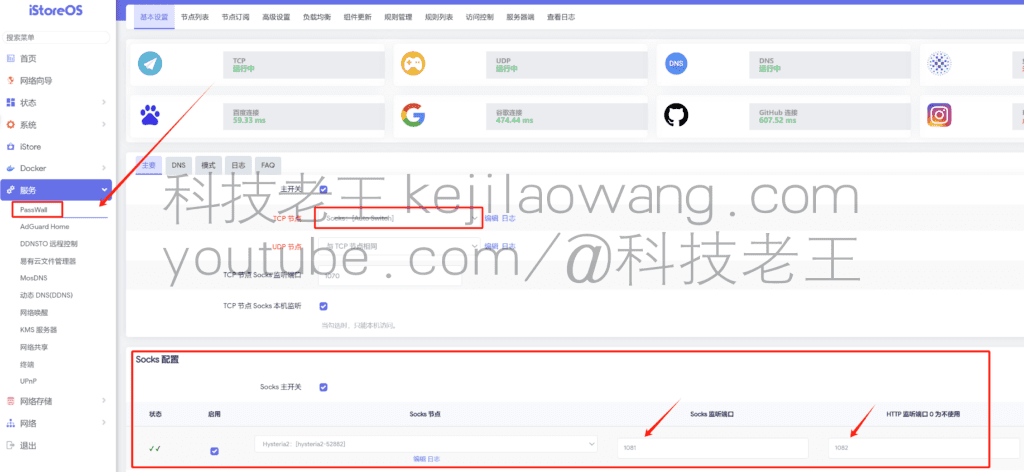
2, next we then location point “Edit” for the next step in the settings

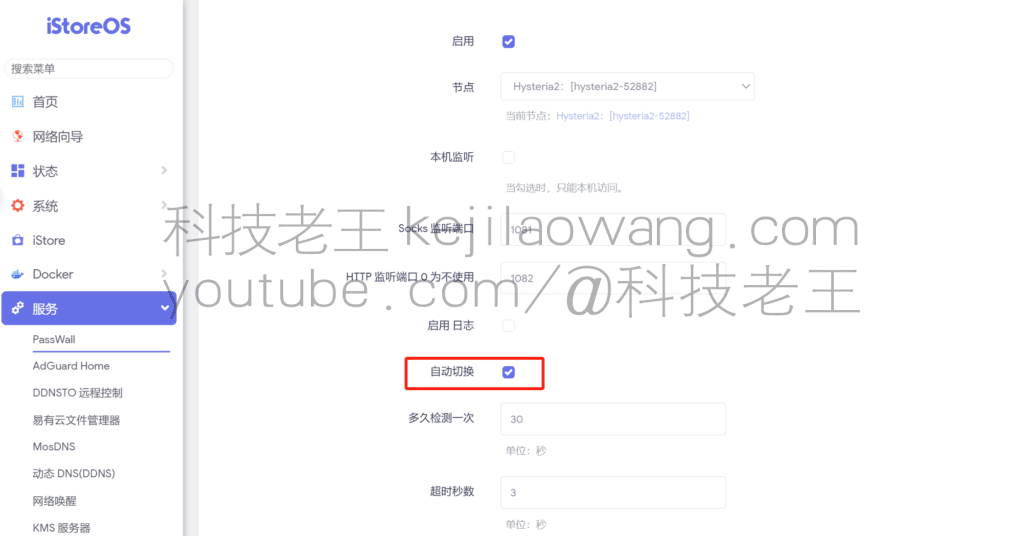
3, into the “Socks Settings”, we are in the “automatic switching” option, confirm that the effective state of the check box, and other according to the needs of our own settings can be
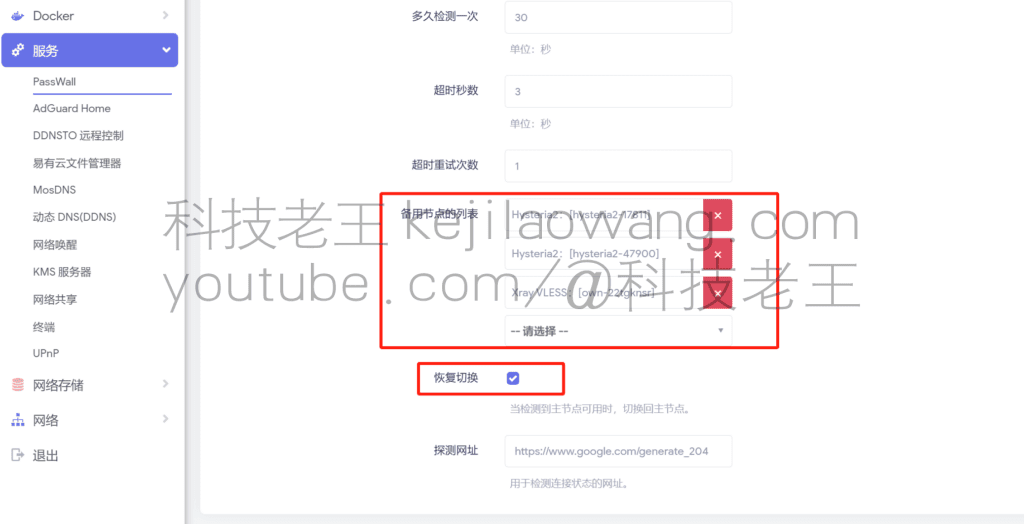
4, the list of standby nodes, we select the relevant nodes we need, and then in the “recovery switching” at the check mark, so that when the main node obstacles to the recovery of the validity of the time, you can automatically cut back, of course, according to their own needs to keep the node after the switch to use when the setup is complete point “! Save & Apply”; can be!
5, and then we go to the main passwall page, point “node list”, add a self-built socks node, the address is “127.0.0.1”, that is, the previous “Socks Listening port” do not get it wrong, otherwise it does not work, can not be used.
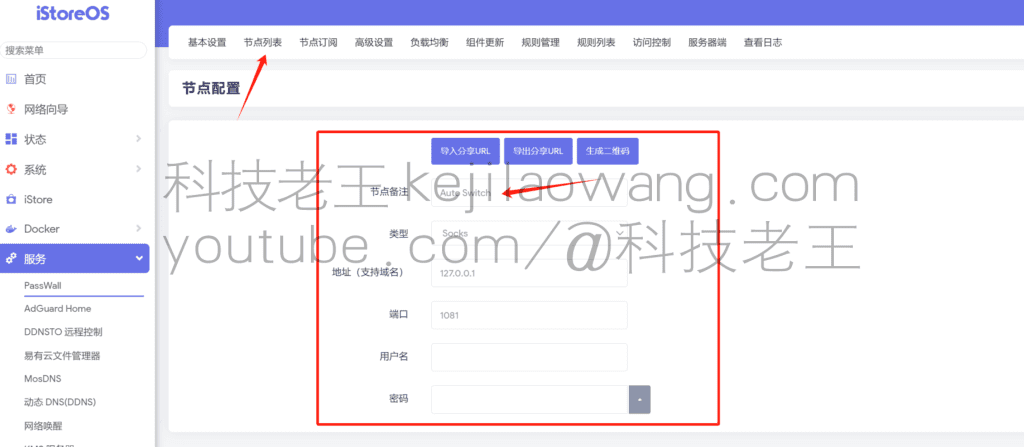
6, confirm the establishment of a good after we return to the main interface passwall, in the “TCP node” to select the socks node we established, and then click “Save & Apply”;
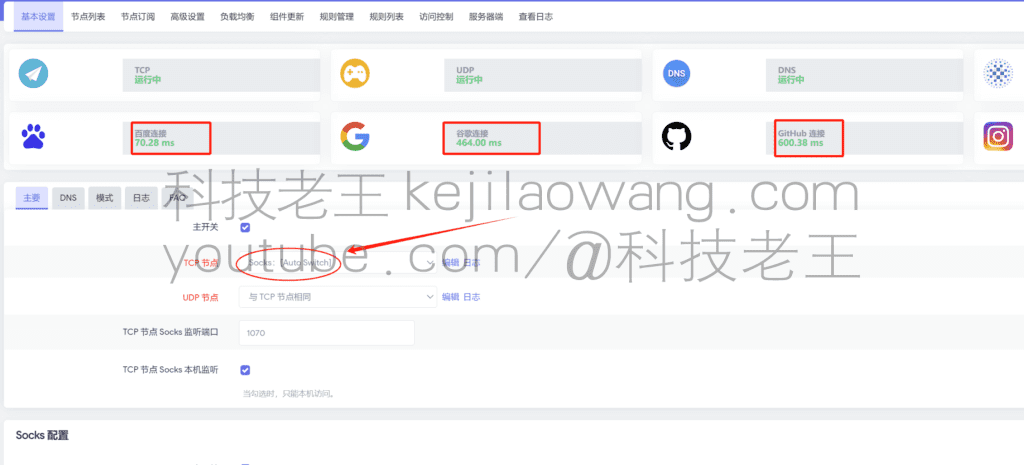
So we can use the network smoothly, no longer need to worry about node drop and then manually to operate, simple and efficient, time and effort, of course, if the pursuit of more efficient such as multiple nodes we can also use theHAproxy load balancingWe can understand is socks nesting passwall multi-node use of advanced version.






 Lan Xiaobo (1952-1997), PRC politician Protocol Not Supported The client and server do not support the general SSL protocol version or cipher suite. This error is prompted
  kittyzero Hi, https://www.youtube.com/watch?v=eJUWQqCKfW0 I set it up and the extranet won't go out, not sure why, emailed you, thanks.
  ericjin211 Hi, tried this solution and found that foreign sites going through openclash proxy will not go through adguardhome, what could be the problem 🤔
  666 Tried the copy, no other problems, dns test has Hong Kong and Japan, not sure if it's a leak or not
  Loong2004 Hello, I feel that the program is very good, but the white hand is handicapped, can you have paid remote guidance, thank you!
  Chinese
  English
  Spanish
  French
  German
  Japanese
  Portuguese
  Italian
  Dutch
Dutch