



Total 3366 characters, estimated reading time: 9 minutes.
OpenWrt PassWall load balancing principles (based on HAProxy)
In the OpenWrt ecosystem, scientific Internet node selection for the fastest speed network optimization, HAProxy load balancing is particularly important to reduce the pressure of a server. It is a technology that effectively improves bandwidth utilization and network performance. openWrt as a flexible router operating system, combined with the PassWall scientific Internet plug-in, can realize the function of load balancing based on multiple lines.PassWall It's a powerful proxy tool that supports a variety of proxy protocols (such as Shadowsocks, V2Ray, Trojan and nowHysteria2(Hy2), etc.) and can be combined with HAProxy This article discusses how PassWall uses HAProxy for load balancing to improve network performance and stability. In this article, we'll take a closer look at how PassWall leverages HAProxy for load balancing to improve network performance and stability.
To view, please open this page in an internet environment with access to YouTube.
A full graphic description is provided below and can be read on.
Detailed settings to watch youtube videos, such as slow opening fault can search youtubeKing of Science and Technology

1. Basic concepts of load balancing
Load Balancing (Load Balancing) is a technique for intelligently distributing network traffic to multiple servers or proxy nodes to optimize resource utilization, increase throughput, and reduce the impact of a single point of failure.
The core features of load balancing in OpenWrt PassWall include:
- Traffic distribution for multi-agent nodes(Load balancing between multiple servers)
- Dynamic line switching(Automatic selection of optimal routes based on node status)
- health checkup(periodic checking of proxy node availability)
PassWall is primarily used through the HAProxy to accomplish this function.
2. HAProxy's role in PassWall load balancing
HAProxy is a high-performance load balancing tool widely used for web server clustering and proxy server traffic management. In OpenWrt PassWall, HAProxy acts as a splitter for proxy traffic, deciding how to distribute data requests to multiple proxy nodes.
2.1 Load Balancing Mode
HAProxy supports a variety of load balancing modes, and PassWall mainly uses the following:
- Round Robin: Traffic is sequentially distributed to multiple proxy nodes for proxy servers with similar performance.
- Least Connections: Prioritizes the proxy node with the lowest number of current connections, which is suitable for the case of uneven load.
- Source IP Binding (Source IP Hash): Ensure that the same user (IP-based) always uses the same proxy node to minimize session disconnection issues.
When configuring HAProxy load balancing in PassWall, you can choose the appropriate mode to optimize performance.
2. The core working principle of PassWall load balancing
PassWall Adopted HAProxy For traffic management, the overall load balancing principle is as follows:
- User request to access the OpenWrt device(local router).
- PassWall captures proxy traffic and handed off to HAProxy.
- HAProxy according to load balancing policy(polling, least connections, etc.) Select the best proxy server.
- Traffic is forwarded to the corresponding proxy node(Shadowsocks, V2Ray, Trojan) Hysteria2 (etc.).
- Proxy servers handle requests and return data that is ultimately delivered to the user's device.
In this way, PassWall ensures that traffic is intelligently distributed to improve network stability and performance.
3. Nanny level setup
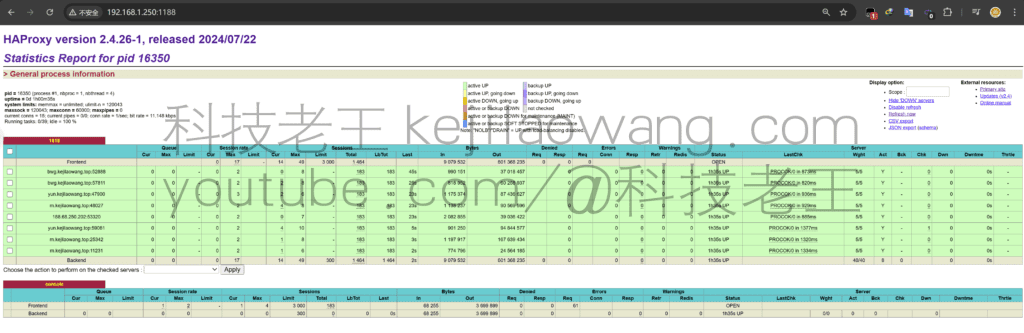
We are based oniStoreOSFor example, if OpenWRT is equivalent, enable HAProxy-PassWall - [|].load balancing] - Openload balancingThen set the username and password with the console port is to log in to HAProxy's page in the figure above in order to observe the traffic diversion collaborative equalization, do a dynamic observation.

Next, we add nodes. In fact, small partners can see my node to add encryption method port or UUID are not the same in front of it is HY2 is also known as theHysteria2Behind it are the nodes for vless and vmss, both of which proved to be usable when we load-balanced here theportsThat must be consistent (this is an array of our group as a later we set to use). For nodes to join the address it, to ensure that the encryption method and other related settings are the same as the same, is in order to efficiently collaborate on the stability of the non-essential in fact, can also be used. Partners can be adjusted according to their own needs, the same configuration it largely reduces the probability of error, partners according to their own use of the environment to set up the use. Next set the load weight is the node priority, mode according to their own needs to set I here is to keep the default weight. Everything goes to HAProxy to collaborate.

And then we'll go back topasswallHome - Node List - Create a new onesocksThe node is ready to start nesting, note an arbitrary name, and then we select thesocksmode, the address is the internal loopback address 127.0.0.1, the port is that we are also customized load balancing address 1818, we keep the same, the formation of a condom, the user clicks on the network needs to be scientific Internet nodes through thesocksThe proxy is given to the HAProxy and the load balancing server receives the network command to triage the task.
give an example: When we visit a website web page static page loadingTCP protocol with UDP video streaming playbackmay come from two different nodes or servers, the powerful HAProxy mutual collaboration system to make the most optimal choice, but also to reduce the pressure of a server or the same node, which is the true meaning of load balancing, not just a simple node switching, that is not the true meaning of load balancing. We can think of it as I'm my last blog.The advanced version of passwall's automatic node switching usage. If you like it, you can also go over there and check it out.

Then we go back to the basic settings, in the TCP here we select our self-built socks named load balancing node, udp to maintain the same, we can see the upper right corner of the load balancing has been normally enabled, our tests are also connected. That means we can use it normally.

We can also use the IP + port settings to log in to the HAProxy management background to view the current node traffic dynamic information, it is more intuitive, you can see the priority of the node as well as traffic usage.
To further validate whether triage collaboration is possible yet, for example, we can use theip.meWe test refresh or use different browsers to open the test, here we see the IP of the external network it is jumping rather than fixed using a single node can not be used and then switch, than our last tutorial to be a lot more reasonable, thus proving that we have the effectiveness of this HAProxy load balancing.
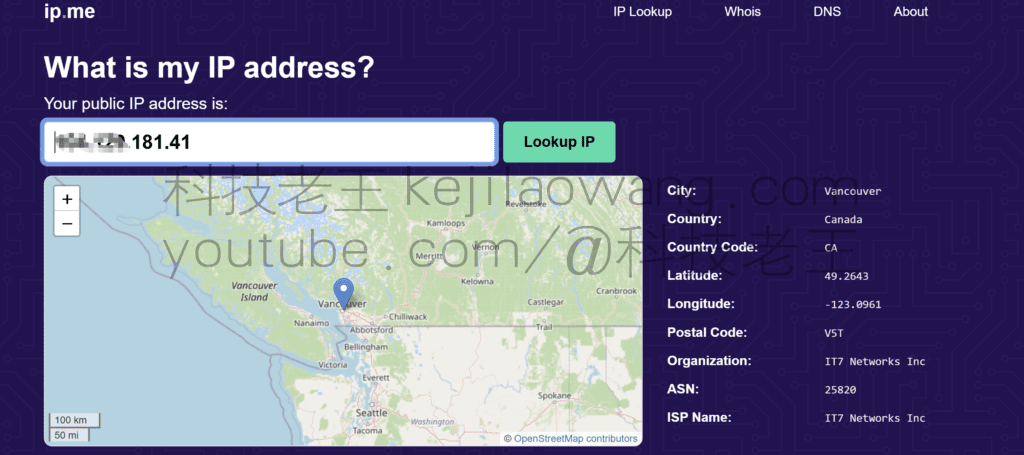
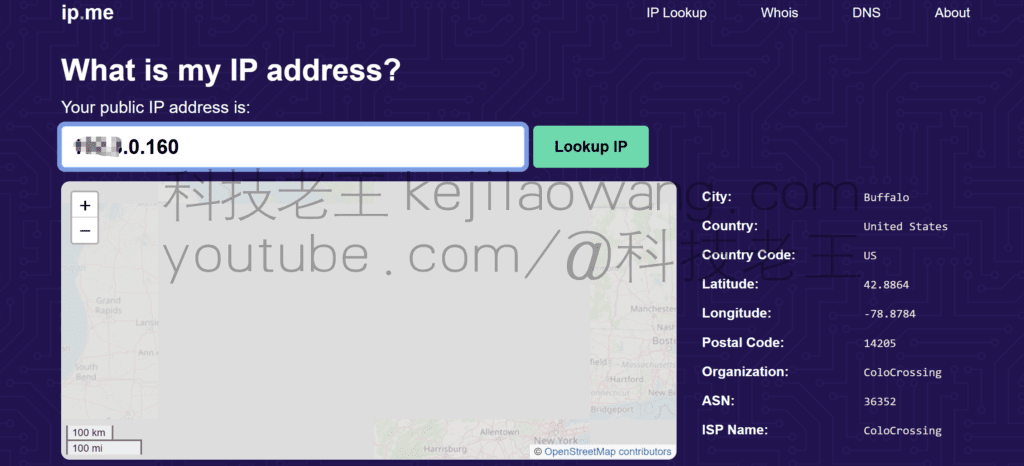
To summarize, the OpenWrt PassWall combines the HAProxy Provides an efficient proxy load balancing solution that not only intelligently distributes traffic, improves bandwidth utilization, and enhances network stability. And it can be reasonably configured Load balancing strategies, health checks, weight optimizationThis can further enhance the proxy experience. If you want to achieve efficient use of OpenWrt you can combine theAdguard home with MosDNSDo further optimization and management to make our network more silky smooth and better experience.
For later detailed setups please follow myyoutubevideo tutorial







 Lan Xiaobo (1952-1997), PRC politician Protocol Not Supported The client and server do not support the general SSL protocol version or cipher suite. This error is prompted
  kittyzero Hi, https://www.youtube.com/watch?v=eJUWQqCKfW0 I set it up and the extranet won't go out, not sure why, emailed you, thanks.
  ericjin211 Hi, tried this solution and found that foreign sites going through openclash proxy will not go through adguardhome, what could be the problem 🤔
  666 Tried the copy, no other problems, dns test has Hong Kong and Japan, not sure if it's a leak or not
  Loong2004 Hello, I feel that the program is very good, but the white hand is handicapped, can you have paid remote guidance, thank you!
  Chinese
  English
  Spanish
  French
  German
  Japanese
  Portuguese
  Italian
  Dutch
Dutch