Total 1391 characters, estimated reading time: 4 minutes.
utilization Unraid 的灵活性,可以轻松地将局域网中的其他存储设备挂载到系统中,扩展存储容量并优化资源利用。也许我们不是只有一个NAS一种设备,这时候我们如何把他们以共享的方式去挂载起来呢,这时候我们就会用到SMB/NFS这种局域网共享的方式,这里举例使用的是Unraid挂载OMV的磁盘共享,给大家做一个实例。上一篇文章我们讲到 OpenMediaVaultAbbreviations (OMV) of disk sharing In this installment we are talking about how to mount this share inside Unraid.
Ensure equipment accessibility Ensure that the target device is enabled for file sharing (e.g. SMB or NFS protocols) on the LAN and is configured with the correct access rights (username, password, etc.) Install the plugin in Unraid's -APPS-search for Unassigned Devices and click Install.
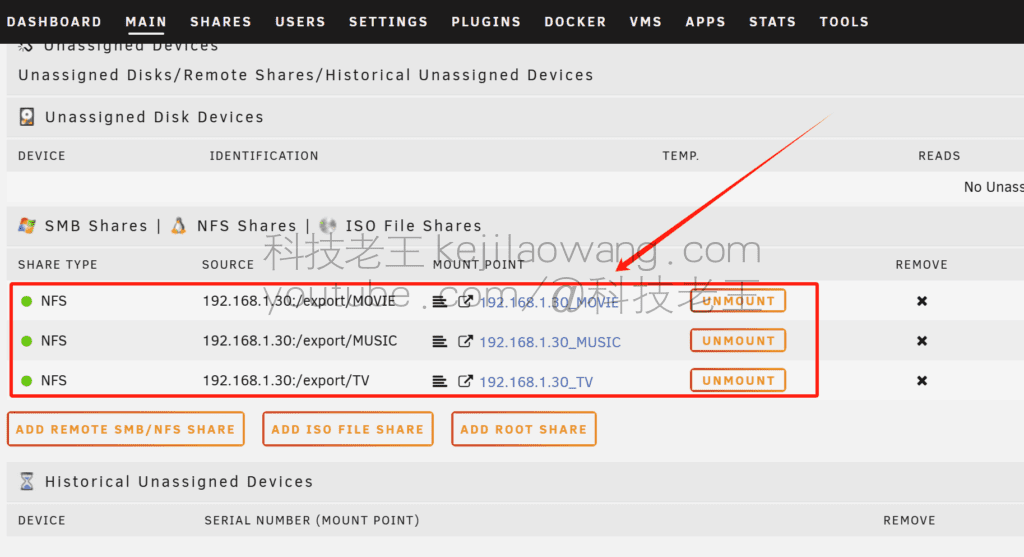
Here I have mounted the OMV video and audio folder
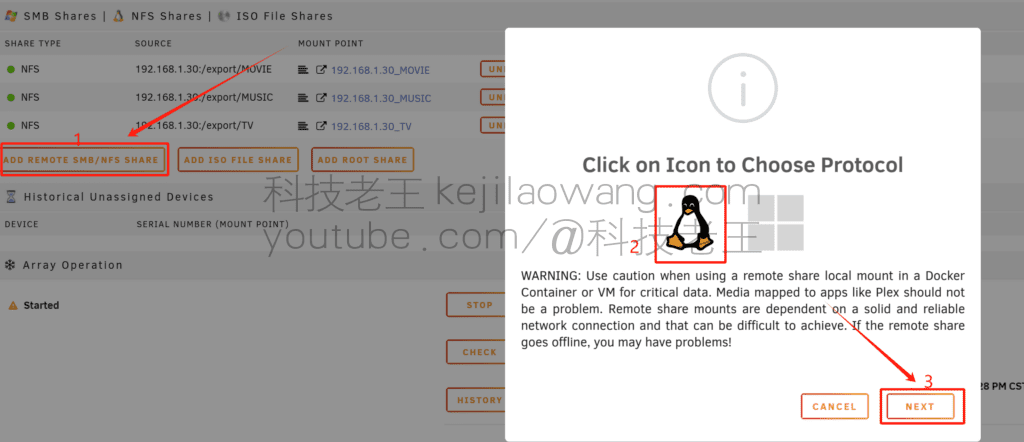
Once the installation is complete, navigate to the “Main” page and locate the Unassigned Devices panel. Click the “+ Add Remote SMB/NFS Share” button. Selectlinux (computer)-The difference is that it is the choice ofNFSIf it's a choice ofwindowsbeSMBmode and then press NEXT
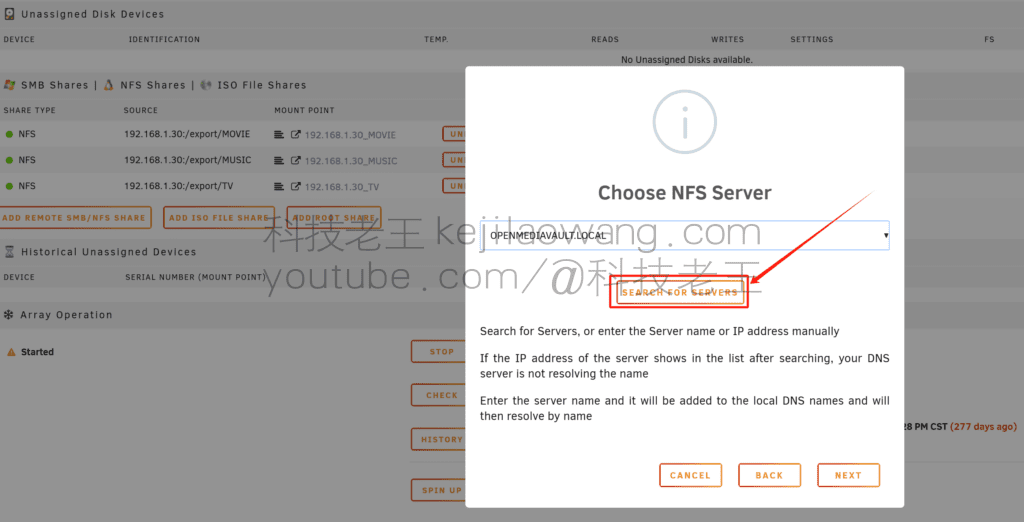
Click to search for LAN devices
strike (on the keyboard) Load Shares Then above the checkbox you select the column you need to mount, click Mount, and in the lower right corner select Done to finish. After successful mounting, the device will appear in the Unassigned Devices panel. Access this shared device via configuration in Docker or VM.
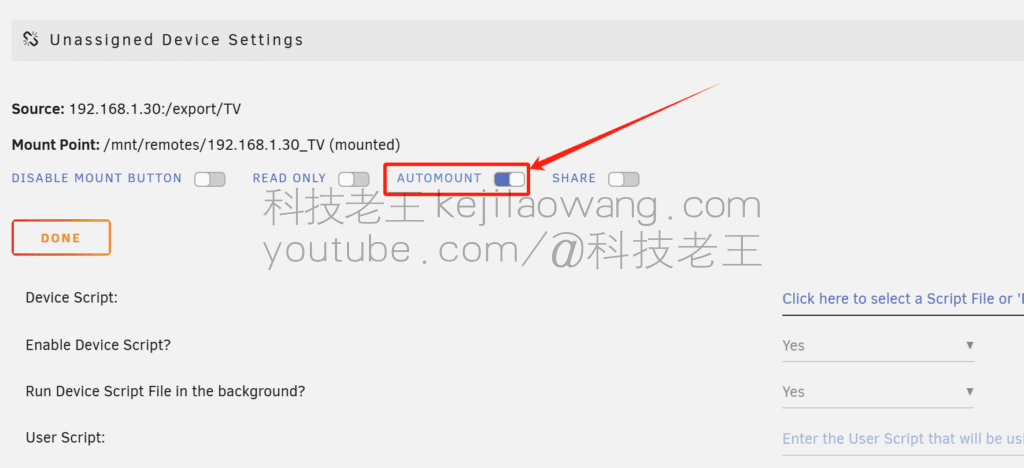
Auto-mount SettingsIf you want the system to mount automatically after a reboot, make sure the “Mount at Startup” option is checked.
Unraid VM Installation Collector X86 AC Gateway: The Most Complete Virtualization Deployment Tutorial (2025)
Virtualize and install Collector X86 AC Controller on Unraid for enterprise-class Wi-Fi roaming and unified management. This article introduces the key steps of image preparation, VM configuration, boot sequence adjustment and NIC compatibility in detail, so that your NAS can be easily turned into a high-performance AC gateway.
Why NAS must be equipped with UPS?Unraid and Santak TG-BOX 850 practical sharing
Due to a variety of Internet disk speed limit and security and privacy of personal photo storage has been the daily use of the necessary to consider the issue, so we NAS server from the company's enterprise and studio exclusive hardware equipment is moving towards the ordinary family and personal use, and NAS has also become a lot of digital enthusiasts must have equipment [...].
Flying Bull NAS experience sharing: D525 from Qunhui to OMV to Flying Bull one return
在玩 NAS 的这几年里,笔者一直存在一个设备就是低配的 D525 平台虽然配置不高性能有限,但是机器小巧内部紧凑且美观一直保留着依旧不断尝试不同系统,逐渐摸索出一条属于自己的“NAS 折腾之路”。 […]
NAS server setup SMB/NFS share mount Windows/UNRAID-NAS usage
With the increasing demand for data storage, more and more people and businesses are choosing NAS (Network Attached Storage) servers to store and share files.NAS servers can provide a home, office, or small business with the ability to set [...]
RackNerd VPS most cost-effective server for around $10/year 1Gbps/2000G/month
RackNerd is a hosting provider offering VPS (Virtual Private Server), Dedicated Server and other infrastructure services. It is popular with many webmasters and developers for its cost-effective, flexible resource allocation and wide coverage of data centers, especially in overseas website building, cross-border business and [...]
Like this:
LikeLoading…
END
0
Copyright Notice: Our original article was published byMr wang on 2024-11-30, total 1391 words.
Reproduction Note: Unless otherwise noted, this site is distributed under a CC BY 4.0 license. Reprints please indicate the author "Technology Lao Wang" and the original source link, any unattributed reprints, remove the source or washing behavior is considered an infringement of copyright.
The old king of technology is aYouTube technical videosA companion text tutorial station covering Scientific Internet Access, Productivity Tools, VPS Servers, NAS TutorialsAll articles are based on long-term testing and real-life experience.
The old king of technology is a man who specializes inTech Tools Hands-On & Tech Tutorial Sharingof independent bloggers, through kejilaowang.com Systematically organizes the text content accompanying YouTube technical videos to help users learn and reuse technical experience more efficiently.
Old King of Tech Main Focus:
🌐 Real-life experience with scientific internet access and VPNs 🤖 AI Tools and Efficiency Software Reviews 🖥️ VPS, NAS, Server and Building a Website Practical Tutorials
All content is based on Real-world use and long-term testing, No patchwork, no shuffling, no gimmicks, just sharing tools and programs that you've used for a long time and would recommend.
👉 Simultaneous operation of the tool navigation station: Technology King's Toolbox This is a centralized portal for organizing VPNs, AI tools, VPS and utility resources.
Users
1
Posts
86
Comments
23
Views
184021
Follow Us
Follow Us: Follow the self-media account of the old king of science and technology to get new videos and updates at the first time.
Mr wangthere turn on the security access mode to full try the source certificate is the encryption from the server to the Flying Cow side the edge certificate is the encryption from your access client to Flying Cow so the cdn must be turned on as well not as unrecognized support you try to troubleshoot it again
Lan Xiaobo (1952-1997), PRC politicianProtocol Not Supported The client and server do not support the general SSL protocol version or cipher suite. This error is prompted
kittyzeroHi, https://www.youtube.com/watch?v=eJUWQqCKfW0 I set it up and the extranet won't go out, not sure why, emailed you, thanks.
ericjin211Hi, tried this solution and found that foreign sites going through openclash proxy will not go through adguardhome, what could be the problem 🤔
666Tried the copy, no other problems, dns test has Hong Kong and Japan, not sure if it's a leak or not
Mr wangThat's not true. As long as it doesn't have your local ip, it's a success.
Loong2004Hello, I feel that the program is very good, but the white hand is handicapped, can you have paid remote guidance, thank you!







 Lan Xiaobo (1952-1997), PRC politician Protocol Not Supported The client and server do not support the general SSL protocol version or cipher suite. This error is prompted
  kittyzero Hi, https://www.youtube.com/watch?v=eJUWQqCKfW0 I set it up and the extranet won't go out, not sure why, emailed you, thanks.
  ericjin211 Hi, tried this solution and found that foreign sites going through openclash proxy will not go through adguardhome, what could be the problem 🤔
  666 Tried the copy, no other problems, dns test has Hong Kong and Japan, not sure if it's a leak or not
  Loong2004 Hello, I feel that the program is very good, but the white hand is handicapped, can you have paid remote guidance, thank you!
  Chinese
  English
  Spanish
  French
  German
  Japanese
  Portuguese
  Italian
  Dutch
Dutch