



Total 3188 characters, estimated reading time: 8 minutes.
introductory
With the advancement of technology, hardware video acceleration has become one of the indispensable features in modern computing systems. Whether it's for media playback, video editing, or running virtualized environments, hardware acceleration can greatly improve performance and efficiency. In this article, we will discuss the role of the integrated graphics driver that comes with the Intel® Celeron® CPU J3160 processor, and clarify the importance of enabling hardware acceleration in UNRAID systems, especially by enabling the renderD128 drive to accomplish this.
The Importance of Integrated Graphics and Hardware Acceleration
Integrated graphics (iGPU) are standard on many modern processors, especially on low-power processors. Often with lower power consumption and more compact designs than traditional discrete graphics cards, integrated graphics are well suited for home servers, low-power workstations, and lightweight computing tasks.
1. Enhancement of video processing performance
Video processing tasks, such as video playback, transcoding, and editing, often require a large amount of computing resources. While traditional CPUs take up a lot of computing power when processing video, integrated graphics can help offload video processing tasks to the GPU, thus reducing the burden on the CPU and improving overall system performance. For example, when streaming high-definition video or transcoding video on a media server such as Plex, enabling hardware acceleration can dramatically improve efficiency, reduce latency and lag, and provide a smoother viewing experience.
2. Saving energy and optimizing power consumption
One of the biggest advantages of integrated graphics cards is their low power consumption characteristics. Without the need for additional hardware, such as a discrete graphics card, integrated graphics can provide sufficient graphics processing power. For long-running home servers or lightweight computing devices, enabling hardware acceleration not only improves performance, but also significantly reduces power consumption, extends the life of the device, and reduces energy expenses.
3. Accelerated virtualization tasks
For those using virtualization systems such as UNRAID, the hardware acceleration provided by integrated graphics can also play an important role in running virtual machines. In UNRAID, if you are using a virtual machine to run a desktop operating system or application, enabling hardware acceleration on the integrated graphics card will improve the graphics performance of the virtual machine, especially in virtualized applications that require a graphical interface or video rendering. With hardware acceleration, graphics tasks in the virtual machine can be handled by the integrated graphics card, reducing the computational strain on the CPU.
Hardware Acceleration in UNRAID Systems: Enable renderD128 drive (vehicle wheel)
Hardware acceleration is not enabled by default in UNRAID systems. This means that even if your CPU is equipped with an integrated graphics card, UNRAID does not automatically utilize the card to accelerate video or graphics processing. In order to fully utilize the performance of the integrated graphics card, we need to manually enable the relevant drivers, especially the renderD128 Drive.
renderD128 The Role of the Drive
renderD128 driver is part of the Intel Integrated Graphics driver and is specifically designed to support hardware acceleration. When this driver is enabled, UNRAID systems recognize and utilize the integrated graphics of processors such as the Intel® Celeron® CPU J3160 to accelerate video transcoding, rendering, and other graphics tasks. By enabling hardware acceleration, systems can process video streams more efficiently, reduce latency, and provide a smoother multimedia experience.
Hardware acceleration application scenarios
In a UNRAID environment, enable renderD128 Driven hardware acceleration can significantly improve performance in the following common scenarios:
- video transcoding: If you are using media server software such as Plex, Emby, etc., Hardware Acceleration can help you transcode video more efficiently, especially when you need to convert high-resolution video to a different format or quality. When hardware acceleration is enabled, the speed of video transcoding will be significantly increased, which reduces the burden on CPU and improves the transcoding efficiency.
- Graphics Virtualization: If you are using virtual machines (VMs) or Docker containers in UNRAID and need graphics acceleration support, enabling hardware acceleration for integrated graphics can improve the graphics performance of the VM or container. Especially when running an operating system or application with a graphical interface, hardware acceleration ensures a smooth graphical display.
- Video Playback and Streaming: For home server users, enabling hardware acceleration not only improves the responsiveness of the media server, but also reduces stuttering or latency when playing HD video. Hardware acceleration provides better performance whether playing local video directly or through streaming.
summarize
Integrated graphics cards are playing an increasingly important role in modern processors, especially when it comes to video processing, virtualization, and graphics acceleration tasks, where hardware acceleration is especially beneficial. For users with UNRAID systems, enabling the renderD128 The driver allows you to fully utilize the performance of the Intel® Celeron® CPU J3160 integrated graphics card to enhance the efficiency and smoothness of video transcoding, virtualization, and multimedia playback.
By enabling hardware acceleration, you can not only significantly reduce CPU load, but also improve overall system performance and optimize power consumption while ensuring an efficient video processing experience. This is an indispensable step for users looking to use their UNRAID systems for media servers, virtualization, or other graphics processing tasks.
In this article, we will discuss how to enable the integrated graphics driver that comes with the Intel® Celeron® CPU J3160 @ 1.60GHz processor in a UNRAID system. Note that UNRAID does not enable hardware acceleration by default, so we need to activate the renderD128 driver manually. We will walk you through the process step-by-step.
Step 1: Open a terminal
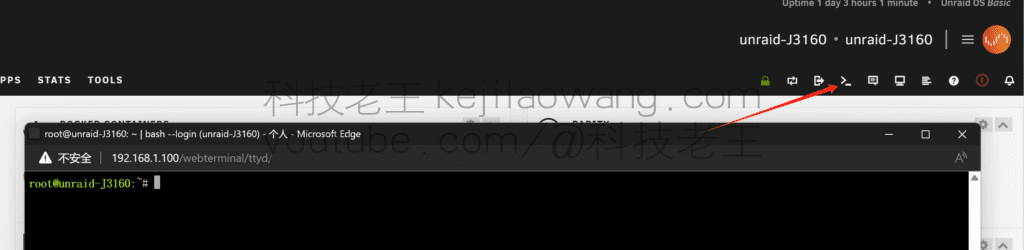
First, start the UNRAID terminal interface. Find the >_ icon, click it to open a terminal window.
Step 2: Activate the integrated graphics driver
Enter the following command in the terminal to load the integrated graphics driver:
modprobe i915Press the Enter key and the driver for the integrated graphics card has been successfully activated!

Step 3: Verify that the driver is enabled
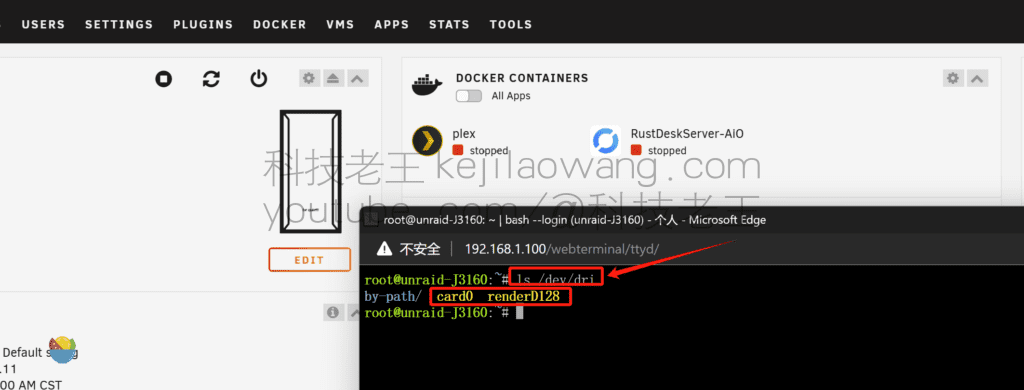
Next, we need to confirm that the driver was successfully installed. Enter the following command in the terminal:
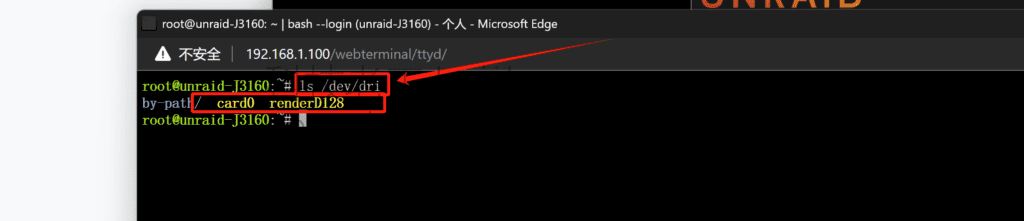
ls /dev/driThen press enter. If you can see renderD128 prompt, then congratulations, the driver has been successfully enabled!
Step 4: Setting up Auto Load on Boot
Until now, our setup has only worked when the system is running, and after a reboot you will need to manually enable the driver again. To simplify things, we'll set up a boot autoloader so that the driver loads automatically every time we boot.
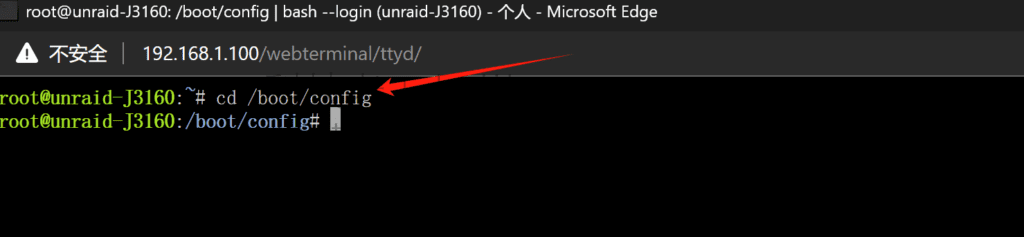
First, enter the following command:
cd /boot/configNext, use the following command to edit the go Documentation:
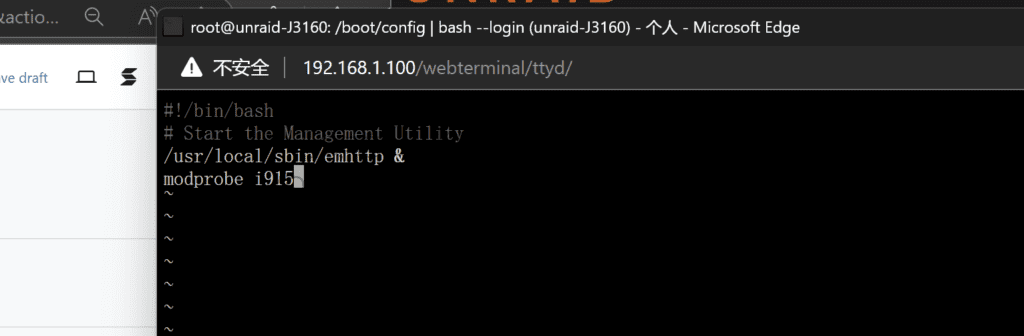
vi goAfter pressing the Enter key, use the keyboard's i key to enter input mode. Add the command at the end of the file:
modprobe i915When you are done typing, press the “Esc” key in the upper left corner, and then type in :wq Save and exit edit mode, be sure to put a colon in front of it!

wind up
Now the setup of the integrated graphics driver is all done. After closing the terminal window, try restarting your computer and enter the command again ls /dev/dri Check if the driver is successfully loaded automatically. With these simple steps, you can easily enable the integrated graphics driver in your UNRAID system to enhance your hardware performance.





 Lan Xiaobo (1952-1997), PRC politician Protocol Not Supported The client and server do not support the general SSL protocol version or cipher suite. This error is prompted
  kittyzero Hi, https://www.youtube.com/watch?v=eJUWQqCKfW0 I set it up and the extranet won't go out, not sure why, emailed you, thanks.
  ericjin211 Hi, tried this solution and found that foreign sites going through openclash proxy will not go through adguardhome, what could be the problem 🤔
  666 Tried the copy, no other problems, dns test has Hong Kong and Japan, not sure if it's a leak or not
  Loong2004 Hello, I feel that the program is very good, but the white hand is handicapped, can you have paid remote guidance, thank you!
  Chinese
  English
  Spanish
  French
  German
  Japanese
  Portuguese
  Italian
  Dutch
Dutch