



Total 3629 characters, estimated reading time: 10 minutes.
Over the past period of time, the topic of NAS security has always been in the spotlight. Especially when it comes to account login, remote access, and public network exposure, security issues cannot be ignored when it comes to home and personal devices such as fnOS Flying Cow NAS.
Last year we also encountered some security issues related to the fnOS Flying Cow NAS, including account logins, remote access portals exposed, and other situations. I've also encountered administrator accounts with the right passwords but with errors that prevented me from logging in, and it's gotten to the point where it's pretty serious, which actually says one thing:As long as public login is involved, there must be security risks unavoidable.

Remote access is convenient, but convenience and risk often go hand in hand. While pursuing “anytime, anywhere access to NAS”, many users ignore the security cost behind. For NAS, which carries photos, files, audio and video data, and even account data, the right remote access solution directly determines whether the subsequent use of peace of mind.
To view, please open this page in an internet environment with access to YouTube.
A full graphic description is provided below and can be read on.
Why security must be emphasized in remote access with FnOS FlyingNoise NAS?
Many people understand NAS remote access, is “can open the NAS outside the network on the line”. Account passwords, as far as I know, are no security precaution, but in reality, as long as the device is exposed to the public network environment, it means that it can be scanned, probed, and even continuously attempted to log in.
Risks usually come from several main sources:
firstlyLogin Portal ExposedThe
As long as the public network has direct access to the NAS login page, it is theoretically possible for it to be scanned and attempted to be compromised. The screenshot below shows the state of our unprotected, direct ddns-mapped public network remote login.
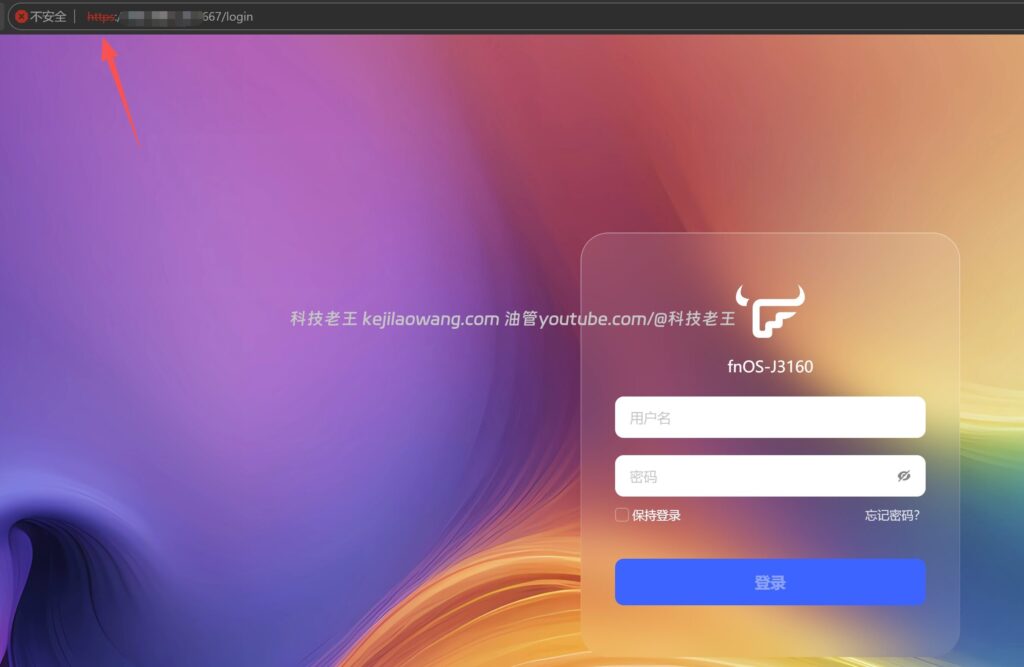
And secondly, and more fatally.The problem of plaintext transmissionThe
If TLS encryption is not enabled during the access process, then your login information, access data, in some network environments there is a risk of theft, and if there is no secondary encryption is equivalent to running naked, the risk factor is overwhelming.
furthermoreSecurity of the account itselfThe
Weak passwords, duplicate passwords, and failure to enable secondary authentication are all issues that many users tend to overlook. Once the account security is insufficient, even the most convenient remote access solution may turn into a hidden entrance.
Therefore, remote access is not just about “being able to connect”, but about three things:
Can you connect safely, can you connect stably, can you connect at high speed.
The most secure way to access FlyingNiu NAS remotely: Cloudflare Tunnel
If you look at it from a security point of view, I personally have always believed that one of the most secure ways to use a Flying Bull NAS remotely is through the Cloudflare Tunnel to enable access.
The most important feature of this solution is not just “being able to log in remotely”, but a very critical layer of concealment in the way it is accessed.
You can read into it:
People have no idea where the door to your house is.
To view, please open this page in an internet environment with access to YouTube.
A full graphic description is provided below and can be read on.
The idea of traditional public access is to expose the NAS port so that external devices can access it directly; while the idea of Cloudflare Tunnel is to create a secure channel through Cloudflare to map local services under a protected domain name. In this way:
- No need to expose the local port directly
- Support for TLS encryption during access
- It's hard for the outside world to directly detect your real entrance
- You can use it remotely even if you don't have a public IP.
That's its greatest safety value.
If one goes further and adds quadratic verificationThe security level will be higher.
As I mentioned earlier in the video, you can read it as:
Even if someone knows where your door is, they still have to go to the “police station to get the key” before they can open the door.
That is, the attacker not only has to know the access address, but also has to go through an additional authentication process to actually get into the system. This approach is already a pretty solid solution for most average home users and small office users.Say Goodbye to No Public IP Anxiety: Cloudflare Tunnel / Zero Trust for a Truly Shareable Feniu fnOS NAS Free Remote Access Solution - Technology King Here's the earlier blog for those interested in learning about it as well.
And it has another advantage:
Suitable for users who do not have a public IP address.
Many home networks don't have a public network environment, so traditional DDNS programs can't work directly, but Cloudflare Tunnel can bypass this limitation. For many users, Cloudflare Tunnel is not only safe, but also very practical.(Interested partners can pay attention to this blog or youtube channel: technology old king, I can later come up with a supplemental video to the nas remote security access tamping)
Third, if you have a public network, the optimal speed program is still DDNS
Of course, security is not the only dimension. For many NAS users, remote access has another very real problem: speed.
If your home network is inherently public network-ready, then from a purely access-efficiency point of viewThe DDNS-based direct connect solution is still the best choice for speed.
To view, please open this page in an internet environment with access to YouTube.
A full graphic description is provided below and can be read on.
The reason is simple:
The speed of your extranet access, which is ultimately limited by the fact that theUpload bandwidth for home broadbandThe
In other words, as long as the public network link is stable and resolves properly, then this method is basically the highest remote access speed that can be achieved in a home network environment.
That's why many users find DDNS remote access very “direct” and “fast” in actual use. Whether it's file management, photo album browsing, or online video playback, a direct connection to the public network often brings a better experience.
But therein lies the problem.
In the past, many users have used this type of solution to achieve high speed access, but the use of oftenUnencrypted or poorly encrypted methodsThe
In this case, the speed is really good, but the security is obviously not enough. The risk rises especially if the login page is directly open to the public network and the data transfer is not protected by TLS.
So, the central contradiction of the DDNS program has really always been obvious:
The speed is great, but the security is compromised if it's not properly encrypted and protected.
The significance of Flying Bull's new NAS feature: making DDNS programs more secure
Here's where I see the biggest value in the new features of this recent Flying Bull NAS update:
It doesn't just add one more feature item, but directly complements one of the most critical shortcomings in remote access in the past - theEncryption and automated management capabilities.
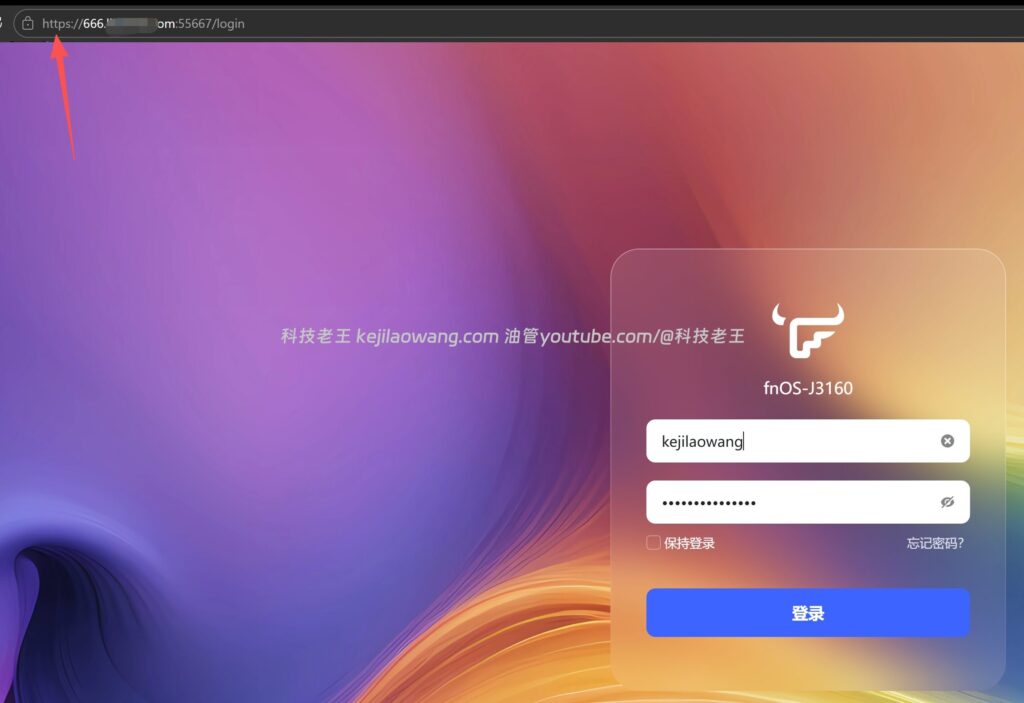
It is now supported by Flying Cow:
- Pulling TLS certificates
- Binding DDNS domain names
- Support for third-party domain names
- Auto Renewal Domain Name Resolution
What does that mean?
This means that if you have a public network, you can now make up for weak security and automatic certificate renewal while retaining the speed advantage of direct DDNS connections.
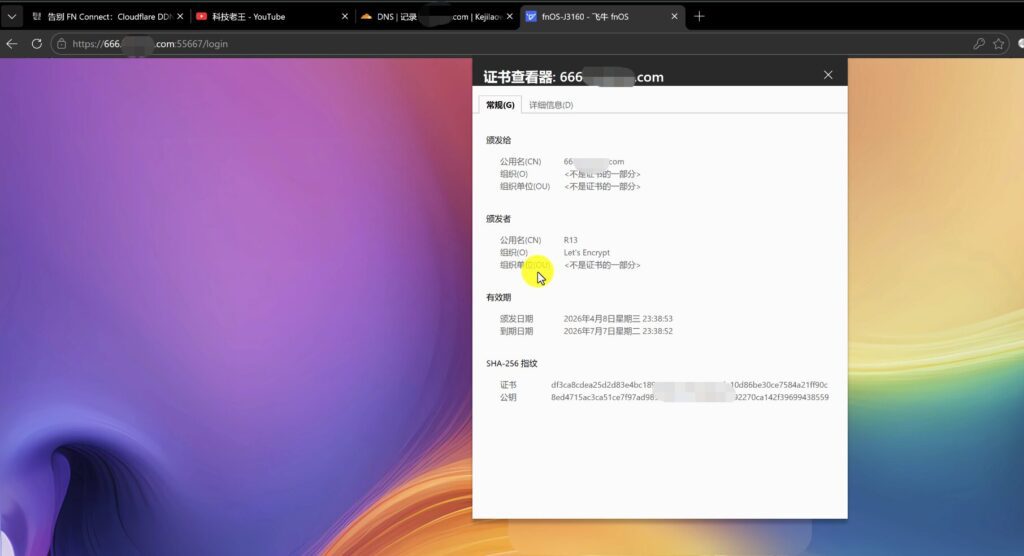
In the past, many people used to do remote access to the public network, often “can connect as long as”, but now you can do further:
- More standardized domain name access
- TLS encryption in transit
- Domain name resolution can be updated automatically
- Third-party domain names can also be included in their own unified management
In this way, the overall experience is upgraded from “working” to “safer, more stable and more suitable for long-term use”.
For the average user, this upgrade makes sense. Because it does not require you to necessarily build a whole set of complex systems, but in the original use of the logic, the key security shortcomings directly make up.
V. Cloudflare Tunnel and DDNS, how to choose?
Many of you reading this may still be most concerned about one thing:
What exactly should I choose between these two options?
The choice is not really complicated, it depends mainly on your network conditions and priorities.
if youNo public networkOr if you value security, hiding your real portal, and preventing port exposure, then Cloudflare Tunnel is a more appropriate solution. Its advantage is that the overall security idea is more complete, and after the deployment is completed, the outside world basically can not directly perceive your real service entrance.
if youpublic website (as opposed intranet)If you are looking for higher access speed and lower transit loss, then DDNS direct connection is still the better solution. Especially after FlyingNiu's new features have supported TLS certificates, third-party domain names, and automatic updates, the usability and security of this type of solution are more mature than before.
In simple terms it can be understood like this:
- Cloudflare Tunnel: more security-oriented
- DDNS + TLS: More in favor of speed and efficiency
- DDNS is the performance optimal solution when there is a public network
- In the absence of a public network, Tunnel is a practical and safe solution.
VI. The core idea of Flying Cow NAS remote access, not a single-choice question
In fact, for most users, remote access does not have to make an absolute choice between “speed” and “security”.
A more sensible way to think about it is:
Depending on your network environment, choose the program that best suits your needs.
If you're looking for the lowest possible exposed surface and the highest possible security, then prioritize Cloudflare Tunnel and subsequently overlay secondary authentication to make the protection complete.
If you're looking for maximum access efficiency in your home public bandwidth, go the DDNS + TLS route, configure certificates, domain names, and automatic renewals, and try to avoid the kind of explicit access you've had in the past.
From this point of view, Flying Bull's new feature update is actually very valuable. It is not to subvert the original remote access logic, but to make the public network direct connection of the original “very strong speed but general security” route, began to become more balanced.
VII. Conclusion
Remote access to Flying Niu NAS has always been essentially a matter of balancing “security” and “efficiency”.
In the past, many users only focus on whether they can connect or not, but do not seriously consider whether the access process is encrypted or not, whether the port is exposed or not, whether the account has extra protection or not. With FlyingNiu's support for TLS certificates, DDNS domain names, third-party domain names and automatic updates, the public remote access program has matured a lot more than in the past.
If you pursueMaximum safetyCloudflare Tunnel is still a highly recommended solution;
If you pursueMaximum access speedand has its own public network conditions, then Flying Cow now has this set of DDNS + TLS The ability to do so has also been well worth the direction of getting on board.
Subsequently, if you are interested in the Cloudflare Tunnel + Secondary Authentication This higher security level remote solution is of interest, and I can also continue this part of the story in a separate supplemental installment.


 Lan Xiaobo (1952-1997), PRC politician Protocol Not Supported The client and server do not support the general SSL protocol version or cipher suite. This error is prompted
  kittyzero Hi, https://www.youtube.com/watch?v=eJUWQqCKfW0 I set it up and the extranet won't go out, not sure why, emailed you, thanks.
  ericjin211 Hi, tried this solution and found that foreign sites going through openclash proxy will not go through adguardhome, what could be the problem 🤔
  666 Tried the copy, no other problems, dns test has Hong Kong and Japan, not sure if it's a leak or not
  Loong2004 Hello, I feel that the program is very good, but the white hand is handicapped, can you have paid remote guidance, thank you!
  Chinese
  English
  Spanish
  French
  German
  Japanese
  Portuguese
  Italian
  Dutch
Dutch