



Total 2675 characters, estimated reading time: 7 minutes.
For the past year, I've been recommending to my buddies around me to make the most cost-effective VPS on the net RackNerd--Especially their widely acclaimed San Jose (San Jose) server room node. Has been, “San Jose fastest, most stable, the most suitable for domestic access” said in the technical circle has been circulating for a long time, and the actual experience, can really feel this node in the access speed, latency and stability, than the same price VPS more advantageous, I tested and used the latency is indeed a little lower.
However, this time, because I forgot to renew, my own VPS was unfortunately stopped by the suspension authority to think about the previous installation for the small friends of the3X-UI S-UI there areH-UIIt's a bit of a hassle to re-install, so I was wondering if I could resume the renewal program. Taking advantage of the opportunity to re-open and adjust the program, I also happen to record the entire “reinstallation + replacement of the San Jose node” process, to make a complete tutorial to share with you, I hope to let first-time contact RackNerd or the first time to migrate/reinstall the VPS friends less detour.
To view, please open this page in an internet environment with access to YouTube.
A full graphic description is provided below and can be read on.
🧩 I. Why does everyone recommend the RackNerd San Jose node?
Regarding the San Jose node, there have been several features that have made it very popular with domestic users:
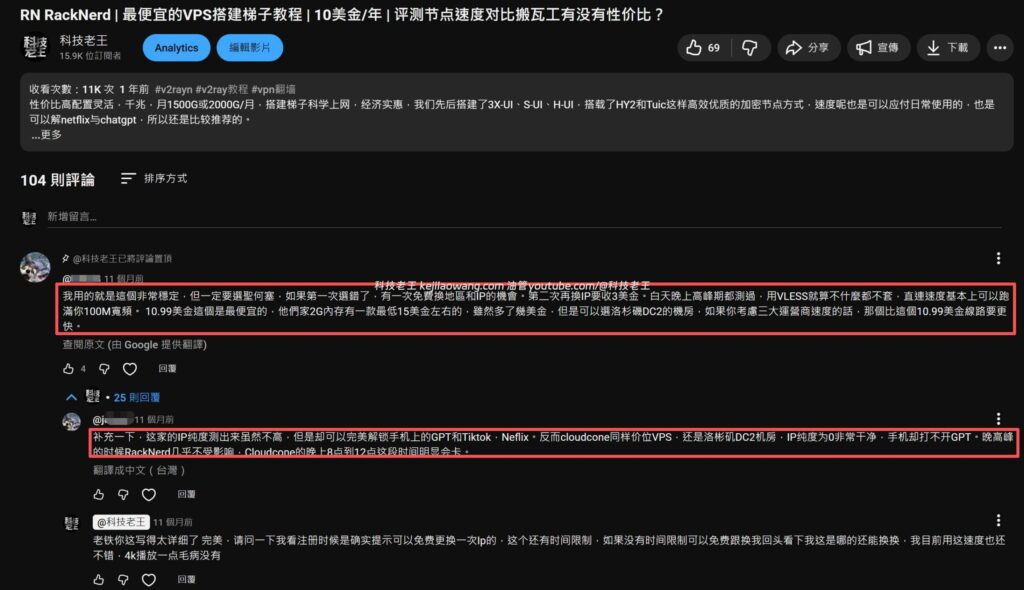
✔ 1. Lower latency
Directly connected from the domestic, U.S. West nodes generally lower latency than the U.S. East, and San Jose belongs to the connectivity is very good room, routing bypass less previous YouTube video issued after a number of partners recommended the use of San Jose nodes.
✔ 2. High stability
After a year of use, my VPS has not been disconnected or run down. Especially for running tools, acceleration, and light services is perfect.
✔ 3. excellent value for money in its price range
RackNerd's big promotion package is often “cabbage price”, but the performance is not bad, very suitable for personal, small sites or transit class needs, even now I kejilaowang.com as a blog site also migrated to RackNerd above.
🔧 Second, VPS forget to renew the fee was shut down how to do? Can I resume the machine?
The answer is:It can be! And it's very simple.
Create a service order to write a mailing:
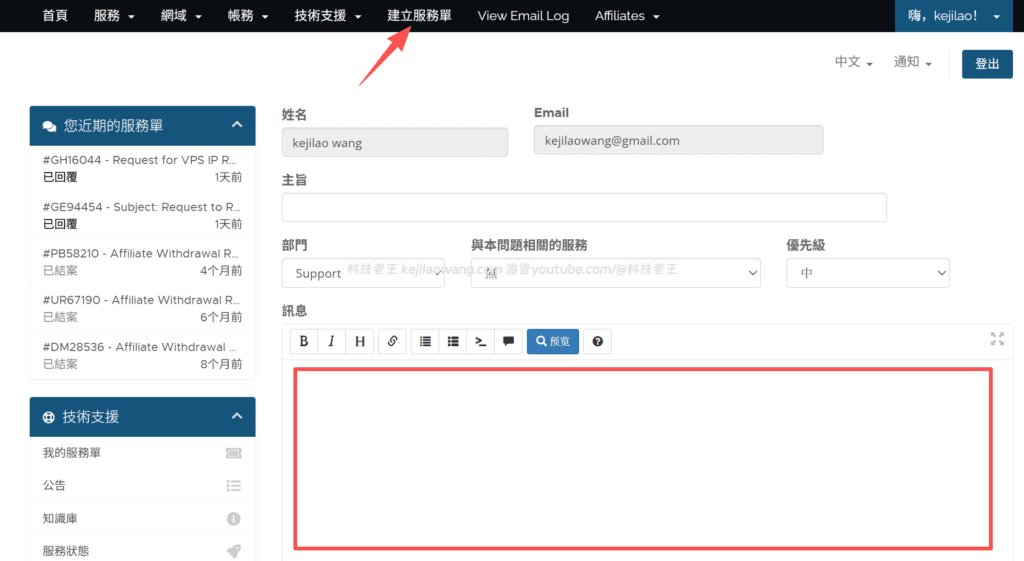
🟥 RackNerd Repeater Replacement Node (San Jose) Work Order (English)
Subject. Request Migration to San Jose Datacenter
Hello Support Team.,
I would like to request a migration of my VPS to the San Jose datacenter for better network performance.
Please assist when possible.
Thank you!
🟩 Chinese version (for you to confirm content)
Hello RackNerd Customer Service.
My VPS was suspended because I forgot to renew it, now I have paid my bill, please help me to restore my VPS service.
Also, I want to replace my current VPS with the San Jose Server Room, and replace it with an IP from San Jose.
Below is information about my services:
- Service Name
- product or service package (e.g. for a cell phone subscription)
- Current IP
- Order Number
Any assistance with this would be greatly appreciated!
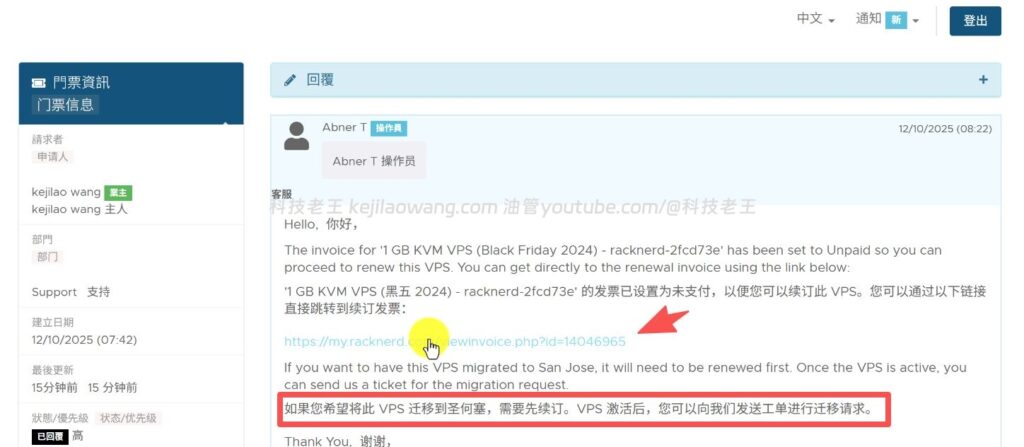
🔄 iii. want to replace the San Jose node? Support?
A lot of people don't:
RackNerd is capable of changing server rooms!
For example, if your VPS was originally in places like LA (Los Angeles), NY (New York), or CHI (Chicago) and you want to switch to San Jose, it is possible to do so by submitting a work order.
Submission Process:
Keep submitting work orders below is my example:
Hello RackNerd Support Team.,
Hello RackNerd support team.
I would like to kindly inquire whether it is possible to have my VPS IP reassigned to a San Jose (US) location.
I would like to sincerely ask if it is possible to reassign my VPS IP to a location in San Jose (USA).
VPS Hostname: racknerd-XXXX
VPS hostname: racknerd-XXXX
Current IP: 192.3.0.160 Current IP: 192.3.0.160
If IP reassignment is available, please let me know the available options or any requirements on my side. I understand this may depend on availability and I would greatly appreciate your assistance.
If IP reassignment is possible, please let me know what options are available or what conditions I need to fulfill. I understand that this may depend on availability and your help is greatly appreciated.
Thank you very much for your time and support.
Thank you very much for your time and support.
After a final second check to see if the backups safeguarded data security, etc. finally replaced the San Jose IP address, and it was indeed free.
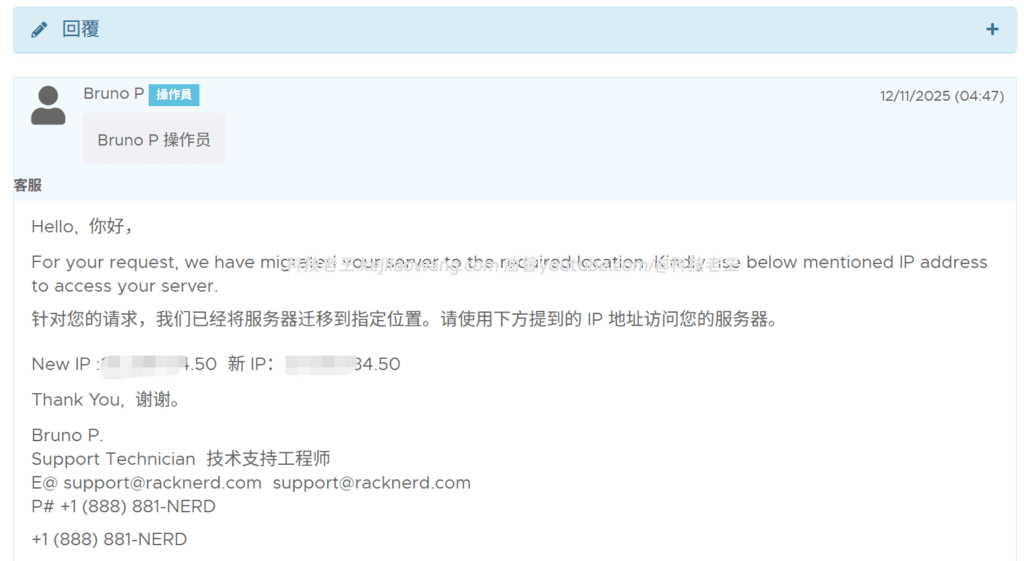
🔧 Remember to synchronize Cloudflare domain name resolution after changing IP (very important)
Because this VPS was previously deployed 3x-ui / s-ui panelsThe IP address of the node is used for node connectivity or panel access, and the domain name is bound for node connectivity or panel access, so you must change the IP address again after changing the IP address in the Updating DNS Resolution Records in CloudflareOtherwise:
- The panel is inaccessible
- Nodes all fail
- Client cannot connect
- HTTPS certificate validation failed
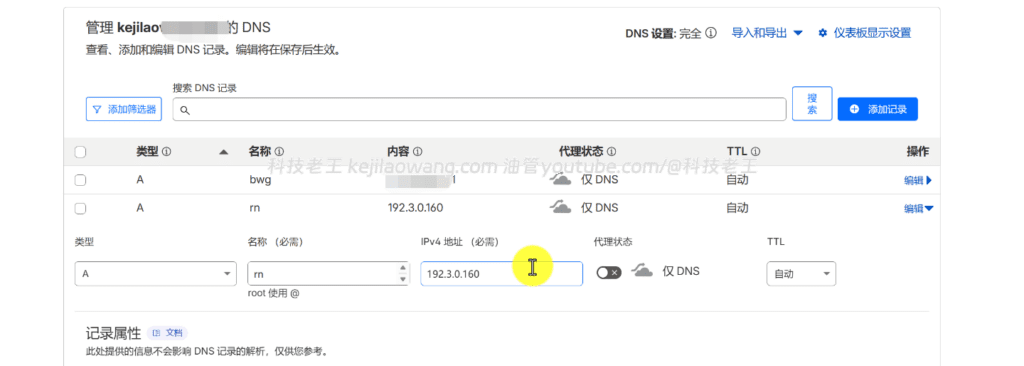
The update steps are also simple:
- Log in to Cloudflare
- Find your domain name
- go into DNS → Records
- Modify the existing A-record and replace the old IP with the new San Jose IP.
- Wait about 30 seconds - 2 minutes for the program to take effect
- The panels and nodes can be restored to normal use.
💡 IV. Demonstration of this operation: reboot + replacement of San Jose node
Here are my actual steps for your reference:
① Forgot to Renew Your VPS, Caused VPS Suspension
The backend shows Suspended and cannot SSH login.
② Bill Payment Recovery Service
After a few minutes the VPS resumes normal operation.
③ Submission of work order request for replacement to San José
Customer service will generally review packages to see if they support migration.
④ Migration completed, new IP assigned
After the migration, the old IPs are disabled and the new VPS nodes have lower latency.
⑤ Update configuration
- Reset SSH
- Updating Ports and Keys
- Checking network performance
- Redeployment of tools or scripts
After the migration, the latency of Ping from China is significantly better, about 20-40ms faster than the old node.
📊 V. Testing San Jose node performance from home (real-world)
Below is the test after migration (example values):
| Test items | in the end |
|---|---|
| Ping Delay (GD) | 150-165ms |
| download speed | 25-40 Mbps (home broadband) |
| stability | very stable |
| packet loss | <1% |
Significantly better than traditional US East node speeds by a notch.
🎯 Six: What scenarios are appropriate for San Jose?
| take | recommended index |
|---|---|
| Scientific Internet / Transit | ⭐⭐⭐⭐⭐ |
| Lightweight Tools / API | ⭐⭐⭐⭐ |
| Web Hosting | ⭐⭐⭐⭐⭐⭐⭐⭐ |
| backup service | ⭐⭐⭐⭐ |
| Docker Applications | ⭐⭐⭐⭐ |
If you are primarily oriented to Domestic users accessing foreign services, San Jose is one of the most solid US West options.
📝 VII. Summarizing
This time, RackNerd VPS was shut down because I forgot to renew the subscription, so I did a reset and node migration. The whole process is not complicated, summarized as follows:
- VPS Suspended → Pay your bill to get it back!
- Want to switch to the San Jose node → Submit a work order for migration
- San Jose node → domestic access generally performs better
- Price/performance remains RackNerd's greatest strength.
For those who are new to VPS, RackNerd is still well worth getting, especially the San Jose server room.


 Lan Xiaobo (1952-1997), PRC politician Protocol Not Supported The client and server do not support the general SSL protocol version or cipher suite. This error is prompted
  kittyzero Hi, https://www.youtube.com/watch?v=eJUWQqCKfW0 I set it up and the extranet won't go out, not sure why, emailed you, thanks.
  ericjin211 Hi, tried this solution and found that foreign sites going through openclash proxy will not go through adguardhome, what could be the problem 🤔
  666 Tried the copy, no other problems, dns test has Hong Kong and Japan, not sure if it's a leak or not
  Loong2004 Hello, I feel that the program is very good, but the white hand is handicapped, can you have paid remote guidance, thank you!
  Chinese
  English
  Spanish
  French
  German
  Japanese
  Portuguese
  Italian
  Dutch
Dutch